



Zoom
Zoom 1S Etching/Engraving Tool Kit for Silhouette
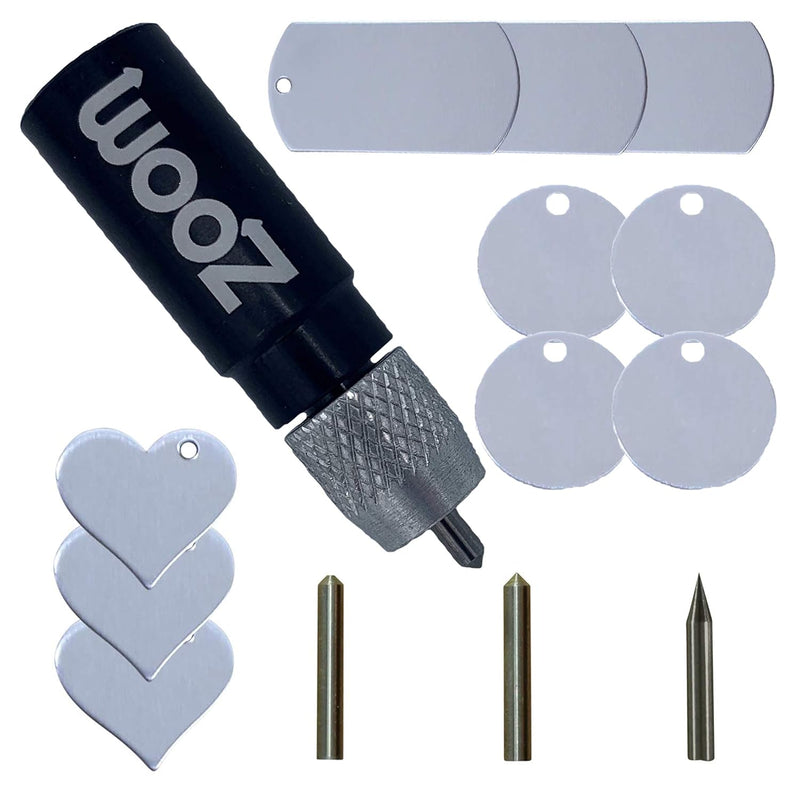
Three interchangeable tips and a bundle of metal blanks make this the go-to etching kit for Silhouette machine owners ready to move beyond paper and vinyl.
$29.99*
View on Amazon
✓ In Stock on Amazon.com
*Price sourced from Amazon.com. Last updated:Aug 27, 2026.Price and availability are subject to change — details.
Affiliate Disclosure: As an Amazon Associate, Studio Supplies earns from qualifying purchases made through links on this page, at no additional cost to you. This helps support our editorial team.
Notice a mistake? Let Us Know
Overview
Key Features
WORKS IN ALL SILHOUETTE MACHINES BEFORE CAMEO 4: For Cameo 4 Tool search "Zoom Precision Cameo 4"
3 TIPS IN 1: Highest quality precision, regular, and blunt tips included
METAL STAMPING BLANKS INCLUDED: Includes 10 quality metal stamping blanks: circle tags: 1" diameter with hole; hearts 3/4" x 3/4" with right hole; dog tags 1" x 2" with hole
HARD PLASTIC CARRYING CASE INCLUDED: Includes a hard plastic carrying case for convenient storage, organization, and transport
DOES NOT WORK IN CRICUT MACHINES: Search for “Zoom Precision Maker Etching Tool” to find the right tool for Cricut machines
Specifications
Model
Zoom 1S
Compatible Machines
Silhouette Cameo 1, 2, 3; Curio; KNK; Gazelle; Pazzle; Xyron Wishblade; US Cutter; Zing; Expression; Expression 2
Incompatible Machines
Silhouette Cameo 4; Cricut machines
Tips Included
3 (Precision, Regular, Blunt)
Metal Blanks Included
10 (circle tags 1" dia., hearts 3/4" × 3/4", dog tags 1" × 2")
Carrying Case
Hard plastic case included
Frequently Asked Questions
Which Silhouette machines is this tool actually compatible with?
It works in Silhouette Cameo 1, 2, and 3, as well as Curio, KNK, Gazelle, Pazzle, Xyron Wishblade, US Cutter, and Zing. Critically, it does NOT fit the Cameo 4 — Zoom makes a separate tool for that machine, so double-check your model before ordering.
What materials can I etch or engrave with this kit?
The three tips are designed for different hardness levels. The precision tip handles fine-line work on metal blanks and thin metal sheets. The regular and blunt tips are suited to softer materials like leather, craft foam, and some plastics. The included metal blanks (aluminum-style circle tags, hearts, and dog tags) are a practical starting point for jewelry and tag projects.
How do I set up the tool in Silhouette Studio — do I need special settings?
In Silhouette Studio, select the etching or sketch tool option and adjust the blade depth to 0 (since this is a tip, not a blade). Force settings will vary by material — metal blanks typically need higher force (around 25–33) with multiple passes. Zoom includes links to instructional videos in the kit.
Can I swap tips mid-project without losing my registration?
Yes — the tip swap is straightforward since all three tips fit the same tool body. If your material is still on the mat and you haven't moved it, re-registration isn't an issue. It's worth doing a test pass on scrap material after a tip change to confirm force settings are still dialed in.
Is this good for beginners, or do you need prior Silhouette experience?
Etching on metal has a steeper learning curve than cutting vinyl — first-time results on metal blanks often take two or three test passes to get force and speed dialed in. If you're already comfortable running your Silhouette for vinyl or paper, this is a natural next skill to build.
Related Products


