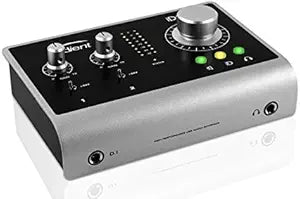
Audient

Audient P182 iD14 High-Performance USB Audio Interface

4.5 (428 reviews)

Two Class-A mic preamps and Burr-Brown converters bring large-format console transparency to a compact desktop interface without the price tag.

$599.00*
Check availability

*Price sourced from Amazon.com. Last updated:Jul 14, 2026.Price and availability are subject to change.

Affiliate Disclosure: Studio Supplies may earn a commission from qualifying purchases made through links on this page, at no additional cost to you. This helps support our editorial team.

Notice a mistake? Let Us Know

Overview

The Audient iD14 is a two-channel USB audio interface built around the same Class-A discrete mic preamp topology that Audient uses in its ASP8024 large-format consoles. That lineage matters sonically: the preamp circuit delivers a clean, open top end with controlled noise floor that allows condenser microphones and ribbon mics alike to perform without the transformer colorations or gain compression that cheaper op-amp designs introduce. Burr-Brown AD/DA converters handle the analog-to-digital translation, providing the conversion accuracy that ensures what goes in comes out faithfully — critical for tracking sessions where the source sound needs to survive intact through a mix. Inputs include two XLR/TRS combo jacks, a JFET instrument DI, and an ADAT optical port for external preamp expansion. Monitor outputs are two balanced ¼-inch jacks with console-style monitor control — a rotary encoder that governs output level directly without software mediation.

The iD14 is built for the professional home studio, small project room, or compact broadcast setup where signal quality must rival larger facilities without the physical footprint. Podcast producers, singer-songwriters tracking in treated rooms, and small-ensemble session engineers all find the two-preamp configuration adequate for primary tracking — and the ADAT expansion means the hardware isn't a ceiling when projects grow. ScrollControl mode transforms the monitor knob into a DAW parameter controller, a design borrowed directly from Audient's console workflow and one that distinguishes the iD14 from comparably priced interfaces with passive volume knobs. Build quality is solid: the aluminum chassis handles desk use and travel without the flex or creak common in plastic-bodied alternatives. For engineers who care more about what the signal chain sounds like than how many meters the interface displays, the iD14 delivers a disciplined, professional result.

Key Features

iD14

Specifications

Model Name
iD14
Connectivity
USB

Pros & Cons

👍 Pros

  • The Class-A preamp circuit maintains a consistently low noise floor even when pushed to higher gain settings needed for dynamic microphones in quiet vocal booths.
  • Burr-Brown AD/DA converters deliver a conversion quality that translates accurately between the analog and digital domain, preserving transient detail in percussive and vocal material.
  • The JFET DI input introduces a high-impedance instrument stage with a subtle harmonic character that suits direct guitar tracking without additional outboard gear.
  • ADAT optical input enables an eight-channel expansion path, making the iD14 scalable for small ensemble recording beyond its two built-in preamps.
  • ScrollControl mode repurposes the monitor knob as a DAW parameter controller, reducing mouse interaction during mixing sessions and improving workflow efficiency.

👎 Cons

  • With only two XLR combo inputs, the iD14 requires ADAT expansion immediately for any session involving more than two simultaneous microphone sources — the base configuration is limited for multi-mic tracking.
  • The headphone output, while functional, does not provide the same drive capability as dedicated headphone amplifiers — high-impedance cans above 150Ω may lack sufficient volume and dynamic punch at maximum output.
  • The iD14 lacks a dedicated hardware mute button on the monitor output, which is a notable omission compared to interfaces in the same price bracket that include one.
  • USB bus power without a dedicated power supply means the iD14 can exhibit noise artifacts on USB ports with poor power regulation — particularly relevant on older motherboards or hub-connected setups.
  • The iD14's software mixer (iD Mixer) provides basic routing but lacks the flexible virtual routing and loopback capabilities found in competing interfaces using ASIO-level virtual drivers.

Frequently Asked Questions

The iD14's Class-A discrete preamps deliver clean gain with a low noise floor — you'll have sufficient headroom to drive condenser microphones without introducing the grainy self-noise that afflicts budget interfaces at high gain settings. The preamp circuit topology mirrors Audient's large-format console designs, meaning the characteristic sound is neutral rather than colored.
Yes, the iD14 provides switchable 48V phantom power on the XLR inputs, which is required for most condenser microphones. For ribbon microphones, always ensure phantom power is disabled before connecting — the iD14's phantom power switch allows per-channel control, which is the correct approach for protecting passive ribbon elements.
The JFET instrument input on the iD14 replicates the high-impedance input stage of a tube amplifier's front end. Use it for direct guitar or bass recording when you want a slightly warmer input character — the JFET circuit adds a subtle harmonic coloration that many engineers prefer over the transparent Class-A preamp path for direct instrument tracking.
Yes — the ADAT optical input allows you to connect an external 8-channel preamp with ADAT output, effectively expanding the iD14 to 10 simultaneous inputs. This is a practical upgrade path for session recording that has outgrown two channels without replacing the interface entirely.
ScrollControl converts the iD14's monitor volume knob into a scroll/parameter control within any DAW. In practice, it lets you adjust plugin parameters or scroll through tracks without reaching for a mouse. Engineers who mix on the iD14 regularly find it a genuine workflow accelerator — it's a feature borrowed from Audient's console workflow design.