Blackmagic Design

Blackmagic Design HYPERD/STM HyperDeck Studio Mini Recorder

4.2 (117 reviews)

A half-rack broadcast deck that records and plays back SD, HD, and Ultra HD video directly to affordable SD cards.

$1,237.99*
Check availability

*Price sourced from Amazon.com. Last updated:Jun 19, 2026.Price and availability are subject to change.

Affiliate Disclosure: Studio Supplies may earn a commission from qualifying purchases made through links on this page, at no additional cost to you. This helps support our editorial team.

Notice a mistake? Let Us Know

Overview

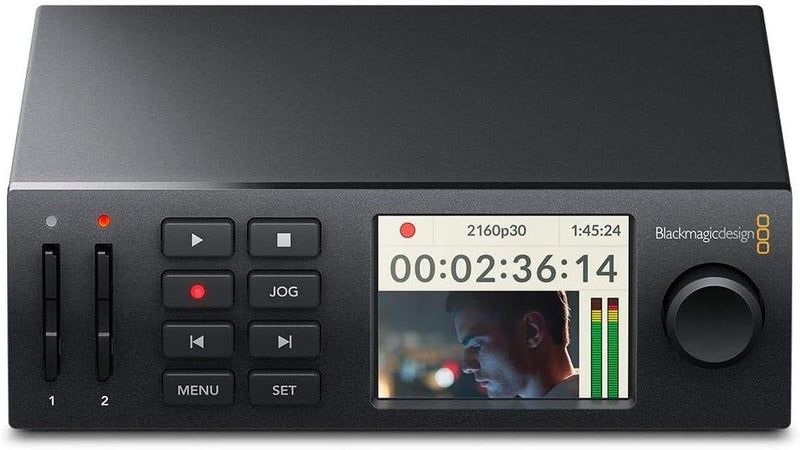
The Blackmagic Design HyperDeck Studio Mini is a compact broadcast deck designed for recording, playback, and digital signage in professional video environments. Despite its half-rack size — just 6.69 by 5.51 by 1.73 inches — it handles SD, HD, and Ultra HD video up to 2160p via its 6G-SDI input, recording directly to widely available SD cards or faster UHS-II cards. This eliminates the cost of proprietary recording media and makes it easy to hand off cards for editing. The two SD card slots support automatic failover, so recording continues uninterrupted when one card fills up, a critical feature for live events, broadcasts, and long-form captures.

On the output side, two 6G-SDI outputs and one HDMI output provide flexible routing to broadcast monitors, projectors, or downstream equipment. The built-in front-panel LCD displays a live video thumbnail, timecode, recording status, and menu settings, giving operators quick visual confirmation without tying up an external monitor. The unit supports a range of professional codecs including ProRes and DNx families alongside compressed H.264 and H.265 options, allowing you to balance file size against quality based on your workflow requirements. Its small footprint and rack-mountable design make it equally at home in a permanent broadcast facility, a mobile production flypack, or a digital signage installation where reliable looping playback is needed.

Key Features

SD, HD and Ultra HD recorder and player

1 x 6G-SDI input, 2 x 6G-SDI outputs, 1 x HDMI output

Two SD card slots for continuous recording to regular SD cards or UHS-II cards

LCD for monitoring, status information and menu settings

12 Month Limited Manufacturer's Warranty

Specifications

Model
HYPERD/STM
Resolution Support
SD, HD, Ultra HD
Input
1 x 6G-SDI
Outputs
2 x 6G-SDI, 1 x HDMI
Recording Media
SD cards, UHS-II cards (dual slots)
Front Panel
LCD for monitoring, status, and menu
Dimensions
6.69 x 5.51 x 1.73 inches
Weight
1.28 pounds (581 grams)
Manufacturer
Blackmagic Design
Warranty
12-month limited manufacturer's warranty

Blackmagic HyperDeck Studio Mini — Editorial Review & Use Cases

The Blackmagic Design HyperDeck Studio Mini (HYPERD/STM) is a half-rack solid-state broadcast recorder / player that records and plays back SDI video to and from standard SD cards using broadcast codecs (ProRes, DNxHD, H.264). Per Blackmagic's official HyperDeck Studio page, the Mini accepts 3G-SDI input, records to dual SD card slots (continuous recording across cards), supports ethernet streaming control, and runs as a network-controlled deck via Blackmagic's HyperDeck Ethernet protocol.

What the HyperDeck Studio Mini Specifically Wins

  • Dual SD card slots with auto-continuation — when one card fills, recording continues seamlessly on the second card. Critical for long-form recording (sermons, concerts, sporting events, conferences)
  • Broadcast codecs (ProRes 422 / ProRes 422 HQ / DNxHD / H.264) — files drop directly into Premiere / FCPX / Resolve / Avid edit timelines without transcode
  • Ethernet control for remote operation — controllable from ATEM switchers, automation systems, or networked operator consoles
  • SDI in + SDI out (with timecode / RS-422 deck control) — drops cleanly into a broadcast infrastructure as a recording deck or playback source
  • Half-rack form factor — fits dual-deck per 1U rack slot; cleaner than full-rack alternatives in tight equipment racks
  • SD card media is cheap and replaceable — vs proprietary recording media on legacy decks; consumer-grade UHS-II SD cards (Sony Tough, Lexar Professional, SanDisk Extreme Pro) work fine
  • Loop playback / VTR-style transport controls — broadcast operator workflow familiar from tape-deck era

Where the HyperDeck Studio Mini Specifically Fits

  • Church / worship facility recording capturing services to SD cards in ProRes for later edit / archive
  • Conference / corporate event recording with archive + livestream feeds running through one recording chain
  • Broadcast standby / commercial playout — pre-recorded spots loaded to SD and played back on cue from network control
  • Sports / esports production archive recording program feed + isolated camera feeds
  • Documentary / studio interview production with full ProRes capture for finish-grade post
  • OB van / small broadcast truck deployment as a backup or primary recording deck
  • ATEM workflow integration — networked deck controlled by ATEM macros for in-show playback cues

Honest Limits Buyers Should Know

  • 1080p60 maximum — no 4K. The HyperDeck Studio Mini caps at 1080p60 (3G-SDI single-link). 4K workflows need the HyperDeck Extreme 4K, HyperDeck Shuttle 4K, or HyperDeck Studio HD/4K Pro
  • SD card media — not enterprise-grade reliability. Consumer SD cards do fail under heavy use. Best practice: V90 / UHS-II cards rated for video, replaced annually in heavy production environments, with redundant recording to a separate device for irreplaceable content
  • No internal storage / no SSD media slot. SD cards only. Workflows that need higher capacity or NVMe-class data rates need to step up to HyperDeck Extreme or HyperDeck Studio Pro variants with SSD/USB-C external media support
  • Limited audio channels (2 channels embedded). Multi-track audio production needs a separate audio recorder or step-up to HyperDeck Studio Pro (8-channel audio)
  • Ethernet control protocol is Blackmagic-specific. Third-party automation systems need integration work; broadcast playout systems typically use BVW-75 / RS-422 fallback
  • Front-panel display is small. Bay-rack operators in dimly lit control rooms may find the readout text small; the Ethernet remote control or Web Manager UI provides clearer monitoring

Where Buyers Should Look Elsewhere

  • 4K production / archive → HyperDeck Extreme 4K, HyperDeck Studio HD/4K Pro, HyperDeck Shuttle 4K
  • Multi-camera / multi-channel synchronized recording → HyperDeck Studio Pro (multi-channel) or ATEM Mini Pro ISO (records each input separately as ISO files)
  • SSD / NVMe-grade recording for long-form → HyperDeck Studio HD Pro (SSD slot) or Blackmagic Cloud Pod (SD + NAS)
  • Cinema-grade RAW recording from camera HDMI/SDI → Atomos Ninja V+ / Shogun 7
  • Cloud / remote workflows → Blackmagic Cloud-enabled HyperDeck variants that sync footage to remote NAS / Dropbox / Frame.io

Sources & Citations

  1. Blackmagic Design, "HyperDeck Studio product family page," blackmagicdesign.com (accessed 2026-05-18)
  2. ProVideo Coalition, "HyperDeck Studio coverage," provideocoalition.com (accessed 2026-05-18)
  3. Newsshooter, "HyperDeck Studio Mini workflow coverage," newsshooter.com (accessed 2026-05-18)

Last verified: 2026-05-18

Now that you've seen the details — ready to take a closer look?

Check availability

Pros & Cons

👍 Pros

  • Records to standard SD and UHS-II cards, which are far less expensive than proprietary SSD media used by competing decks
  • The half-rack form factor fits neatly into broadcast racks and takes up minimal space in mobile production setups
  • Dual SD card slots enable continuous recording with automatic failover, eliminating gaps during long events
  • Both 6G-SDI and HDMI outputs allow simultaneous connection to broadcast monitors and consumer displays
  • The front-panel LCD provides real-time monitoring and menu access without requiring an external screen

👎 Cons

  • Only one 6G-SDI input, so it cannot record two sources simultaneously without an external switcher
  • SD card write speeds may limit recording options at higher resolutions and bitrates compared to SSD-based decks
  • No built-in Ethernet or network connectivity for remote control or file transfer
  • The small front-panel LCD is useful for status checks but too small for critical focus or color evaluation
  • Does not include an internal battery, so it requires continuous external power for field use

Frequently Asked Questions

It records in ProRes, DNxHD, DNxHR, and compressed H.264 and H.265 formats, covering a range from high-quality production masters to smaller proxy files.
Yes. The two SD card slots support automatic failover — when one card fills up, recording seamlessly continues to the second card with no interruption.
It supports SD, HD (1080i/1080p), and Ultra HD (2160p) formats up to 2160p30 via the 6G-SDI input.
Yes, the front-panel LCD screen displays a live video preview along with status information, timecode, and menu settings, allowing basic monitoring without an external display.
Yes. The HyperDeck Studio Mini can loop or play back video files from SD cards through its SDI and HDMI outputs, making it well-suited for signage and event display applications.