



BSTiltion
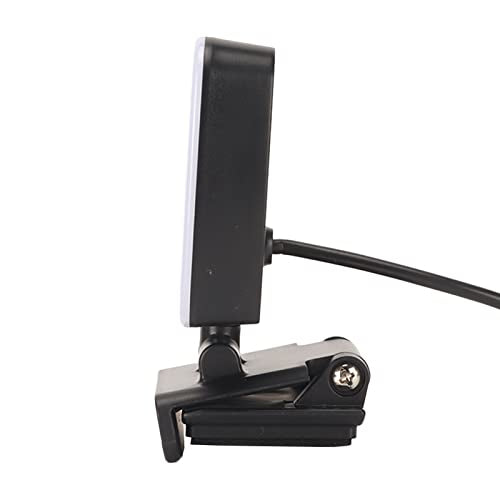
BSTiltion Clip-On USB Webcam Fill Light
Three switchable light colors and ten dimming levels let you tune webcam lighting to any call without extra gear
$21.89*
View on Amazon
✓ In Stock on Amazon.com
*Price sourced from Amazon.com. Last updated:Aug 17, 2026.Price and availability are subject to change — details.
Affiliate Disclosure: As an Amazon Associate, Studio Supplies earns from qualifying purchases made through links on this page, at no additional cost to you. This helps support our editorial team.
Notice a mistake? Let Us Know
Overview
Key Features
[VERSATILE LIGHTING] Illuminate your video calls with ease thanks to 3 adjustable light colors: warm yellow, warm white, and bright white. This webcam light enhances your presence, making it perfect for remote meetings, online classes, and live broadcasts, creating the ideal brightness for any setting.
[CUSTOMIZABLE BRIGHTNESS] Enjoy complete control over your lighting with 10 dimming modes. Whether you desire a subtle glow or a bright shine, this mini video light can be adjusted to accommodate your unique requirements, providing the perfect lighting ambience effortlessly.
[FLEXIBLE ROTATION] The innovative design allows for 360-degree left and right rotation, along with 160 degrees of upper and lower movement. This flexibility enables you to position the light exactly where you need it most, ensuring optimal lighting angles for all your video interactions.
[USB POWERED CONVENIENCE] Effortlessly connect this video light to your laptop, power bank, or charger adapter via USB. It offers a seamless power solution that allows you to bring professional lighting with you wherever you go, ensuring you're always ready for video engagements.
[EASY INSTALLATION] Simple to set up and use, this mini webcam light can be quickly mounted on your laptop or other devices. Just connect it to power, adjust its position, and choose your desired light settings to shine brightly in any virtual platform.
Specifications
Brand
BSTiltion
Product Type
Mini webcam fill light
Light Colors
Warm yellow, warm white, bright white (3 total)
Dimming Modes
10
Horizontal Rotation
360 degrees left and right
Vertical Tilt
160 degrees up and down
Power Source
USB (laptop, power bank, or charger adapter)
Mounting
Clip-on for laptop or similar devices
Frequently Asked Questions
How many lighting options does the BSTiltion webcam light actually offer?
It combines 3 color settings — warm yellow, warm white, and bright white — with 10 dimming modes, giving you a broad range of tone and intensity combinations for different calls.
How does the BSTiltion light get its power?
It's USB powered. You connect it to a laptop, power bank, or charger adapter, so there's no internal battery to recharge and it can run wherever you have a USB port.
Can I aim this webcam light at a specific angle?
Yes. The mount rotates 360 degrees left and right and tilts 160 degrees up and down, letting you position the beam to match your camera height and room layout.
Is the BSTiltion webcam light hard to set up?
No. It's designed for quick installation — mount it on your laptop or device, plug in the USB power, adjust its position, then pick your color and brightness.
What situations is this light meant for?
It's aimed at remote meetings, online classes, and live broadcasts, where adjustable color and brightness help you keep a well-lit, consistent on-camera presence.
Related Products


