
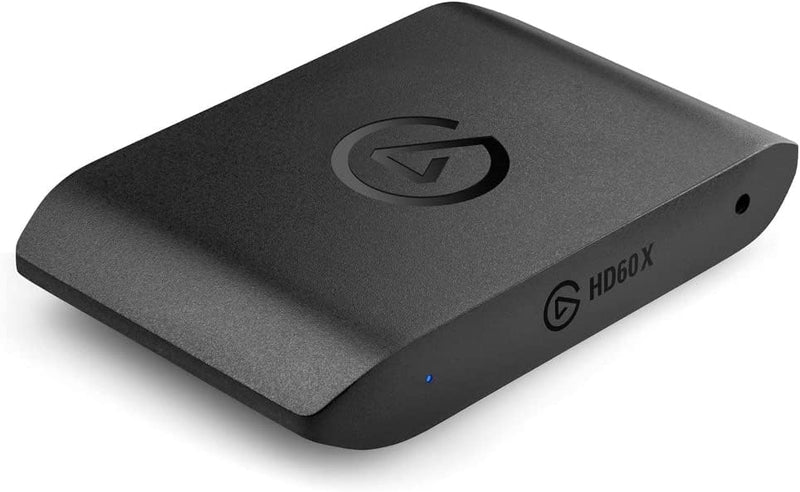


Elgato HD60 X Capture Card — Where It Fits
The Elgato HD60 X (model 10GBE9901) is the external USB capture card targeted at console streamers and content creators who want a compact plug-and-play recording / streaming device. Per Elgato's official HD60 X product page, the device captures up to 4K30 or 1080p60 with HDR10 support, supports passthrough at up to 4K60 / 1440p120 / 1080p240, includes Variable Refresh Rate (VRR) passthrough, runs over USB 3.0, and supports OBS, Streamlabs, Twitch, YouTube, and Discord workflows natively. This module walks through where the HD60 X is the right tool and where it isn't.
Use Case 1 — Console Streamers and YouTubers
The HD60 X's strongest fit is the console-streaming creator. Per Elgato's official technical specifications, the card has native PS5, PS4, Xbox Series X/S, Xbox One X/S, and Nintendo Switch / Switch 2 support. The 4K60 HDR passthrough means the gamer's display sees the full original signal with no quality degradation; the 1080p60 HDR10 or 4K30 capture path provides the recorded copy. TechRadar's HD60 X review characterizes the card as a "small, solidly-built, plug-and-play box" and ranks it as the best capture card in their roundup, specifically citing native Xbox Series X and PS5 support and excellent Full HD picture quality.
Use Case 2 — Multi-PC Streaming Setups
The two-PC streaming setup (one gaming PC, one streaming PC) is a common workflow for high-end streamers who want to offload the OBS encoding workload from the gaming machine. The HD60 X plugs into the streaming PC and accepts HDMI from the gaming PC. The HDR10 passthrough means streamers gaming on an HDR monitor get the full HDR experience on their display while the streaming PC captures the SDR or HDR encode for broadcast. Per Elgato's spec page, the USB 3.0 interface delivers the low-latency capture path that two-PC workflows depend on.
Use Case 3 — Solo Creators Recording Gameplay Without a Capture PC
For solo creators who want to record gameplay or commentary without a second PC, the HD60 X plugs between the console and the display, and connects via USB to a Mac or PC running OBS / Elgato 4K Capture Utility. Recording happens on the streaming computer; the gaming display sees clean passthrough. This eliminates the need for in-game recording tools that may impact game performance.
Use Case 4 — VRR / High-Frame-Rate Streaming
VRR (Variable Refresh Rate) passthrough is the HD60 X's specific differentiator versus older capture cards. Gamers on VRR-capable monitors paired with VRR-capable consoles (PS5 with VRR, Xbox Series X) get tear-free gameplay on the display while the capture stream runs. Per Elgato's product page, the HD60 X supports VRR up to 4K60 / 1440p120 / 1080p240 — comprehensive coverage across modern high-refresh-rate gaming.
Use Case 5 — Mac-Based Creator Workflows
Per Elgato's spec page, the HD60 X works with macOS without driver installation (UVC class-compliant on the camera side, with Elgato 4K Capture Utility as an optional companion app for advanced features). Apple Silicon Macs (M1 / M2 / M3 / M4) handle the capture workload comfortably; the HD60 X is one of the few capture cards with first-class Mac support, opening the device to creators who choose Final Cut Pro / iMovie / Logic Pro workflows over Windows-native alternatives.
Honest Limits Buyers Should Know
- 4K capture is 30 fps, not 60 fps. Per TechRadar's review, the main capture ceiling is 4K30; 4K60 is passthrough-only. For creators who specifically need 4K60 recording, the Elgato 4K X (sibling product) is the appropriate tier
- HDR on 4K capture is not supported. The HD60 X captures HDR10 at 1080p60, but the 4K30 capture path is SDR-only. HDR-tagged 4K footage in OBS / Final Cut Pro requires stepping up to the 4K X capture card family
- USB external, not PCIe internal. For dedicated streaming PCs where minimum-possible-latency capture matters, internal PCIe capture cards (Elgato 4K60 Pro MK.2) have a marginally lower latency floor. For external use the HD60 X is appropriate; for PCIe-only workflows it's the wrong tier
- No physical pass-through audio split. Audio is bundled into the HDMI capture stream. Pro streamers who want to route game audio separately (independent mix, per-source compression, etc.) use an HDMI audio extractor between the source and HD60 X, or step up to Elgato's higher-tier products with separate audio outputs
- Webcam captures via separate USB device. The HD60 X is for game / console / HDMI source capture only. Webcam capture requires a separate USB or capture-card path (Elgato Cam Link 4K for HDMI-out cameras, or a native USB webcam)
Best-Fit Buyer Profiles
- Console streamers on Twitch / YouTube running 1080p60 HDR broadcasts who want clean 4K60 passthrough on their gaming display
- Two-PC streaming setups wanting to offload the encoding workload from the gaming machine and capture cleanly on a dedicated streaming PC
- Solo creators recording console gameplay for YouTube uploads where 1080p60 or 4K30 final-output quality is the goal
- Mac-based content creators who need a capture card with first-class macOS support and Final Cut Pro integration
- VRR-monitor gamers wanting tear-free passthrough at the highest refresh rates their console supports
Where Buyers Should Look Elsewhere
- 4K60 capture (not passthrough) → Elgato 4K X — the next tier up in the same family with 4K60 capture and HDR-on-4K support
- PCIe internal capture for dedicated streaming PCs → Elgato 4K60 Pro MK.2 (PCIe x4 card) for the absolute minimum latency path
- Webcam HDMI capture (not gaming) → Elgato Cam Link 4K, which is purpose-built for HDMI camera capture without the gaming feature set
- Pro broadcasting and multi-source mixing → Blackmagic ATEM Mini Pro / Pro ISO for hardware-based multi-source switching, recording, and streaming
Sources & Citations
- Elgato, "Game Capture HD60 X product page," elgato.com (accessed 2026-05-18)
- Elgato Help, "Game Capture HD60 X — Technical Specifications," help.elgato.com (accessed 2026-05-18)
- TechRadar, "Elgato HD60 X review," techradar.com (accessed 2026-05-18)
Last verified: 2026-05-18


