



HuiJiang Tech Parts
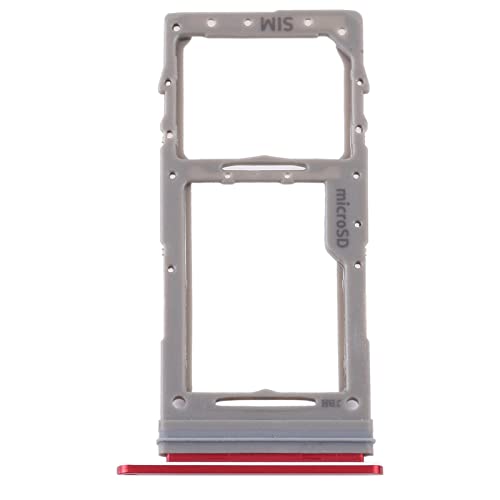
HuiJiang Tech Parts Galaxy Note 10 Lite SIM and Micro SD Card Tray
A model-specific replacement tray that restores SIM and Micro SD storage on a Galaxy Note 10 Lite without a trip to the repair shop
$6.88*
View on Amazon
✓ In Stock on Amazon.com
*Price sourced from Amazon.com. Last updated:Oct 08, 2026.Price and availability are subject to change — details.
Affiliate Disclosure: As an Amazon Associate, Studio Supplies earns from qualifying purchases made through links on this page, at no additional cost to you. This helps support our editorial team.
Notice a mistake? Let Us Know
Overview
Key Features
Package includes: 1x Card Tray. All items are inspected before shipping.
Easy installation. Use the eject pin to remove the old tray and insert the replacement. Please ensure your phone is powered off before installation.
For Samsung Galaxy Note 10 Lite SM-N770 SIM Card Tray + Micro SD Card Tray
Specifications
Brand
HuiJiang Tech Parts
Compatible Model
Samsung Galaxy Note 10 Lite SM-N770
Type
SIM Card Tray + Micro SD Card Tray
Color
Red
Package Contents
1x Card Tray
Installation
Eject pin, no soldering
Frequently Asked Questions
Will this tray fit any Samsung Galaxy Note 10 Lite?
It is made specifically for the SM-N770 variant. Check your phone's model number before ordering, as trays from other Galaxy models will not seat correctly in this device.
Can I use both a SIM card and a Micro SD card at the same time?
Yes. This tray is designed to hold both a SIM card and a Micro SD card together, restoring the phone's expandable storage alongside its network connection.
Does the package include an eject pin for installation?
No. The package includes only one card tray, so you will need to supply your own eject pin to remove the old tray and insert the replacement.
How difficult is it to install this tray myself?
Installation is straightforward. With the phone powered off, use an eject pin to remove the old tray and slide the new one into the same slot. No soldering or phone disassembly is required.
Do I need to power off my phone before swapping the tray?
Yes. The manufacturer advises ensuring the phone is powered off before removing the old tray and inserting the replacement.
Related Products


