



HuiJiang Tech Parts
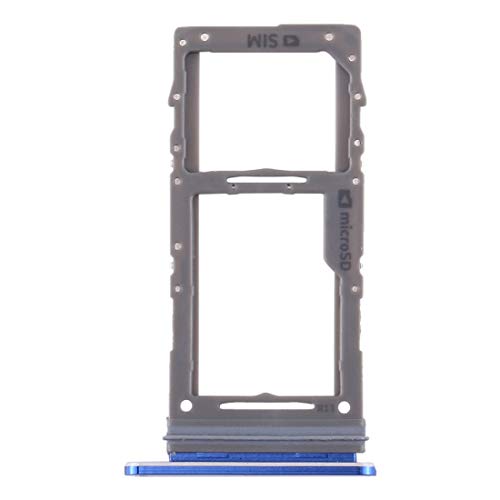
HuiJiang Tech Parts Galaxy Note10+ Replacement SIM Card Tray
A direct blue replacement SIM and microSD tray built specifically for the Samsung Galaxy Note10+ when the original is lost or damaged
$7.01*
View on Amazon
✓ In Stock on Amazon.com
*Price sourced from Amazon.com. Last updated:Oct 23, 2026.Price and availability are subject to change — details.
Affiliate Disclosure: As an Amazon Associate, Studio Supplies earns from qualifying purchases made through links on this page, at no additional cost to you. This helps support our editorial team.
Notice a mistake? Let Us Know
Overview
Key Features
Package includes: 1x Card Tray. All items are inspected before shipping.
Easy installation. Use the eject pin to remove the old tray and insert the replacement. Please ensure your phone is powered off before installation.
For Samsung Galaxy Note10+ SIM Card Tray / Micro SD Card Tray
Specifications
Brand
HuiJiang Tech Parts
Compatible Model
Samsung Galaxy Note10+
Part Type
SIM Card Tray / Micro SD Card Tray
Card Support
SIM card and microSD card
Color
Blue
Package Contents
1x Card Tray
Installation
Eject-pin removal and replacement
Required State
Phone powered off during installation
Frequently Asked Questions
Which phone model is this replacement card tray made to fit?
It is made specifically for the Samsung Galaxy Note10+. The listing ties fitment to that model, so you should confirm your handset is a Note10+ before ordering.
Does this tray hold both a SIM card and a microSD card?
Yes. It is described as a SIM Card Tray and Micro SD Card Tray, matching the dual-card layout the Note10+ uses for a SIM and a microSD card.
What do I need to install the replacement tray?
An eject pin. You power the phone off, use the pin to remove the old tray, then insert the replacement. No drivers or adhesives are required for the swap.
What color is the tray, and what comes in the package?
The tray is blue, and the package includes one card tray. All items are inspected before shipping according to the listing.
Should the phone be on or off when I change the tray?
Off. The instructions state you should ensure the phone is powered off before removing the old tray and inserting the replacement.
Related Products


