

Kramer Electronics
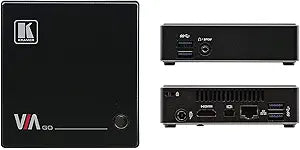
Kramer Electronics VIA-GO Wireless Presentation Device
1080p
Seamless Wireless Presentation and Collaboration The Kramer Electronics VIA GO offers instant wireless connectivity for iOS, Android, Chromebook, PC, and Mac users, enabling advanced presentation capabilities. Stream content with crystal-clear mirrored images and stunning video playback. With bui...
$132.00*
View on Amazon
✓ In Stock on Amazon.com
*Price sourced from Amazon.com. Last updated:Oct 12, 2026.Price and availability are subject to change — details.
Affiliate Disclosure: As an Amazon Associate, Studio Supplies earns from qualifying purchases made through links on this page, at no additional cost to you. This helps support our editorial team.
Notice a mistake? Let Us Know
Overview
Seamless Wireless Presentation and Collaboration
The Kramer Electronics VIA GO offers instant wireless connectivity for iOS, Android, Chromebook, PC, and Mac users, enabling advanced presentation capabilities. Stream content with crystal-clear mirrored images and stunning video playback. With built-in Wi-Fi and LAN connectivity, it's easy and flexible to install, featuring industry-leading encryption for secure use on internal networks.
Specifications:
- Wireless Connectivity: No dongle needed
- Streaming Multimedia: 60fps HD wireless video streaming (up to 6Mbps)
- User Interface: Simple and intuitive
- Display Participants: Up to two participant screens simultaneously
- Mirroring: iOS and Android mirroring
- Integration: VIA Site Management (VSM) software & VIA Pad
- Wi-Fi Band Support: 2.4GHz (access point mode), 2.4GHz/5GHz (client mode)
- Wireless device connectivity — no dongle needed.
- 60fps streaming multimedia — share HD wireless video streaming (using the via app multimedia feature). supports up to 6Mbps video bit rate when using the built– in wi– fi module in access point mode.
- easy to use — simple and intuitive user interface.
- display participants — up to two participant screens can be displayed simultaneously on main screen.
- iOS and Android mirroring.
- seamless integration with via site management (vsm) software & the via pad
- wi– fi band support — 2.4GHz (access point mode), 2.4GHz/5GHz (client mode).
Key Features
Kramer via go wireless presentation solution
Login using conventional wifi and/or LAN connections
Supports Windows and Mac laptops, Chromebooks as well as iOS, Windows and Android mobile operating systems
High-quality video streaming, Supports full HD 1080p/60 (using the via app multimedia feature) — Supports up to 6Mbps video bit rate when using the built-in wi–fi module in access point mode
Up to two participant screens can be displayed simultaneously on main screen
Specifications
Product Type
Wireless Presentation Device
Connectivity
Conventional Wi-Fi, LAN
Supported Operating Systems
Windows, Mac, Chromebooks, iOS, Windows, Android mobile OS
Video Streaming Quality
Full HD 1080p/60 (via VIA app multimedia)
Max Video Bit Rate (AP Mode)
6Mbps
Simultaneous Screen Display
Up to two participants
Frequently Asked Questions
What operating systems does the Kramer VIA-GO support for presentations?
The Kramer VIA-GO supports a wide range of operating systems including Windows and Mac laptops, Chromebooks, as well as iOS, Windows, and Android mobile operating systems.
How do users connect to the VIA-GO for presentations?
Users can log in to the VIA-GO using conventional Wi-Fi connections or through LAN connections for flexibility.
Does the VIA-GO support high-definition video streaming?
Yes, it supports high-quality video streaming, including full HD 1080p/60, particularly when using the VIA app's multimedia feature.
What is the maximum number of participant screens that can be shown at once?
Up to two participant screens can be displayed simultaneously on the main screen, facilitating collaborative presentations.
What video bit rate can be achieved with the built-in Wi-Fi module?
When utilizing the built-in Wi-Fi module in access point mode, the device supports up to a 6Mbps video bit rate.
Related Products


