



Logitech
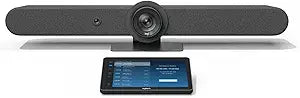
Logitech TAPRBGUNIAPP Zoom Room Conference System
Logitech Tap for Zoom Rooms brings one-touch meeting join and instant content sharing to any conference space.
$4,722.11*$4,765.02Save 0%
View on Amazon
✓ In Stock on Amazon.com
*Price sourced from Amazon.com. Last updated:Aug 30, 2026.Price and availability are subject to change — details.
Affiliate Disclosure: As an Amazon Associate, Studio Supplies earns from qualifying purchases made through links on this page, at no additional cost to you. This helps support our editorial team.
Notice a mistake? Let Us Know
Overview
Specifications
Compatibility
Zoom Rooms
Connectivity
USB (to PC or Mac)
Controller
Logitech Tap Touch Controller
Features
One-Touch Join, Calendar Integration, Instant Content Sharing
Software Required
Zoom Rooms Application
Model
TAPRBGUNIAPP
Frequently Asked Questions
What conferencing platform is this system designed for?
This Logitech Tap bundle is specifically configured and licensed for Zoom Rooms. It is not a generic USB peripheral — it is purpose-built to run the Zoom Rooms experience.
Does this system require a separate computer to operate?
Yes, the Tap controller connects via USB to a PC or Mac that runs the Zoom Rooms software. The computer serves as the processing hub, while the Tap provides the touch interface for meeting control.
Can I join meetings with a single touch?
Yes, the Tap controller features one-touch join functionality with calendar integration, so scheduled meetings appear on the display and can be launched instantly without manual entry of meeting IDs.
Does the system require additional software installation beyond Zoom?
No additional software is needed beyond the Zoom Rooms application on the connected PC or Mac. The Tap controller communicates over USB without requiring separate drivers or management software.
Related Products


