

Logitech
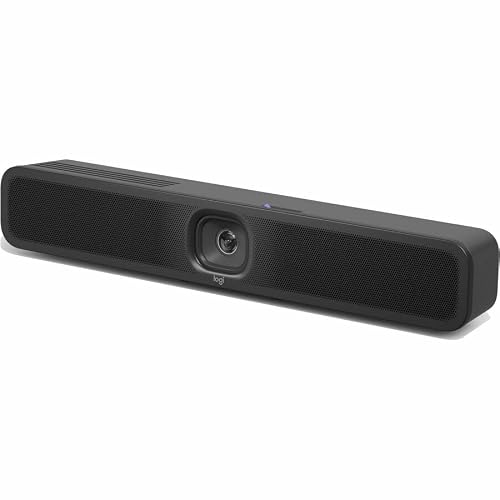
Logitech MeetUp 2 All-in-One USB Conference Camera
An all-in-one USB conference camera whose AI audio and video features keep improving over time through regular Logitech updates
$997.56*$1,052.03Save 5%
View on Amazon
✓ In Stock on Amazon.com
*Price sourced from Amazon.com. Last updated:Oct 07, 2026.Price and availability are subject to change — details.
Affiliate Disclosure: As an Amazon Associate, Studio Supplies earns from qualifying purchases made through links on this page, at no additional cost to you. This helps support our editorial team.
Notice a mistake? Let Us Know
Overview
Key Features
Have the flexibility to deploy MeetUp 2 (TAA-compliant) with an in-room compute or connected to a laptop in BYOD mode.
Compatible with the platforms commonly used for video conferencing such as Microsoft Teams, Zoom, and Google Meet.
AI-based audio and video features that become more capable over time through regular updates that improve performance, add capabilities, and deepen integrations.
Easy to set up in small spaces thanks to multiple mounting options and clean cabling.
Easily manage your MeetUp 2 (TAA-compliant) and other Logitech video collaboration devices with Logitech Sync. Monitor room status, deploy updates, and modify settings, all from a single cloud-based app.
Specifications
Brand
Logitech
Model
MeetUp 2
Type
All-in-one USB conference camera
Connection
USB
Deployment Modes
In-room compute or laptop BYOD mode
AI Features
AI-based audio and video, improved via regular updates
Platform Compatibility
Microsoft Teams, Zoom, Google Meet
Management Software
Logitech Sync (cloud-based)
Recommended Space
Small spaces
Compliance
TAA compliant
Mounting
Multiple mounting options
Frequently Asked Questions
Can the MeetUp 2 be used with just a laptop, or does it need a room system?
Both work. You can connect the MeetUp 2 to a laptop in BYOD mode, or deploy it with an in-room compute unit for a dedicated room setup, depending on your needs.
Which video conferencing platforms does the MeetUp 2 support?
It is compatible with the platforms commonly used for video conferencing, including Microsoft Teams, Zoom, and Google Meet, so it fits into most existing workflows.
Is the Logitech MeetUp 2 TAA compliant for government purchasing?
Yes. The MeetUp 2 is TAA-compliant, making it appropriate for government agencies and enterprises with procurement requirements tied to trade-agreement sourcing.
What do the AI-based features on the MeetUp 2 actually do over time?
Logitech states the AI audio and video features become more capable over time through regular updates that improve performance, add capabilities, and deepen platform integrations.
How do IT teams manage the MeetUp 2 across multiple rooms?
Through Logitech Sync, a cloud-based app that lets IT monitor room status, deploy updates, and modify settings for the MeetUp 2 and other Logitech video collaboration devices from one place.
Is the MeetUp 2 a good fit for large conference rooms?
It is designed for small spaces, with mounting options and clean cabling suited to compact rooms, so larger conference rooms may call for a different solution.
Related Products


