

Monoprice
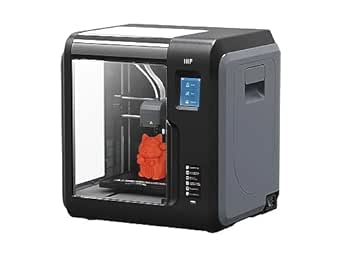
Monoprice 133820 Voxel 3D Printer - Enclosed, Heated Bed
Experience Hassle-Free 3D Printing with Advanced FeaturesThe Monoprice Voxel 3D Printer combines user-friendly design with professional-grade capabilities. Its fully enclosed structure, removable heated build plate, and intuitive touch screen interface make 3D printing accessible to both beginner...
$299.00*
View on Amazon
✓ In Stock on Amazon.com
*Price sourced from Amazon.com. Last updated:Aug 28, 2026.Price and availability are subject to change — details.
Affiliate Disclosure: As an Amazon Associate, Studio Supplies earns from qualifying purchases made through links on this page, at no additional cost to you. This helps support our editorial team.
Notice a mistake? Let Us Know
Overview
Experience Hassle-Free 3D Printing with Advanced Features
The Monoprice Voxel 3D Printer combines user-friendly design with professional-grade capabilities. Its fully enclosed structure, removable heated build plate, and intuitive touch screen interface make 3D printing accessible to both beginners and experienced users. The Voxel’s quick-change nozzle and auto-leveling features streamline the printing process, saving you time and effort.
- Build Volume: 150 x 150 x 150 mm
- Build Plate: Removable, Flexible, and Heated (up to 60°C)
- Nozzle: Quick Change (Tool-less replacement)
- Leveling: Auto Leveling
- Connectivity: Wi-Fi
- Internal Storage: 8GB
- Compatibility: Windows XP/Vista/7/8/10, Mac OS X, Linux
- Special Features: Filament Sensor with Auto-Pause
Key Features
Quick change nozzle: unlike other 3D printers, which require tools and 20-40 minutes of work to replace the nozzle, The voxel has a quick change nozzle that allows you to change the nozzle in seconds, without the need for tools of any kind
Heated, flexible, and removable: The removable, flexible build plate makes removing a model A breeze. Simply remove and flex it to dislodge the model. You can easily replace it if it becomes damaged or can swap in a second build plate to start a new print immediately after completion of a project. Additionally, it can be heated to temperatures up to 60°c
Auto Leveling: the printer ships fully calibrated and ready to print out of the box. If necessary, you can easily adjust the distance between the nozzle and the bed via the touch screen interface.Operating compatibility: Windows XP/Vista/7/8/10, Mac OS X, Linux
Auto feeding with filament sensor: makes loading filament simple. Insert your filament into the printer’s filament loading Port, then tap ‘load filament’ on the color touchscreen menu. Additionally, a built-in sensor recognizes low filament levels and will pause prints in progress until filament is reloaded
Please visit Monoprice website and search for 'voxel' Or Type Part number 33820 in the search bar to visit the product page and download the latest software and manual
Specifications
Product Type
3D Printer
Model Name
Voxel
Nozzle Type
Quick Change Nozzle
Build Plate Features
Heated, Flexible, Removable
Max Build Plate Temperature
Up to 60°c
Leveling
Auto Leveling
Filament System
Auto Feeding with Filament Sensor
Operating Compatibility
Windows XP/Vista/7/8/10, Mac OS X, Linux
Design
Enclosed
Frequently Asked Questions
How quickly can the nozzle be changed on the Monoprice Voxel 3D Printer?
The Voxel 3D Printer features a quick change nozzle that allows for replacement in seconds, without requiring any tools.
What are the benefits of the build plate on this printer?
The build plate is heated (up to 60°c), flexible, and removable, making it easy to remove printed models and allowing for quick swapping.
Does this printer require manual bed leveling?
No, the Monoprice Voxel 3D Printer supports auto leveling, arriving fully calibrated and allowing for easy adjustments via the touch screen.
What happens if the filament runs out during a print?
A built-in filament sensor recognizes low filament levels and will automatically pause prints until new filament is reloaded.
What operating systems are compatible with this 3D printer?
This printer offers broad operating compatibility, including Windows XP/Vista/7/8/10, Mac OS X, and Linux.
Is the printer enclosed?
Yes, the Monoprice Voxel 3D Printer features an enclosed design.
Where can I find the latest software and manual for the printer?
Users should visit the Monoprice website and search for 'voxel' or part number 33820 to download the latest software and manual.
Related Products


