


Panasonic
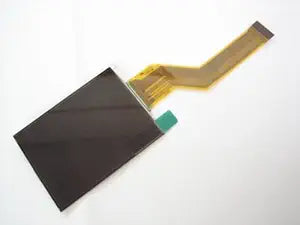
Panasonic DMC-FX60 LCD Screen Repair Part
A direct-fit replacement LCD screen that restores the display on your Panasonic DMC-FX60 or FX65 digital camera.
View price on Amazon
Affiliate Disclosure: As an Amazon Associate, Studio Supplies earns from qualifying purchases made through links on this page, at no additional cost to you. This helps support our editorial team.
Notice a mistake? Let Us Know
Overview
Specifications
Compatibility
Panasonic DMC-FX60, DMC-FX65
Display Type
LCD Screen
Backlight
Not included on some models
Included Tool
T10 Screw Tool
Installation Note
Soldering may be required; additional tools may be needed
Frequently Asked Questions
Will this LCD screen work in both the DMC-FX60 and DMC-FX65?
Yes, this replacement screen is compatible with both the Panasonic DMC-FX60 and the DMC-FX65, as they share the same LCD panel design.
Does this screen include a backlight?
Some versions of this replacement do not include a backlight. Check the listing details for your specific unit, and verify whether your camera model requires an integrated backlight before ordering.
Is soldering required for installation?
Soldering may be required depending on your specific camera model and how the original LCD was connected. The listing includes a T10 screw tool, but additional tools may be needed for the full repair.
What tools are included with the replacement screen?
A T10 screw tool is included. However, depending on your camera model, you may need additional tools such as a small Phillips screwdriver, plastic pry tools, or a soldering iron to complete the installation.
Related Products


