



QLECMSGSW
QLECMSGSW Driver-Free Bluetooth 5.0 Audio Transmitter Dongle
A driver-free Bluetooth 5.0 dongle that finally gives a TV without wireless support a way to connect to your headphones
View price on Amazon
Affiliate Disclosure: As an Amazon Associate, Studio Supplies earns from qualifying purchases made through links on this page, at no additional cost to you. This helps support our editorial team.
Notice a mistake? Let Us Know
Overview
Key Features
Compact and easy to carry
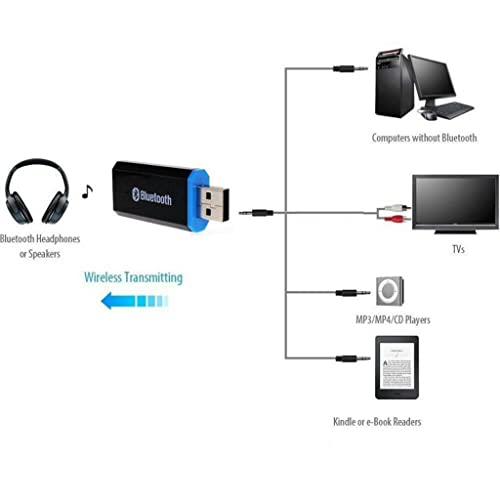
Solve the problem that the TV cannot connect to the headset
5.0+EDR version, compatible with multi-protocol transmission, faster and more stable
+AUX input function, directly plug into to use
To connect the AUX interface device, you need to connect to the port to supply power to the charger
Provide a stable Wi-Fi connection. It is an economical way and enables you to enjoy many advantages brought by Wi-Fi technology.
Specifications
Brand
QLECMSGSW
Product Type
Audio dongle transmitter
Bluetooth Version
5.0+EDR
Input
AUX input
Driver Requirement
Driver-free
Power
Requires connection to a powered port or charger
Portability
Compact and lightweight
Compatibility
Multi-protocol transmission
Frequently Asked Questions
Does this transmitter need any drivers or software to work with my TV?
No. The dongle is driver-free and plugs directly into an AUX interface, so there is nothing to install or configure on the source device before using it.
What Bluetooth version does the QLECMSGSW transmitter use?
It uses Bluetooth 5.0+EDR, a version the listing highlights for faster and more stable multi-protocol transmission compared to older Bluetooth standards.
Does the transmitter run on its own power or does it need to be plugged in?
It needs power to operate. To connect a device through the AUX interface, you must also connect the transmitter to a port that supplies power, such as a charger.
Will this solve the problem of a TV that cannot connect to wireless headphones?
Yes, that is its stated purpose. It is designed specifically to give a TV that lacks wireless support a way to connect to a headset through the AUX connection.
How does it connect to my audio source?
Through an AUX input function. You plug it directly into the AUX interface of the device, which must have a compatible jack, and it transmits the audio wirelessly.
Related Products


