Roku

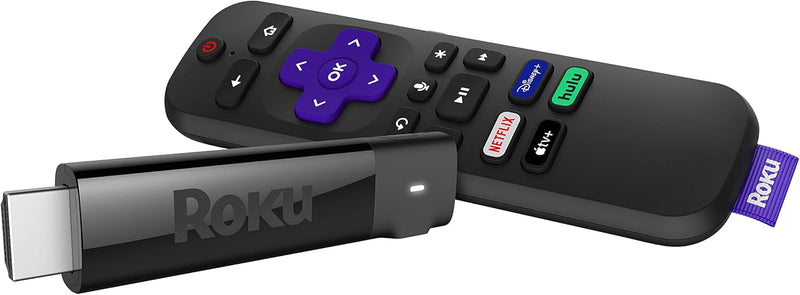
Roku 3810R Streaming Stick+ 4K HDR

4.7 (126339 reviews)
4KHDR

Experience Streaming in Stunning 4K HDR with Roku Streaming Stick+ Transform your TV into a smart entertainment hub with the Roku Streaming Stick+. Enjoy seamless streaming of your favorite content in HD, 4K, and HDR. With long-range wireless connectivity, you can enjoy smooth, buffer-free stream...

$25.95*$44.99Save 42%
In Stock on Amazon.com
View on Amazon

*Price sourced from Amazon.com. Last updated:May 27, 2026.Price and availability are subject to change.

Affiliate Disclosure: Studio Supplies may earn a commission from qualifying purchases made through links on this page, at no additional cost to you. This helps support our editorial team.

Notice a mistake? Let Us Know

Overview

Experience Streaming in Stunning 4K HDR with Roku Streaming Stick+

Transform your TV into a smart entertainment hub with the Roku Streaming Stick+. Enjoy seamless streaming of your favorite content in HD, 4K, and HDR. With long-range wireless connectivity, you can enjoy smooth, buffer-free streaming even in rooms far from your router. The included voice remote allows for easy control of your TV and streaming experience.

Specifications:

  • Streaming Resolution: HD/4K/HDR
  • Wireless: Long-range Wireless Receiver
  • Remote: Roku Voice Remote with TV Controls
  • Connectivity: Wi-Fi
  • Special Features: Wireless
  • Batteries: 2 AAA (included)
  • Item Weight: 0.56 Pounds
  • Dimensions: 3.7 x 0.8 x 0.47 inches

Key Features

Wireless that goes the distance: Basement rec room. Backyard movie night. Bring ‘em on. The long-range wireless receiver gives you extended range and a stronger signal for smooth streaming even in rooms farther from your router

Brilliant picture quality: Experience your favorite shows with stunning detail and clarity—whether you’re streaming in HD, 4K, or HDR, you’ll enjoy picture quality that’s optimized for your TV with sharp resolution and vivid color

Tons of power, tons of fun: Snappy and responsive, you’ll stream your favorites with ease—from movies and series on Apple TV, Prime Video, and Netflix, to cable alternatives like Sling, enjoy the most talked-about TV across thousands of channels

No more juggling remotes: Power up your TV, adjust the volume, mute, and control your streaming all with one remote—use your voice to quickly search across channels, turn captions on, and more in a touch

Setup is a cinch: Plug it in, connect to the internet, and start streaming—it’s that simple

Private listening on mobile: Use the free Roku mobile app to pump up the volume on your shows without disturbing the house

Endless entertainment: Stream what you love, including free TV, live news, sports, and more. It’s easy to stream what you love and cut back on cable bills with access to 500,000 plus movies and TV episodes across thousands of free and paid channels

Automatic software updates: Get the most up to date software including all the latest features and available channels without even thinking about it

Works with popular voice assistants: Enjoy easy voice control with Siri, Alexa, or Hey Google

Share it with Apple AirPlay: Effortlessly share videos, photos, music, and more from your Apple devices to your TV

Specifications

Model
3810R Streaming Stick+
Resolution Support
4K HDR, HD
Wireless
Long-range wireless receiver
Remote Features
TV power, volume, mute, streaming control, voice search
Voice Assistant Compatibility
Siri, Alexa, Hey Google
Mobile App
Free Roku mobile app (iOS and Android) for private listening
Content Access
500,000+ movies & TV episodes, thousands of channels
Updates
Automatic software updates
Casting
Apple AirPlay

Roku Express HD Streaming Device (829610003252) — Editorial Review & Use Cases

The Roku Express HD (model 829610003252) is Roku's entry-tier 1080p HD streaming media player — designed as the cheapest entry point to the Roku platform's 700+ streaming channels (Netflix, Disney+, Apple TV+, YouTube, Prime Video, HBO Max / Max, Peacock, Paramount+, etc.). Per Roku's official Express product page, the unit ships with HDMI cable, IR remote control, USB power cable + AC adapter, and supports 1080p HD output, Wi-Fi (802.11n / b/g/n single-band), HDMI 1.4, and the full Roku OS with channel store + voice search via mobile app.

What the Roku Express HD Specifically Wins

  • Lowest-cost entry to Roku platform — at $25-40 retail, the cheapest path to add streaming to any TV with HDMI
  • 700+ free + paid streaming channels — Netflix, Disney+, Apple TV+, YouTube, Prime Video, Hulu, HBO Max / Max, Peacock, Paramount+, Tubi (free), Pluto TV (free), The Roku Channel (free), etc.
  • Roku OS is platform-neutral — vs Amazon Fire TV (heavily Amazon-promoted) or Apple TV (Apple-ecosystem), Roku presents all streaming services equally without preferential ranking
  • Voice search via Roku mobile app — voice commands "Find action movies starring Tom Cruise" work across all installed channels
  • HDMI cable + IR remote + power adapter all included — out-of-box ready; no separate purchases needed
  • 1080p HD output — fine for older 1080p TVs, projectors, dorm room screens, kitchen TVs, RV / cabin setups
  • Single-band Wi-Fi (2.4 GHz) — works in nearly any Wi-Fi network without configuration
  • Roku ecosystem familiar to existing Roku TV / Premiere / Streaming Stick owners
  • No subscription required to access free streaming — Pluto TV, Tubi, The Roku Channel, Crackle, FreeVee all free
  • Voice search integration with Alexa + Google Home (via Roku mobile app pairing)

Where the Roku Express HD Specifically Fits

  • Adding streaming to older 1080p HD TVs without smart TV apps — common in many homes with TVs purchased 2015-2018
  • Bedroom / kitchen / dorm secondary TV setup
  • RV / cabin / vacation home with portable / shared TV use
  • Gift to parents / grandparents new to streaming
  • Hotel / Airbnb portable streaming — bring own Roku for personalized account access
  • Office break room / conference room TV streaming
  • Kids' room TV streaming with Kids profile parental controls
  • Cord-cutting starter device — initial replacement for cable on a single TV
  • Older projector / display use for movie nights
  • Backup streaming device when smart TV apps fail or are outdated
  • Budget upgrade for older 720p devices to 1080p HD

Honest Limits Buyers Should Know

  • 1080p HD only — no 4K, no HDR. 4K TVs benefit from the higher-tier Roku Express 4K+, Roku Streaming Stick 4K, or Roku Ultra. The Express HD outputs 1080p maximum
  • Wi-Fi 4 (802.11n) — slower than Wi-Fi 5/6. Modern Wi-Fi 6 routers see lower throughput on this device than newer Roku Ultra (Wi-Fi 6). 1080p streaming bandwidth is adequate; 4K would not be
  • 2.4 GHz single-band Wi-Fi. No 5 GHz support; congested 2.4 GHz networks may have buffering. Ethernet is NOT available on the Express HD — needs Wi-Fi mandatory
  • HDMI 1.4 — not HDMI 2.0/2.1. No 4K HDR, no Dolby Vision, no eARC support. Adequate for 1080p streaming; not for premium audio/video pass-through
  • IR remote requires line-of-sight to device. Remote control beam needs to point at the Roku; obstruction (TV stand, cabinet) blocks signal. The Streaming Stick 4K and Ultra have Wi-Fi remotes that work through obstruction
  • USB-powered from TV USB port or AC adapter. Some older TVs' USB ports don't deliver enough current; AC adapter is the reliable power source. Most modern TVs work fine
  • No headphone jack or wireless audio output. Audio comes only via HDMI. For late-night listening with headphones, Roku Streaming Stick 4K+ or Ultra have remote with headphone jack
  • No native local file playback. Local USB drive media playback is limited; for local media server use, Plex / Jellyfin channels are workarounds
  • Limited channel customization vs Apple TV. Apple TV's UI customization is more granular; Roku's interface is more locked-down
  • Ad-supported home screen. Roku's home screen displays Roku ads + sponsored channel placements. Some users find this intrusive; Apple TV is ad-free

Where Buyers Should Look Elsewhere

  • 4K + HDR TV with no smart apps → Roku Express 4K+, Roku Streaming Stick 4K, Roku Ultra
  • Dolby Vision + Dolby Atmos premium audio/video → Roku Ultra, Apple TV 4K, Amazon Fire TV Cube
  • Ad-free streaming home screen → Apple TV 4K, Apple TV HD
  • Wi-Fi 6 home network leveraging → Roku Ultra (Wi-Fi 6), Apple TV 4K (Wi-Fi 6)
  • Ethernet wired connection → Roku Ultra (has Ethernet), Apple TV 4K
  • Voice remote on the remote itself → Roku Voice Remote variants, Apple TV Siri Remote
  • Gaming + streaming combo → Apple TV 4K (Apple Arcade) or Amazon Fire TV Cube (Luna)
  • Casting from phone (Chromecast functionality) → Google TV / Chromecast with Google TV (4K + Chromecast built-in)
  • Older 720p devices → Roku Express (non-HD) at slightly cheaper price

Sources & Citations

  1. Roku, "Roku Express HD product page," roku.com (accessed 2026-05-18)
  2. The Verge, "Roku Express HD review and streaming device buying guide," theverge.com (accessed 2026-05-18)
  3. Tom's Guide, "Best streaming devices buying guide," tomsguide.com (accessed 2026-05-18)
  4. The Wirecutter (NYT), "Best streaming media player buying guide," nytimes.com/wirecutter (accessed 2026-05-18)

Last verified: 2026-05-18

Now that you've seen the details — ready to take a closer look?

View on Amazon

Pros & Cons

👍 Pros

  • Features a long-range wireless receiver, providing extended signal strength for smooth streaming even in rooms far from the router.
  • Delivers brilliant picture quality, optimizing shows in HD, 4K, or HDR with sharp resolution and vivid color for any TV.
  • Offers snappy and responsive performance, making it easy to stream from a vast array of services like Apple TV, Prime Video, and Netflix.
  • The included remote allows control over TV power, volume, mute, and streaming, reducing the need for multiple remotes.
  • Setup is straightforward: plug it in, connect to the internet, and start streaming without complicated procedures.
  • Enables private listening on mobile devices through the free Roku mobile app, so you can enjoy shows without disturbing others.
  • Provides endless entertainment with access to over 500,000 movies and TV episodes across thousands of free and paid channels.
  • Receives automatic software updates, ensuring you always have the latest features and channels without manual intervention.
  • Works with popular voice assistants including Siri, Alexa, or Hey Google for convenient voice control of your entertainment.
  • Supports Apple AirPlay, allowing effortless sharing of videos, photos, and music from Apple devices to your television.

👎 Cons

  • While the remote controls TV power and volume, it may not universally control all functions of every TV or sound system.
  • The "endless entertainment" claim relies on access to both free and paid channels, with paid content requiring additional subscriptions.
  • Private listening on mobile requires the free Roku mobile app, adding a separate device to manage audio output.
  • Extended wireless range is beneficial, but actual performance can still be affected by home network interference and structural obstacles.
  • The comprehensive features and voice assistant integration may still have a learning curve for users new to streaming devices.

Frequently Asked Questions

Yes, the Roku Streaming Stick+ requires a connection to the internet via its long-range wireless receiver to access streaming content.
Yes, the remote allows you to use your voice to quickly search across channels, and it works with popular voice assistants like Siri, Alexa, or Hey Google.
Yes, you can use the free Roku mobile app for private listening, allowing you to pump up the volume on your shows through your mobile device without disturbing anyone.
To experience 4K HDR picture quality, you will need a 4K and HDR compatible television, as the device optimizes picture quality for your TV.
Yes, the Roku Streaming Stick+ supports Apple AirPlay, allowing you to effortlessly share videos, photos, music, and more from your Apple devices to your TV.