



Roku
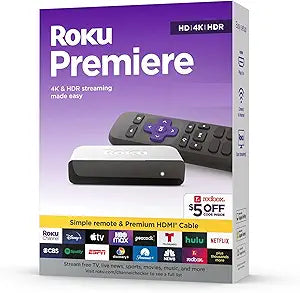
Roku 3920RW-SW Premiere 4K HDR Streaming Player
4KHDR
Plug in the included HDMI cable, connect to Wi-Fi, and you're streaming 4K HDR from 350+ free channels in minutes — the Roku Premiere makes the upgrade effortless.
$28.90*
Check availability
*Price sourced from Amazon.com. Last updated:Aug 28, 2026.Price and availability are subject to change — details.
Affiliate Disclosure: As an Amazon Associate, Studio Supplies earns from qualifying purchases made through links on this page, at no additional cost to you. This helps support our editorial team.
Notice a mistake? Let Us Know
Overview
Key Features
Watch What You Love Upgrade Your Streaming With A Massive Selection Of Free, Live, And Premium Tv, Including Roku Originals And 350 Free Live Tv Channels On The Roku Channel.
Incredible Picture, Exceptional Value Whether You’Re Streaming In 4K, Hd, Or Hdr You’Ll Enjoy Picture Quality That’S Optimized For Your Tv With Sharp Resolution And Vivid Color.
Tons Of Power, Tons Of Fun Compact And Power Packed, You'Ll Stream Your Favorites With Ease, Including Movies And Series On Hbo Max, Netflix, Disney , And Prime Video.
Quick Guided Setup Plug It In With The Included Premium High Speed Hdmi Cable, Connect To The Internet, And Start Streaming—It’S That Simple.
Works With Popular Voice Assistants Enjoy Easy Voice Control With Siri, Alexa, Or Google Assistant.
Specifications
Video Output
4K UHD, HD, HDR
Connectivity
Wi-Fi
Included Cable
Premium High-Speed HDMI Cable
Voice Assistant Compatibility
Siri, Alexa, Google Assistant
Screen Mirroring
Apple AirPlay supported
Free Channels
350+ live TV channels via The Roku Channel
Model
3920RW-SW
Color
Black (SW)
Frequently Asked Questions
Does the Roku Premiere actually output 4K HDR, and will it look noticeably better than my current HD streaming stick?
Yes — it outputs up to 4K UHD with HDR support, and on a 4K HDR TV the difference versus 1080p is visible on well-mastered content (nature documentaries, recent movies). The HDMI cable in the box is a Premium High-Speed cable rated to handle 4K HDR bandwidth, so you don't need to hunt for a separate one.
How complicated is setup, and do I need to create a Roku account?
Setup is a guided on-screen process — plug in the HDMI cable, connect to Wi-Fi, and follow the prompts. A Roku account is required to activate the device and access the channel store, but creating one is free and takes a few minutes. The entire setup from box to streaming typically takes under 10 minutes.
Will this work with the voice assistant I already use — Alexa, Google Assistant, or Siri?
All three are supported. You can use your existing Amazon Echo, Google Home, or Apple HomePod/Siri-enabled device to control playback, switch inputs, and search for content without touching the Roku remote.
Does the Roku Premiere support Apple AirPlay for streaming from my iPhone or iPad?
Yes — AirPlay is supported, letting you mirror or cast content directly from iOS/iPadOS devices to your TV. This is useful for sharing photos, videos, or apps that aren't available as native Roku channels.
Is there a subscription cost to access the free channels, or are they genuinely free?
The 350+ live TV channels on The Roku Channel are ad-supported and genuinely free — no subscription required. Premium services like Netflix, Disney+, HBO Max, and Prime Video require their own subscriptions, but accessing them through the Roku interface doesn't add any additional cost beyond what you'd pay those services directly.
Related Products


