



TCL
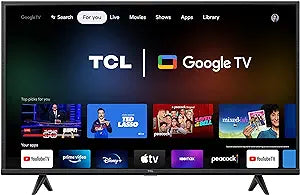
TCL 43S446 43-Inch 4K UHD HDR Google Smart TV
4KUHDHDR
Google TV's personalized recommendations and 4K HDR picture quality make this 43-inch TCL one of the most capable living room upgrades under $400.
View on Amazon for pricing
Affiliate Disclosure: As an Amazon Associate, Studio Supplies earns from qualifying purchases made through links on this page, at no additional cost to you. This helps support our editorial team.
Notice a mistake? Let Us Know
Overview
Key Features
Tcl Television S446 4K Led television
Specifications
Brand
TCL
Model
43S446
Screen Size
43 inches
Resolution
4K UHD (3840 x 2160)
HDR Support
Yes
Smart Platform
Google TV
Digital TV Tuner
Advanced Digital TV Tuner
HDMI Ports
Multiple
Frequently Asked Questions
What's the difference between Google TV and standard Android TV on this set?
Google TV is a layer built on top of Android TV that aggregates content from all your streaming apps into a single unified home screen with personalized recommendations. Instead of opening Netflix or Disney+ separately, Google TV surfaces individual shows and movies across services based on your watch history. It also supports Google Assistant for voice search and works with Chromecast built-in, so you can cast from a phone or tablet without any extra hardware.
Does 4K HDR make a visible difference on a 43-inch screen at typical viewing distances?
At a typical living room distance of 6–8 feet, a 43-inch 4K panel resolves finer detail than 1080p in close-up scenes and high-detail content like sports or nature documentaries. HDR's impact — expanded color volume and brighter highlights — is typically more noticeable than the resolution jump, especially on content mastered for HDR. The practical result is a more natural, less flat-looking image compared to non-HDR FHD sets.
How many HDMI ports does the 43S446 have?
The listing specifies multiple HDMI ports. TCL's S-series 43-inch models typically include 3 HDMI inputs — verify current port count with the product listing, as configurations can vary by retailer SKU.
Can I use this TV without a cable or satellite subscription?
Yes. Google TV's interface is built around streaming-first use, and the advanced digital TV tuner supports free over-the-air broadcast channels via a standard antenna (sold separately). Between streaming apps and OTA channels, a cable subscription is entirely optional.
Is the Google TV interface easy to set up for someone not familiar with smart TV platforms?
Setup is guided and straightforward — you sign into a Google account, and the TV imports your existing Google Play app preferences and watch history. Most users complete initial setup in under 10 minutes. If you already use Android on a phone or tablet, the interface will feel immediately familiar.
Related Products


