

ViewSonic
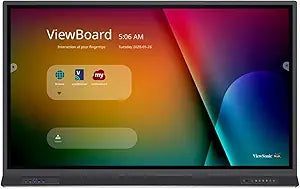
ViewSonic IFP8652 ViewBoard - 86" 4K Interactive Display
4K86 Inch45W
Transform Your Classroom with Interactive Collaboration The ViewSonic IFP8652 86 Inch ViewBoard 4K Interactive Flat Panel Display is the next generation of whiteboards designed for modern classroom environments. Featuring a 33-point touch screen, integrated microphone, and versatile connectivity ...
$3,447.26*
Check availability
*Price sourced from Amazon.com. Last updated:Aug 27, 2026.Price and availability are subject to change — details.
Affiliate Disclosure: As an Amazon Associate, Studio Supplies earns from qualifying purchases made through links on this page, at no additional cost to you. This helps support our editorial team.
Notice a mistake? Let Us Know
Overview
Transform Your Classroom with Interactive Collaboration
The ViewSonic IFP8652 86 Inch ViewBoard 4K Interactive Flat Panel Display is the next generation of whiteboards designed for modern classroom environments. Featuring a 33-point touch screen, integrated microphone, and versatile connectivity options, this display enhances collaboration and engagement.
ViewSonic IFP8652: Specifications
- Display Size: 86 inches
- Resolution: 4K Ultra HD (3840 x 2160)
- Touch Technology: Infrared, 33-Point Touch (Windows), 20-Point Touch (Android)
- Brightness: 350 cd/m2
- Contrast Ratio: 1,200:1 (Static), 4,000:1 (Dynamic)
- Response Time: 8ms (Typical GTG)
- Viewing Angles: 178º horizontal, 178º vertical
- Light Source: LED
- Operating System: ViewBoard OS based on Android 9.0
- Processor: ARM Quad Core A73 CPU, 1.8GHz
- Memory: 4GB LPDDR4
- Storage: 32GB eMMC
- Microphone: Beamforming array x 8, Noise Cancelation
- Internal Speakers: 15W (x2)
- Subwoofer: 15W (x1)
- Connectivity: HDMI 2.0 In (3), USB 3.0 (4), USB 2.0 Type B (2), USB 3.1 Type C (1), OPS PC Slot (1), RJ45, VGA
- Wireless: Optional LB-WIFI-001 adapter, 802.11AC + Bluetooth 4.0
- VESA Compatible: 800 x 600 mm
Key Features
86 Inch 4K Ultra HD (3840x2160p) touch screen collaboration display is the next generation of whiteboard for classroom environments
33-point multi-touch ViewBoard interactive flat panel lets multiple users write or draw on the screen with their fingers and stylus pens
ViewSonic's integrated MyViewBoard annotation software and ViewBoard Cast streaming software lets users collaborate remotely with people from any location or within the classroom
With built-in beamforming microphone and 45W stereo soundbar, this ViewBoard delivers optimal sound for everyone in the classroom and those learning remotely
Comes with built-in quad-core processor and versatile connectivity options including multiple HDMI,VGA, RJ45, and USB ports
Specifications
Display Size
86 inches
Resolution
4K Ultra HD (3840x2160p)
Touch Points
33-point multi-touch
Integrated Software
MyViewBoard annotation, ViewBoard Cast streaming
Audio
Built-in beamforming microphone, 45W stereo soundbar
Processor
Built-in quad-core processor
Connectivity
Multiple HDMI, VGA, RJ45, USB ports
Frequently Asked Questions
What is the screen size and resolution of the ViewSonic IFP8652 ViewBoard?
The ViewSonic IFP8652 features a large 86-inch screen with 4K Ultra HD (3840x2160p) resolution.
How many touch points does this interactive display support simultaneously?
This ViewBoard interactive flat panel supports 33-point multi-touch, allowing multiple users to write or draw at the same time.
What software is integrated with the ViewSonic ViewBoard for collaboration?
It comes with ViewSonic's integrated MyViewBoard annotation software and ViewBoard Cast streaming software to facilitate remote and in-classroom collaboration.
What kind of audio capabilities does the IFP8652 have?
The display delivers optimal sound with a built-in beamforming microphone and a powerful 45W stereo soundbar.
What connectivity options are available on this interactive display?
It offers versatile connectivity options, including multiple HDMI, VGA, RJ45, and USB ports, for easy integration with various devices.
Does this ViewBoard have its own internal processing power?
Yes, it comes with a built-in quad-core processor to ensure smooth operation of its interactive and software features.
Related Products


