

Acer
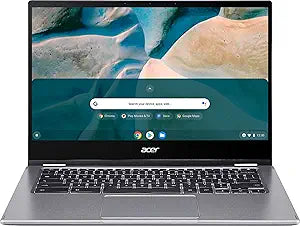
Acer CP514-1H-R4HQ Chromebook Spin 514 (Convertible)
★★★★★
Versatile and Portable Chromebook for Everyday UseThe Acer Chromebook Spin 514 is a versatile convertible laptop designed for everyday productivity and entertainment. Featuring a 14” Full HD Touchscreen, Ryzen 3 3250C processor, 4GB DDR4 Memory, and 64GB eMMC Flash Memory, this Chromebook offers ...
$259.99*
Check availability
*Price sourced from Amazon.com. Last updated:Jul 14, 2026.Price and availability are subject to change.
Affiliate Disclosure: Studio Supplies may earn a commission from qualifying purchases made through links on this page, at no additional cost to you. This helps support our editorial team.
Notice a mistake? Let Us Know
Overview
Versatile and Portable Chromebook for Everyday Use
The Acer Chromebook Spin 514 is a versatile convertible laptop designed for everyday productivity and entertainment. Featuring a 14” Full HD Touchscreen, Ryzen 3 3250C processor, 4GB DDR4 Memory, and 64GB eMMC Flash Memory, this Chromebook offers a seamless and responsive user experience. Its convertible design allows you to switch between laptop and tablet modes, making it perfect for on-the-go use.
Specifications:- Brand: Acer
- Model: CP514-1H-R4HQ
- Display: 14” Full HD Touchscreen
- Processor: Ryzen 3 3250C
- Memory: 4GB DDR4 Memory
- Storage: 64GB eMMC Flash Memory
- Type: Convertible Laptop
Key Features
Acer Chromebook Spin 514
Specifications
Product Type
Chromebook
Model Name
Spin 514
Form Factor
Convertible
Pros & Cons
👍 Pros
- Experience the convenience of a convertible design, allowing for use as a laptop or tablet.
- Benefit from the lightweight and portable form factor, ideal for on-the-go productivity and entertainment.
- Enjoy the simplicity and security of the Chrome OS operating system, with automatic updates and cloud integration.
- Access a wide range of applications through the Google Play Store, expanding functionality beyond traditional laptops.
- Utilize its flexible form to present, create, or consume content in various modes like tent or stand.
👎 Cons
- Chrome OS relies heavily on internet connectivity, which might limit functionality in offline environments.
- The storage capacity of Chromebooks typically favors cloud-based solutions over extensive local storage.
- Performance might be limited for resource-intensive applications or professional software not available on Chrome OS.
- Users accustomed to Windows or macOS might experience a learning curve with the Chrome OS interface.
- Specific display features, processor details, or RAM are not detailed, which could impact user experience expectations.
Frequently Asked Questions
Is the Acer Chromebook Spin 514 a traditional laptop or something else?
The Acer Chromebook Spin 514 is a convertible laptop, meaning it can transform and be used in various modes, including as a tablet.
What operating system does this Chromebook run on?
It operates on Chrome OS, Google's cloud-centric operating system known for its simplicity and security features.
Is this device suitable for users who need flexibility in how they use their computer?
Yes, its convertible design allows for adaptable use, catering to needs from typing to touch-based interaction.
Are there any specific performance details available for this model?
The provided information primarily highlights its convertible design and identifies it as a Chromebook, without specific details on CPU, RAM, or storage beyond its category.
Related Products

