AMD

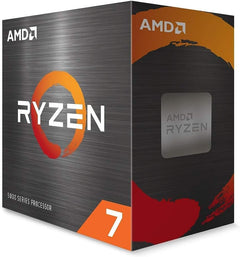
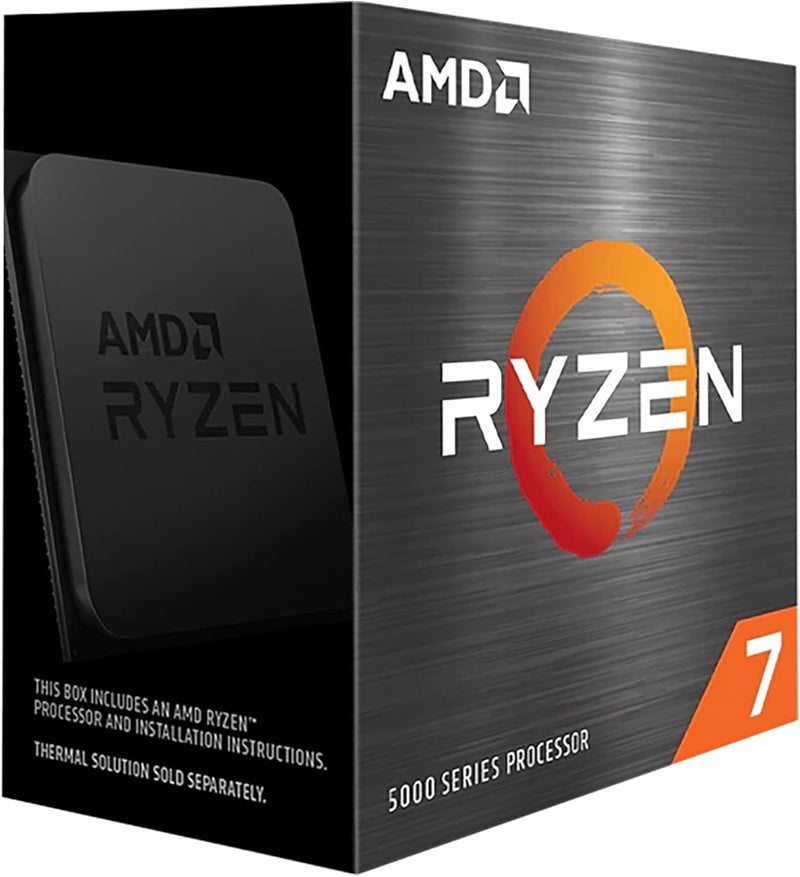
AMD Ryzen 7 5700X3D 8-Core Gaming Desktop Processor

4.8 (1910 reviews)
Ryzen 7 5700X3D

Dominate the Game with Unmatched Processing Power Introducing the AMD Ryzen 7 5700X3D, an 8-core, 16-thread desktop processor engineered for exceptional gaming performance. Featuring AMD 3D V-Cache™ technology, this processor delivers a top-tier gaming experience with massive cache and unlocked ...

$329.99*
Check availability

*Price sourced from Amazon.com. Last updated:Jun 03, 2026.Price and availability are subject to change.

Affiliate Disclosure: Studio Supplies may earn a commission from qualifying purchases made through links on this page, at no additional cost to you. This helps support our editorial team.

Notice a mistake? Let Us Know

Overview

Dominate the Game with Unmatched Processing Power

Introducing the AMD Ryzen 7 5700X3D, an 8-core, 16-thread desktop processor engineered for exceptional gaming performance. Featuring AMD 3D V-Cache™ technology, this processor delivers a top-tier gaming experience with massive cache and unlocked overclocking capabilities.

Specifications:

  • Cores/Threads: 8 Cores / 16 Threads
  • Cache: 100MB Total Cache
  • Max Boost Clock: 4.1 GHz
  • Memory Support: DDR4
  • Socket: AMD Socket AM4
  • Processor Brand: AMD
  • CPU Model: Ryzen 7
  • CPU Speed: 3 GHz

Key Features

TOP-TIER GAMING EXPERIENCE

8 Cores and 16 processing threads, L1 Cache 512 KB, L2 Cache 4 MB, L3 Cache 96 MB

4.1 GHz Max Boost, Unlocked Memory Overclocking, DDR4 support

For the proven AMD Socket AM4 platform, with proven upgradability

Cooler not included, liquid cooler recommended

Specifications

Core Count
8 Cores
Thread Count
16 Threads
L1 Cache
512 KB
L2 Cache
4 MB
L3 Cache
96 MB
Max Boost Clock
4.1 GHz
Memory Support
DDR4
Socket Type
AMD Socket AM4
Cooler Included
No

AMD Ryzen 7 5700X3D — Comparison to the 5800X3D and 7800X3D

The 5700X3D drops AMD's 3D V-Cache technology into the AM4 platform at a sub-$300 entry point, giving owners of older AM4 motherboards a meaningful gaming-CPU upgrade path without a platform-wide rebuild. Choosing among the 5700X3D, the existing 5800X3D, and the newer AM5 7800X3D comes down to platform cost, gaming-versus-productivity priority, and budget tier.

Lineup at a Glance

CPU Platform Cores / Threads Base / Boost L3 Cache TDP
Ryzen 7 5700X3D AM4 (DDR4) 8 / 16 3.0 / 4.1 GHz 96 MB 105 W
Ryzen 7 5800X3D AM4 (DDR4) 8 / 16 3.4 / 4.5 GHz 96 MB 105 W
Ryzen 7 7800X3D AM5 (DDR5) 8 / 16 4.2 / 5.0 GHz 96 MB 120 W

Specifications drawn from AMD's Ryzen processor lineup page and the per-CPU product pages.

Gaming Performance — Where the X3D Cache Matters

Tom's Hardware's 5700X3D review calls the chip "a value gaming masterpiece," noting that the down-clocking from 5800X3D speeds is offset by retaining the full 96 MB L3 cache that 3D V-Cache adds to the Zen 3 die. GamersNexus's benchmark review tested the 5700X3D directly against the 5800X3D and showed gaming gaps generally below the 10% threshold:

  • Baldur's Gate 3 — 5700X3D is approximately 3% slower than the 5800X3D
  • Cyberpunk 2077 — 5700X3D is approximately 4% slower
  • Final Fantasy 14 at 1080p — 5800X3D leads the 5700X3D by 11%
  • Rainbow Six Siege at 1080p — 5800X3D leads by approximately 7%

Per TechSpot's 5700X3D review, the 5700X3D pricing represents a ~22% discount versus the 5800X3D for what works out to less than a 10% performance reduction in most gaming workloads.

vs. the 7800X3D (AM5)

The 7800X3D is AMD's current gaming flagship and runs on the AM5 platform with DDR5 memory. GamersNexus's testing shows the 7800X3D ahead by roughly 24-28% in CPU-bound gaming benchmarks like F1 2023 and Baldur's Gate 3. The 7800X3D's lead is real, but so is the cost — buyers building or upgrading need an AM5 motherboard and DDR5 memory, often pushing the platform-wide cost premium above $500 versus dropping the 5700X3D into an existing AM4 board.

Decision Framework

Pick the 5700X3D if you already own an AM4 motherboard and DDR4 memory and want a gaming-CPU upgrade for sub-$300. Drop-in compatibility with virtually every B450, X470, B550, and X570 board (with a BIOS update on older boards) means the upgrade cost is just the CPU itself.

Pick the 5800X3D if AM4-platform gaming performance is the priority and the modest performance gap (sub-10% in most titles) justifies the price premium. Used-market 5800X3D pricing has fallen substantially since the 5700X3D launched, making the gap narrower than it was at the 5800X3D's original MSRP.

Pick the 7800X3D if you are building a new system from scratch and want the current gaming-CPU flagship. The AM5 platform's longer support window (announced through 2027+ per AMD's roadmap) extends future upgrade paths in ways AM4 no longer provides.

Sources & Citations

  1. Tom's Hardware, "AMD Ryzen 7 5700X3D Review: A Value Gaming Masterpiece," tomshardware.com (accessed 2026-05-16)
  2. GamersNexus, "AMD Ryzen 7 5700X3D CPU Review & Benchmarks vs. 5800X3D," gamersnexus.net (accessed 2026-05-16)
  3. TechSpot, "AMD Ryzen 7 5700X3D Review: 3D V-Cache for $250," techspot.com (accessed 2026-05-16)
  4. PC Gamer, "AMD Ryzen 7 5700X3D review," pcgamer.com (accessed 2026-05-16)
  5. AMD, "Ryzen Processors," amd.com (accessed 2026-05-16)

Last verified: 2026-05-16
How to Swap a CPU on an AM4 Motherboard (Ryzen Drop-In Upgrades)

AMD's AM4 platform supports drop-in CPU upgrades across Zen 2 and Zen 3 architectures — a Ryzen 5 3600 owner with a B450 or X570 board can step up to a Ryzen 7 5800X3D, Ryzen 7 5700X3D, or Ryzen 9 5900X using the same socket, cooler, and memory. According to AnandTech's review, the 5800X3D's 96 MB 3D V-Cache makes it the definitive AM4 gaming peak, while TechPowerUp confirmed the 5700X3D delivers similar gaming performance at a lower price point. The total swap time, including BIOS preparation, is typically under 45 minutes.

Step Zero: BIOS Update Is Mandatory on B450/X470

B450 and X470 boards shipped before Zen 3 existed. Installing a Ryzen 5000-series CPU without first flashing a compatible AGESA version results in a board that will not POST. Check the board's CPU Support List on the manufacturer's product page, confirm the current BIOS version in the BIOS setup screen, and flash to the required version with the existing CPU before swapping. Boards with BIOS Flashback (ASUS) or Flash BIOS Button (MSI) can flash without any installed CPU — consult the board manual for the correct USB port and button procedure.

Safety

AM4 is a PGA (Pin Grid Array) socket: the pins are on the CPU. Handle the processor by its edges, never touching the gold pins on the bottom. Power off completely, flip the PSU rocker switch off, and touch the bare metal chassis before reaching inside. Bent CPU pins from incorrect insertion or forceful seating are a real risk — always verify alignment before lowering the retention arm.

Tools Needed

  • Phillips #1 and #2 screwdrivers (cooler bracket screws; sizes vary by cooler)
  • Isopropyl alcohol 90%+ and lint-free cloth (for removing old thermal paste)
  • Fresh thermal paste (do not reuse dried paste from the previous installation)

Installation Steps

  1. Back up BIOS settings — photograph custom XMP/DOCP profile, fan curves, voltage adjustments. A CPU swap resets these to defaults on most boards.
  2. Update BIOS first — if the current BIOS does not include Zen 3 microcode, flash the update with the existing CPU installed. Confirm the update completes and the correct BIOS version is showing before proceeding.
  3. Power off and discharge — shut down through the OS, flip the PSU rocker switch off, press the case power button once to discharge capacitors. Touch the bare metal chassis interior before reaching inside.
  4. Remove the CPU cooler — loosen mounting screws in a diagonal pattern to release pressure evenly. Gently twist the cooler to break the paste bond before lifting. Disconnect the CPU fan header.
  5. Clean IHS and cooler base — wipe both surfaces with isopropyl alcohol on a lint-free cloth until clean and dry.
  6. Remove the old CPU — lift the AM4 retention arm fully, then lift the CPU straight out by its edges. Inspect the socket contact pins under a bright light for any bent pins before proceeding.
  7. Install the new CPU — align the gold triangle on the CPU corner with the triangle on the AM4 socket. Lower the CPU flat without sliding. It should settle by gravity with zero lateral force. Close the retention arm.
  8. Apply thermal paste and reseat the cooler — place a pea-sized dot of fresh paste at the center of the new CPU's IHS. Mount the cooler with even pressure, tightening screws in a diagonal pattern in multiple passes. Reconnect the CPU fan header.
  9. Boot to BIOS — verify the new CPU model and core count are detected correctly.
  10. Re-enable XMP/DOCP — memory settings reset to JEDEC defaults on CPU swap. Re-enable the XMP or DOCP profile for rated memory speed. Save and reboot.
  11. Update chipset drivers — download and install the latest AMD chipset driver package from AMD's support and downloads page. Reboot after installation.

Troubleshooting in Brief

  • System won't POST (CPU LED solid): BIOS does not include microcode for the new CPU. Flash the BIOS update — use Flashback if the board supports it.
  • Temperatures high at idle: Cooler not seated flat. Recleaning and remounting is the fix. On Ryzen 7 5800X3D and 5700X3D, AMD's 90°C thermal limit is by design at full load per TechPowerUp's review; idle above 50°C at stock indicates a seating problem.
  • Memory not at rated speed: XMP/DOCP was not re-enabled. Enable the profile in BIOS memory settings.
  • Performance below expectation: Confirm XMP is active and chipset drivers are current. Enable PBO in BIOS for full auto-boost headroom.

AM4 Platform Ceiling

AM4 has no path to Zen 4 or Zen 5 — those require AM5 with DDR5 memory. The definitive AM4 gaming peak is the Ryzen 7 5800X3D (96 MB 3D V-Cache) or Ryzen 7 5700X3D; the productivity ceiling is the Ryzen 9 5950X (16-core). According to TechPowerUp's 5800X3D review, the processor competes with significantly more expensive AM5 parts in gaming benchmarks due to cache latency advantages in game engines.

The full guide with BIOS update procedures, cooler removal details, pin inspection guidance, and complete troubleshooting is at studio-supplies.com/blogs/guides/cpu-swap-am4-ryzen-upgrade-guide.

Sources & Citations

  1. AMD, "Ryzen 5000 Series Desktop Processors," amd.com (accessed 2026-05-31)
  2. AMD, "Ryzen 7 5800X3D Product Specifications," amd.com (accessed 2026-05-31)
  3. AnandTech, "The AMD Ryzen 7 5800X3D Review: Value Gaming Masterpiece," anandtech.com (accessed 2026-05-31)
  4. TechPowerUp, "AMD Ryzen 7 5800X3D Review," techpowerup.com (accessed 2026-05-31)
  5. TechPowerUp, "AMD Ryzen 7 5700X3D Review," techpowerup.com (accessed 2026-05-31)
  6. AMD, "AM4 Platform Support FAQ," amd.com (accessed 2026-05-31)

Last verified: 2026-05-31

Now that you've seen the details — ready to take a closer look?

Check availability

Pros & Cons

👍 Pros

  • Offers a top-tier gaming experience, optimized for demanding gaming applications.
  • Features 8 Cores and 16 processing threads, providing robust multitasking and high-performance capabilities.
  • Comes with a substantial 96 MB of L3 Cache, which is crucial for reducing latency in gaming and intensive tasks.
  • Boasts a 4.1 GHz Max Boost clock speed, enabling excellent performance in single-threaded and burst workloads.
  • Supports unlocked memory overclocking, allowing users to fine-tune RAM performance for enhanced system speed.
  • Utilizes the proven AMD Socket AM4 platform, ensuring upgradability and compatibility with existing motherboards.

👎 Cons

  • A cooler is not included with the processor, requiring an additional purchase and installation.
  • A liquid cooler is recommended, suggesting that standard air cooling might be insufficient for optimal performance, adding to cost and complexity.
  • The processor supports DDR4 memory, which is not the newest standard, potentially limiting future-proof builds compared to DDR5 platforms.
  • While AM4 offers upgradability, it is a mature platform, meaning significant future architectural advancements will likely be on newer sockets.
  • The focus on "TOP-TIER GAMING EXPERIENCE" implies its full potential may not be realized in non-gaming applications.

Frequently Asked Questions

No, a cooler is not included with the AMD Ryzen 7 5700X3D processor. A liquid cooler is recommended for optimal performance.
This processor is designed for the proven AMD Socket AM4 platform, offering compatibility with a wide range of motherboards.
The AMD Ryzen 7 5700X3D features 8 Cores and 16 processing threads, providing strong performance for gaming and multitasking.
Yes, this processor supports unlocked memory overclocking, allowing you to customize your DDR4 RAM settings for potentially improved system performance.
The AMD Ryzen 7 5700X3D processor has a Max Boost clock speed of 4.1 GHz, which helps deliver high performance in demanding applications.