



Price history
Anu Limen
Anu Limen 1080P USB Conference Webcam with Built-in Microphone
A driverless 1080p conference webcam with a built-in mic that reaches 33 feet, so you can drop it into any Windows setup and start your call without installing a thing
$13.99*
View on Amazon
✓ In Stock on Amazon.com
*Price sourced from Amazon.com. Last updated:Jul 28, 2026.Price and availability are subject to change.
Affiliate Disclosure: Studio Supplies may earn a commission from qualifying purchases made through links on this page, at no additional cost to you. This helps support our editorial team.
Notice a mistake? Let Us Know
Overview
Key Features
1080P HD Webcam - Dynamic 1920 x 1080 resolution at 30fps helps deliver clear video with true color for conference calls, online meetings, video recording, and everyday computer communication
Built-In Microphone - Integrated mic captures voice from up to 33 ft, helping you speak clearly during video chats, remote meetings, online classes, and calls without adding a separate microphone
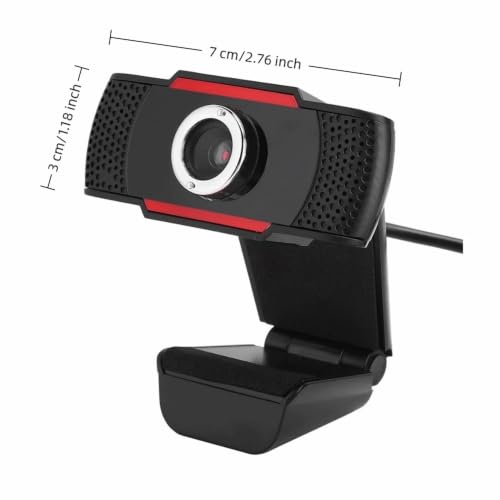
Adjustable Rotatable Lens - Lens tilts up and down 30 degrees with manual focus support, making it easier to frame your face or adjust the viewing angle for laptop and desktop setups
Glass Optical Lens - Premium glass lens with CMOS image sensor supports high-precision imaging, automatic white balance, and automatic color correction for natural-looking video
USB 2.0 Computer Webcam - Driverless USB 2.0 interface works with laptop and desktop computers and supports Windows 2000, XP, Vista 32-bit, Win7, Win8, and Win10 video conferencing software
Specifications
Brand
Anu Limen
Manufacturer
fanjiashings
Resolution
1920 x 1080 (1080P HD)
Frame Rate
30fps
Microphone
Built-in, up to 33 ft voice pickup
Lens
Glass optical lens with CMOS image sensor
Image Processing
Automatic white balance and color correction
Adjustment
30-degree up/down tilt, manual focus
Connection
Driverless USB 2.0
Compatibility
Windows 2000, XP, Vista 32-bit, 7, 8, 10
Intended Use
Laptop and desktop video calls
Frequently Asked Questions
Do I need to install any software or drivers to use this webcam?
No. The camera uses a driverless USB 2.0 interface, so you plug it into a laptop or desktop and it's ready for your conferencing software without any separate installation.
Does this webcam have a microphone, or do I need a separate one?
It has a built-in microphone that captures voice from up to 33 feet, so you can join video chats, remote meetings, and online classes without adding a separate mic.
What video resolution and frame rate does it support?
It records a dynamic 1920 x 1080 (1080P HD) resolution at 30fps, using a glass optical lens and CMOS sensor with automatic white balance and color correction for natural-looking video.
Which operating systems is this webcam compatible with?
The listing states support for Windows 2000, XP, Vista 32-bit, Windows 7, 8, and 10. No macOS, Chrome OS, or Windows 11 support is mentioned in the source material.
Can I adjust the camera angle and focus?
Yes. The lens tilts up and down through a 30-degree range and supports manual focus, letting you frame your face and set sharpness for both laptop and desktop setups.
Does it use autofocus?
No. The webcam relies on manual focus, meaning you set the sharpness yourself rather than having the camera adjust automatically as you move.
Related Products


