
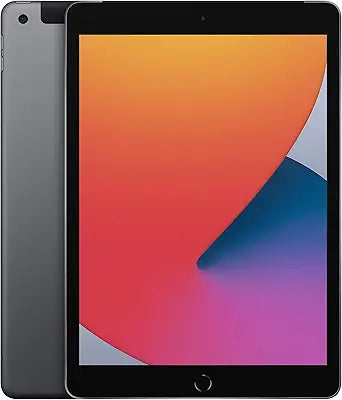
Apple iPad 8th Generation (2020) 32GB Space Gray — Editorial Review & Use Cases
The Apple iPad 8th Generation (2020) is the entry-tier iPad released in September 2020 — featuring the A12 Bionic chip, 10.2-inch Retina display, Lightning connector, 8MP rear + 1.2MP FaceTime HD cameras, and base 32GB storage. Per Apple's official iPad (8th generation) technical specifications page, the device supports iPadOS through current iPadOS 18 (and likely 19+ in 2026), Apple Pencil 1st Gen compatibility, Smart Keyboard support, and 10 hours typical battery life. As of 2026 it's a budget Lightning iPad ideal for entry-level use cases.
What the iPad 8th Gen Specifically Wins
- Entry pricing for an Apple Pencil-compatible iPad — at refurbished / renewed pricing ~$200-300, the cheapest path into the Apple Pencil + iPad ecosystem
- 10.2" Retina display — IPS panel at 2160×1620, 264 ppi, full sRGB coverage. Adequate for note-taking, reading, web, light photo viewing
- A12 Bionic chip — still supported for current iPadOS in 2026. Faster than entry Android tablets in similar price range. Handles current apps (Safari, Mail, iWork, Procreate Pocket, light video editing in iMovie)
- Apple Pencil 1st Generation compatible — Lightning-port pencil works for note-taking + sketching
- Smart Keyboard support — Apple's Smart Connector pairing for the original Smart Keyboard accessory
- 10-hour typical battery life — adequate for full-day classroom / commute / work use
- Lightning + 3.5mm headphone jack — both ports retained on this model (modern iPads dropped the headphone jack)
- Apple's iPadOS ecosystem — Safari, Mail, iWork, Apple Pencil markup, AirDrop, Continuity Camera, iCloud, native Apple apps
- Lightweight + portable — 490 g (Wi-Fi only) for solo carry; 495 g (Wi-Fi + Cellular)
- Solid family / classroom / shared-device use case — at this price tier, multi-user / child-use scenarios are economical
Where the iPad 8th Gen Specifically Fits
- Students entering Apple ecosystem on a budget for note-taking + classwork
- K-12 / classroom iPad fleets — schools deploying iPads at scale benefit from price-per-unit savings
- Children's first iPad for kids 6-12 with parental controls + Screen Time
- Reading / streaming consumption device for adults (Kindle, Apple Books, Netflix, YouTube, Apple TV+)
- Family secondary device for cooking recipes, recipe apps, video calling extended family
- Elderly user / accessible computing — large screen, big touch targets, AirDrop sharing with family
- Travel / hotel / camping as a portable reader / media device + light productivity
- Note-taking + lecture recording for university students
- Doctor's office / clinic patient-information device
- Restaurant / hospitality menu / order-taking device
- Budget alternative to current iPad ($399 new) for users with light needs
Honest Limits Buyers Should Know
- 32 GB is the base storage — fills quickly. macOS + apps + photos library + downloaded apps tend to fill 32GB within 6-12 months. Buyers planning to use as primary device should consider 128GB+ models. External storage via Lightning-to-USB Camera Adapter helps but isn't seamless
- A12 Bionic — 5+ generations behind current Apple Silicon. Modern iPads with M1 / M2 / M3 / M4 chips are 5-10x faster. Heavy apps (Final Cut Pro, Logic Pro on iPad, Procreate at full canvas) perform noticeably worse
- Lightning — not USB-C. Current iPads moved to USB-C. Apple's iPad ecosystem migration toward USB-C means accessories (USB-C hubs, USB-C SSDs, Thunderbolt drives) don't work on the iPad 8th Gen
- Will drop off iPadOS support list eventually. Apple supports A12 Bionic devices currently; future iPadOS releases will eventually exclude it. Plan for ~3-5 more years of OS updates
- iPadOS upgrades may slow the device. Future OS releases optimized for newer chips will run slower on A12. Budget for upgrade by ~3-4 years
- Apple Pencil 1st Gen only — no Pencil 2nd Gen support. The newer magnetic-attach Pencil 2nd Gen (with flat side + Wireless charging) doesn't work; only the cylindrical 1st gen with Lightning-tail charging
- Smart Keyboard 1st gen only. The Magic Keyboard for iPad Pro / Air doesn't work — must use the older Smart Keyboard accessory
- Battery degradation over time. Renewed / refurbished units may have 70-90% battery health. Older 2020-era batteries are mid-life; budget for battery replacement (~$99 Apple service) in 1-3 years
- Camera quality is dated. 8 MP rear + 1.2 MP front are mid-tier. Modern iPad with 12MP cameras significantly better for documents / FaceTime / casual photos
- No 5G — Wi-Fi 802.11ac + LTE only. Newer iPads support Wi-Fi 6E + 5G; this 8th gen tops out at older standards
Where Buyers Should Look Elsewhere
- Current entry iPad → iPad 10th gen (M-series chip generation, USB-C, ~$349 new) or iPad 11 (USB-C, latest entry tier)
- Mid-tier iPad → iPad Air M2 / M3 (USB-C, faster, lighter, better display, Pencil Pro support)
- Pro / creative tier → iPad Pro M3 / M4 (USB-C 4 Thunderbolt, mini-LED / OLED display, Pencil Pro)
- Refurbished Apple program → buy refurbished iPad direct from Apple for warranty + verified battery health
- Cross-platform / Android tablet → Samsung Galaxy Tab S9, Lenovo Yoga, Microsoft Surface for non-Apple workflows
- Pure budget Apple → older refurbished iPad 7th gen / 6th gen (cheaper but shorter remaining iPadOS support)
Sources & Citations
- Apple, "iPad (8th generation) technical specifications," support.apple.com (accessed 2026-05-18)
- Apple Support, "iPadOS compatibility list," support.apple.com (accessed 2026-05-18)
- MacRumors, "iPad buyer's guide and chip generation comparison," macrumors.com (accessed 2026-05-18)
- 9to5Mac, "iPad refurbished and renewed coverage," 9to5mac.com (accessed 2026-05-18)
Last verified: 2026-05-18


