Apple

Apple Magic Keyboard 12.9-inch iPad Pro Arabic

4.8 (9198 reviews)
USB-C

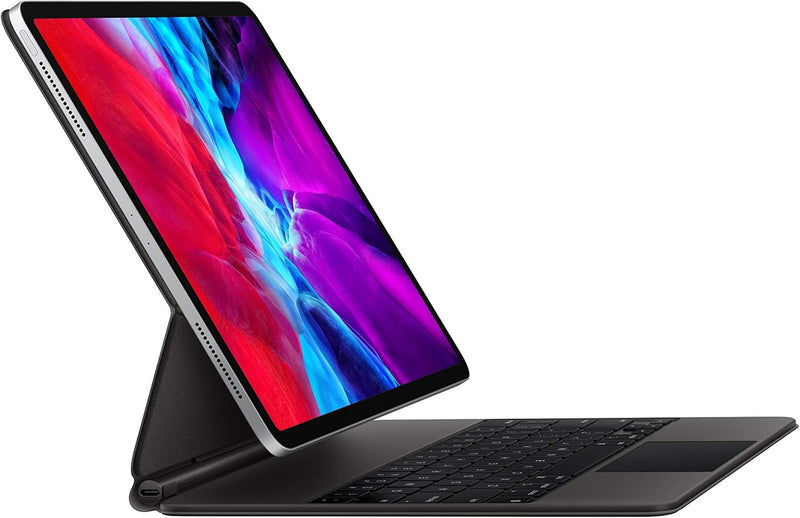
The Magic Keyboard's floating cantilever design transforms a 12.9-inch iPad Pro into a genuinely lap-usable laptop replacement.

$198.00*$349.00Save 43%
Check availability

*Price sourced from Amazon.com. Last updated:Jul 14, 2026.Price and availability are subject to change.

Affiliate Disclosure: Studio Supplies may earn a commission from qualifying purchases made through links on this page, at no additional cost to you. This helps support our editorial team.

Notice a mistake? Let Us Know

Overview

The Apple Magic Keyboard for 12.9-inch iPad Pro is a full keyboard case built around a floating cantilever hinge — a design that lets the iPad sit elevated above the keyboard surface and angle freely rather than folding flat like a folio. For the 3rd and 4th generation 12.9-inch iPad Pro, this means the keyboard connects via Smart Connector (no Bluetooth pairing, no battery required in the keyboard itself) and delivers backlit scissor-switch keys with trackpad support. The Arabic layout version (MXQU2AB/A) is physically identical to other regional versions, with Arabic key legends printed alongside standard characters. The pass-through USB-C port on the keyboard's hinge arm is a thoughtful engineering inclusion — it means you can charge the iPad without sacrificing connectivity at the iPad's own USB-C port.

In practical use, the Magic Keyboard targets iPad Pro owners who want laptop-class text input without carrying a separate device. The trackpad's iPadOS integration is deep — pointer morphing, multi-finger gestures, and full system navigation work as expected. The assembly is heavier than competing keyboard cases, and the cantilever design that looks elegant on a desk becomes unstable on soft surfaces. Generation compatibility is the most important caveat to understand before purchasing: this specific model only works with 12.9-inch iPad Pro 3rd and 4th generation, and Apple has not maintained backward compatibility across Magic Keyboard generations. Verify your iPad generation before committing to this purchase.

Key Features

The Magic Keyboard is an amazing companion for iPad Pro.

It features the best typing experience ever on iPad, a trackpad that opens up new ways to work with iPadOS, a USB-C port for charging, backlit keys, and front and back protection.

With a new floating cantilever design, iPad Pro attaches magnetically and allows you to smoothly adjust to the perfect viewing angle for you.

Compatibility: iPad Pro 12.9-inch (4th generation) and iPad Pro 12.9-inch (3rd generation)

Specifications

Compatibility
iPad Pro 12.9-inch (3rd gen, 4th gen)
Layout
Arabic
Model Number
MXQU2AB/A
Connectivity
Smart Connector (no Bluetooth required)
Trackpad
Yes, multi-touch with iPadOS pointer support
Backlit Keys
Yes
USB-C Port
Yes (pass-through charging only)
Hinge Design
Floating cantilever, magnetic attachment
Protection
Front and back coverage

Apple Magic Keyboard for iPad Pro & iPad Air — Editorial Review

The Apple Magic Keyboard for iPad (MXQT2LL/A and locale variants) is Apple's flagship iPad keyboard accessory — a magnetic-attach case + keyboard + trackpad + pass-through USB-C charging combination that converts the iPad into a laptop-class productivity workflow. Per Apple's iPad keyboard accessories page, the Magic Keyboard family covers 11-inch and 13-inch (formerly 12.9-inch) iPad Pro / iPad Air sizes, with multi-language / color variants (Black, White, German, French, Spanish, Italian, Danish, Ukrainian, Arabic, etc.) all sharing the same hardware base.

What the Magic Keyboard Specifically Wins

  • Floating cantilever design with adjustable viewing angle — the iPad floats above the keyboard base with adjustable tilt, mimicking laptop ergonomics in a way clip-on detachable keyboards can't
  • Built-in trackpad — multi-touch precision trackpad with iPad gesture support (two-finger scroll, three-finger Mission Control / app switcher equivalents). Game-changer for iPadOS productivity workflows in Stage Manager and split-screen apps
  • Pass-through USB-C charging — the keyboard hinge includes a USB-C port that charges the iPad without requiring the iPad's own USB-C port to be in use. The iPad's USB-C is then free for SSD, hub, display output
  • Backlit keys with auto-brightness sensor — laptop-class key illumination that adjusts to ambient room light
  • Scissor-mechanism keys with 1mm travel — same key feel as recent MacBook Air; meaningfully better than chiclet membrane keys on cheap iPad cases
  • Magnetic attach + alignment — drops onto the iPad's magnetic ridge and pairs automatically without Bluetooth setup; no charging required (drives off the iPad's Smart Connector)

Compatibility — Critical Before Buying

Magic Keyboard variants are size + generation specific. Per Apple's compatibility documentation:

  • 11" Magic Keyboard: fits iPad Pro 11" (1st-4th gen), iPad Air 4-5
  • 12.9" Magic Keyboard (older): fits iPad Pro 12.9" (3rd-6th gen)
  • 13" Magic Keyboard (M4 generation): fits iPad Pro 13" M4 (different design, with function row and aluminum top)
  • NOT compatible with: iPad (9th, 10th, 11th gen entry tier) — those iPads use the Smart Keyboard Folio or Magic Keyboard Folio (a separate, lower-tier product)

Per MacRumors' Magic Keyboard buyers guide, the M4 iPad Pro generation introduced a redesigned Magic Keyboard with function row + aluminum top + larger trackpad — buyers on M4 iPad Pro should buy the new design specifically; the older Magic Keyboard will not properly support the M4's redesigned magnetic interface.

Where the Magic Keyboard Specifically Fits

  • iPad-as-laptop-replacement workflows — the trackpad + adjustable cantilever + pass-through charging delivers the closest iPad-to-laptop experience available
  • Field journalism / mobile content creation — single iPad + Magic Keyboard package replaces laptop + iPad for portable workflows
  • Pro creators using Stage Manager + iPadOS 17+ — trackpad navigation is essential for windowed multi-app iPadOS workflows
  • Travel-priority users — the iPad + Magic Keyboard combination is lighter than equivalent-display laptop tier
  • Apple ecosystem users who specifically value the seamless magnetic-attach + auto-pair experience

Honest Limits Buyers Should Know

  • Premium price tier ($299-$349 for 11", $349-$399 for 12.9"/13"). Substantially more expensive than third-party iPad keyboard cases (Logitech Combo Touch, ZAGG Pro Keys at $130-180 tier)
  • Adds significant weight to the iPad. Per Apple's specs, the Magic Keyboard roughly doubles the iPad's total weight when attached. Travelers prioritizing lightest-possible weight may prefer detachable Bluetooth keyboards
  • Cantilever design isn't lap-friendly. The Magic Keyboard works well on a desk but is awkward on a lap — the floating-iPad design lacks the stability of a laptop hinge. For lap-heavy use, the Logitech Combo Touch's kickstand may be preferable
  • Locale variants are tied to the keyboard layout. Buyers should verify the SKU language matches their typing preference — switching between an Arabic layout and an English typing workflow within iPadOS is awkward
  • Older 12.9" Magic Keyboard does not fit M4 iPad Pro 13". The M4 generation requires the new Magic Keyboard design; buyers upgrading from older 12.9" iPad Pro must also buy a new keyboard
  • Trackpad gestures require iPadOS 16+ for full feature set. Older iPadOS versions support basic cursor but not the full Stage Manager / Mission Control gesture set

Where Buyers Should Look Elsewhere

  • Entry-tier iPad (9th, 10th, 11th gen) → Apple Smart Keyboard Folio or Apple Magic Keyboard Folio (the lower-tier folio model, NOT the Magic Keyboard covered here)
  • Budget alternatives → Logitech Combo Touch (with kickstand + trackpad at lower price), ZAGG Pro Keys, Brydge Pro+
  • Lap-friendly typing → Logitech Combo Touch (kickstand provides lap stability)
  • Bluetooth-keyboard standalone use (no case) → Apple Magic Keyboard (standalone, not the iPad-case variant), Logitech MX Keys Mini, Keychron K-series
  • M4 iPad Pro owners → new Magic Keyboard with function row + aluminum top + larger trackpad

Sources & Citations

  1. Apple, "iPad Keyboards product page," apple.com (accessed 2026-05-18)
  2. MacRumors, "Apple Magic Keyboard for iPad buyer's guide," macrumors.com (accessed 2026-05-18)
  3. Apple, "iPad Magic Keyboard — Tech Specs," apple.com (accessed 2026-05-18)

Last verified: 2026-05-18

Now that you've seen the details — ready to take a closer look?

Check availability

Pros & Cons

👍 Pros

  • Floating cantilever design enables precise viewing angle adjustment across a wide range without latches, clasps, or folding awkwardness.
  • Pass-through USB-C charging keeps the iPad's own port free for accessories while the keyboard is in use — a practical detail missing from most iPad keyboard cases.
  • Backlit keys with adjustable brightness make this usable in dim environments, unlike many competing iPad keyboard cases at lower price points.
  • Integrated trackpad with full iPadOS pointer support removes the need to reach up and touch the screen during extended typing sessions.
  • Magnetic attachment and full front-and-back coverage mean the keyboard functions as a protective case during transport.

👎 Cons

  • Compatibility is locked to 12.9-inch iPad Pro 3rd and 4th generation only — this keyboard will not work with the 5th generation or later 12.9-inch models, creating a significant risk of incompatibility when upgrading the iPad.
  • No function row or dedicated media keys — the key layout is compact and omits shortcuts that power users may depend on from a laptop keyboard.
  • The cantilever design places all the iPad's weight on the hinge arm, making the assembly unstable on soft or uneven surfaces like a couch or bed.
  • Pass-through USB-C is charging-only, so users who want to connect external storage or a display still need to occupy the iPad's own port.
  • At the 12.9-inch size, the combined keyboard-plus-iPad assembly is heavy for long-duration lap use.

Frequently Asked Questions

This keyboard fits the 12.9-inch iPad Pro 3rd generation and 4th generation only. It is not compatible with the 11-inch iPad Pro, the 5th generation 12.9-inch iPad Pro, or any iPad Air or standard iPad — the magnetic attachment and Smart Connector alignment are generation-specific.
No. The USB-C port on the Magic Keyboard is for pass-through charging only — it delivers power to the iPad Pro without occupying the iPad's own USB-C port. The keyboard does not support data transfer or display output through its USB-C port.
Yes. The trackpad is fully integrated with iPadOS pointer support, including tap-to-click, two-finger scroll, and swipe gestures for app switching and Control Center access. The pointer adapts its shape contextually across the iPadOS interface.
The iPad Pro attaches magnetically to a hinged arm that allows smooth angle adjustment between approximately 0° and 130°. There are no clasps or locks — the magnetic hold keeps the iPad secure at any set angle, and the design leaves the front camera unobstructed.
Yes, the MXQU2AB/A is the Arabic layout version. iPadOS supports multilingual keyboard input regardless of physical key layout — you can add English or other language software keyboards and switch between them without changing the physical keyboard.