



Apple
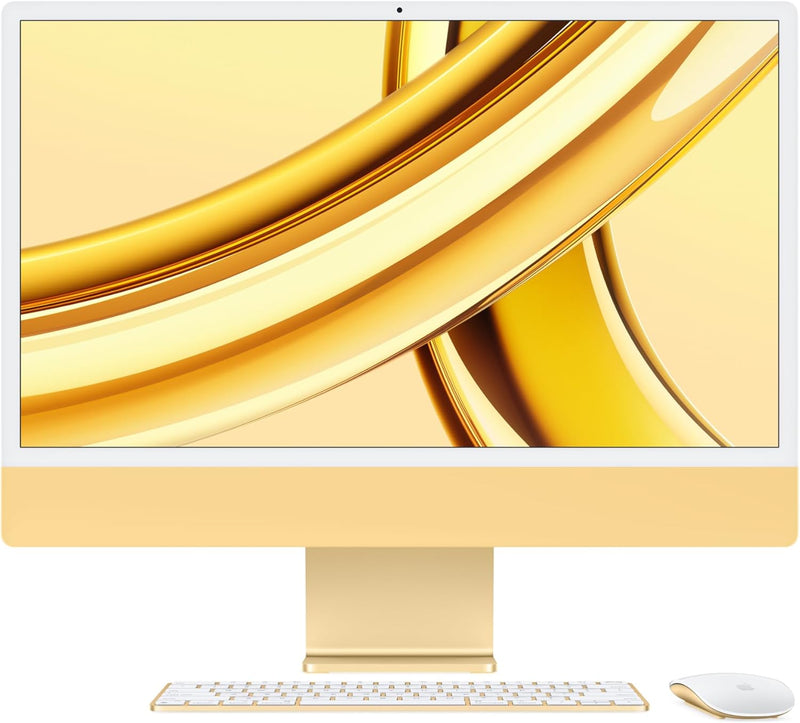
Apple M3 2023 iMac 24-inch All-in-One - Yellow
1080pApple M3Bluetooth 5.3
The M3 iMac's 10-core GPU and unified memory architecture compress a high-end creative workstation into a 11.5mm aluminum panel with a built-in 4.5K display.
$1,499.00*
Check availability
*Price sourced from Amazon.com. Last updated:Oct 24, 2026.Price and availability are subject to change — details.
Affiliate Disclosure: As an Amazon Associate, Studio Supplies earns from qualifying purchases made through links on this page, at no additional cost to you. This helps support our editorial team.
Notice a mistake? Let Us Know
Overview
Key Features
SUPERCHARGED BY M3 — Get more done faster with a next-generation chip from Apple. From creating presentations to gaming, you’ll fly through work and play.
FITS PERFECTLY IN YOUR SPACE — The all-in-one desktop design is strikingly thin, comes in seven vibrant colors, and becomes the centerpiece of any room.
IMMERSIVE DISPLAY — The 24-inch 4.5K Retina display features 500 nits of brightness and support for 1 billion colors. Everything from streaming movies to editing photos is vivid and colorful. (Actual diagonal screen size is 23.5 inches.)
ADVANCED CAMERA AND AUDIO — Look and sound your best with a 1080p FaceTime HD camera, a studio-quality three-mic array, and a six-speaker sound system with Spatial Audio.
WORKS WITH YOUR FAVORITE APPS — All your go-to apps run lightning fast — including Microsoft 365, Adobe Creative Cloud, and Zoom. You can even run many of your favorite iPhone and iPad apps directly on your iMac. (Apps are available on the App Store.)
WORKS WITH ALL YOUR APPLE DEVICES — You can do amazing things when you use your Apple devices together. Copy something on iPhone and paste it on iMac. Use your iMac to answer FaceTime calls or send texts with Messages. And that’s just the beginning.
MAGIC ACCESSORIES INCLUDED — iMac comes with a color-matched Magic Keyboard with Touch ID and Magic Mouse. Touch ID gives you a fast, easy, secure way to unlock your iMac and sign in to apps and sites.
CONNECT IT ALL — iMac features two Thunderbolt / USB 4 ports, two USB 3 ports, Gigabit Ethernet, and a headphone jack. Enjoy seamless wireless connectivity with Wi-Fi 6E and Bluetooth 5.3. (Wi‑Fi 6E available in countries and regions where supported.)
STORE ALL YOUR FILES — iMac comes with plenty of fast SSD storage for all your photo and video libraries, files, and apps. (1GB = 1 billion bytes and 1TB = 1 trillion bytes; actual formatted capacity less.)
EASY TO USE — Mac is designed to be easy to learn and use — so you can start doing what you love in no time at all.
Specifications
Chip
Apple M3 (3nm)
CPU Cores
8-core
GPU Cores
10-core
Neural Engine
16-core
Memory
8GB Unified Memory
Storage
256GB SSD
Display
24-inch 4.5K Retina (23.5" actual diagonal)
Display Resolution
4480 x 2520 at 218 ppi
Brightness
500 nits
Color Support
1 billion colors, P3 wide color
Camera
1080p FaceTime HD
Audio
Six-speaker system with Spatial Audio, three-mic array
Ports
Two Thunderbolt / USB 4, Two USB 3, Gigabit Ethernet, Headphone jack
Wireless
Wi-Fi 6E, Bluetooth 5.3
Operating System
macOS
Color
Yellow
Included Accessories
Magic Keyboard with Touch ID, Magic Mouse (color-matched)
Frequently Asked Questions
How does the 10-core GPU in this Yellow iMac compare to the base 8-core configuration?
The 10-core GPU provides approximately 20% more shader throughput than the 8-core variant, a difference that registers in GPU-accelerated tasks: Final Cut Pro rendering, Metal compute workloads, and gaming. For pure productivity work — documents, spreadsheets, web — the two configurations are functionally equivalent. The 10-core GPU justifies its cost if GPU-intensive creative work is a regular part of your workflow.
What does the addition of USB 3 ports and Gigabit Ethernet mean compared to the base M3 iMac?
This configuration adds two USB 3 ports (10 Gb/s) and Gigabit Ethernet — connectivity absent from the base two-port model. That means four total data ports plus wired network without a hub or dock. For users with USB-A peripherals, a NAS, or a wired network requirement, this eliminates the dongle entirely.
Does Touch ID on the Magic Keyboard work as well as Touch ID on iPhone?
Yes — the Touch ID sensor in the Magic Keyboard uses the same Secure Enclave authentication architecture as iPhone. Unlock, Apple Pay, password autofill, and sudo authentication in Terminal all work with a fingerprint tap. It functions reliably and consistently, though it does require the keyboard to be in Bluetooth range.
Is 8GB Unified Memory a real constraint for 10-core GPU workloads?
It can be. The GPU and CPU share the 8GB pool — GPU-intensive tasks pull from the same allocation as system memory. For sustained 4K video export, complex 3D scene renders, or GPU compute tasks, 8GB can become the ceiling. Apple's memory compression helps, but configuring 16GB at purchase eliminates the bottleneck for demanding creative use.
Can the 4.5K display be used with macOS's display scaling to simulate higher or lower resolutions?
Yes. macOS scales the 4.5K panel to multiple effective resolutions — from a spacious 2560×1440 equivalent down to a 1024×768 equivalent — using HiDPI rendering. The native 4480×2520 panel provides enough pixel density that scaled modes remain sharp at all practical settings.
Related Products

