



Apple
Apple Magic Keyboard for 12.9-inch iPad Pro (Renewed)
★★★★★
USB-C
Scissor-switch keys and a precision Multi-Touch trackpad transform your 12.9-inch iPad Pro into a laptop-class input workstation without adding a separate device.
$249.99*
View on Amazon
✓ In Stock on Amazon.com
*Price sourced from Amazon.com. Last updated:Jul 14, 2026.Price and availability are subject to change.
Affiliate Disclosure: Studio Supplies may earn a commission from qualifying purchases made through links on this page, at no additional cost to you. This helps support our editorial team.
Notice a mistake? Let Us Know
Overview
Key Features
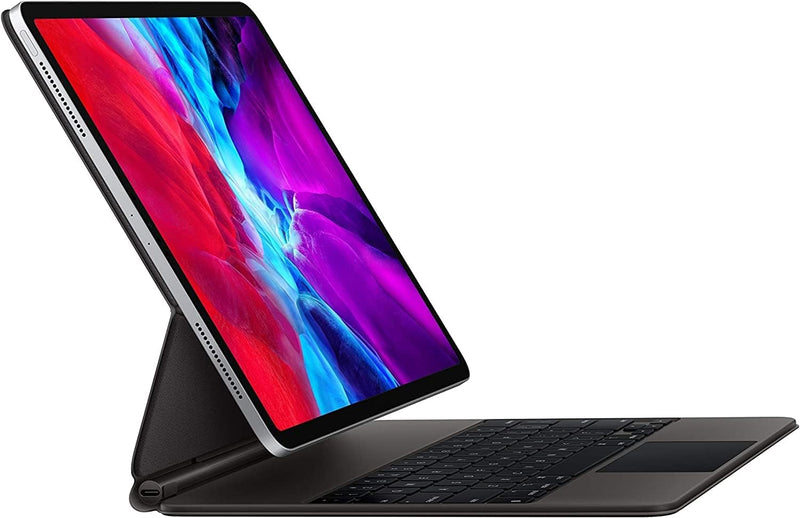
The all-new Magic Keyboard is an amazing companion for iPad Pro.
It features the best typing experience ever on iPad, a trackpad that opens up new ways to work with iPadOS, a USB-C port for charging, backlit keys, and front and back protection.
With a new floating cantilever design, iPad Pro attaches magnetically and allows you to smoothly adjust to the perfect viewing angle for you.
Compatibility: iPad Pro 12.9-inch (3rd and 4th generation)
Specifications
Compatibility
iPad Pro 12.9-inch (3rd and 4th generation)
Switch Mechanism
Scissor-switch, backlit
Key Travel
Approximately 1mm
Trackpad
Multi-Touch, iPadOS gesture support
Connectivity
USB-C (passthrough charging only)
Attachment
Magnetic Smart Connector, floating cantilever hinge
Layout
US English
Condition
Renewed
Pros & Cons
👍 Pros
- Scissor-switch mechanism with 1mm key travel delivers consistent, low-fatigue actuation across a full-size key layout with no compromised key sizes.
- Integrated Multi-Touch trackpad enables precise cursor and gesture control natively in iPadOS — swipe, pinch, and multi-finger gestures all register accurately.
- USB-C passthrough charging routes power through the hinge, keeping the iPad's own port free for peripherals or high-speed data transfers simultaneously.
- Floating cantilever magnetic attachment provides tool-free mounting and smooth angle adjustment across a usable viewing range without mechanical latches.
- Unified front-and-back case construction eliminates the need for a separate screen protector or shell, reducing total accessory count.
👎 Cons
- Compatibility is locked to 12.9-inch iPad Pro 3rd and 4th generation — the 5th-gen M1 and later models require a different, more expensive revision of the Magic Keyboard.
- The USB-C charging port is power-only; users expecting USB data passthrough or display output to an external monitor will find this a hard architectural limit.
- No function row means media controls, brightness, and keyboard shortcuts rely on gesture-based access or on-screen controls, which slows certain keyboard-centric workflows.
- The cantilever hinge supports only landscape orientation and does not fold flat — it cannot be used as a standard portfolio-style case for portrait-mode reading or sketching.
- At roughly 600g added to the iPad's own weight, extended handheld or lap use becomes fatiguing in a way that solo iPad use is not.
Frequently Asked Questions
Which iPad Pro generations does this keyboard actually fit?
It is mechanically and electrically compatible with the 12.9-inch iPad Pro 3rd and 4th generation only. The magnetic Smart Connector and cantilever hinge are keyed to those chassis dimensions — it will not attach securely to the 5th-gen M1 or later models, which use a revised hinge geometry.
Does the USB-C port on the keyboard support data transfer or video output?
No. The USB-C port on the left hinge is passthrough charging only — it accepts power and routes it to the iPad's battery. It does not carry USB data, Thunderbolt, or DisplayPort signals. Your iPad's own USB-C port remains free for accessories or data transfers while the keyboard charges the device.
How stable is the cantilever hinge under typing load on a desk?
The floating cantilever design uses a single magnetic pivot point rather than a traditional hinge, which means the iPad can rock slightly under aggressive typing if the surface is soft or uneven. On a hard desk it is stable within its adjustment range. The trade-off for the slim profile is that it lacks the mechanical lock of a clamshell design.
What is the key travel and switch mechanism?
The Magic Keyboard uses Apple's scissor-switch mechanism with approximately 1mm of key travel — the same mechanism used in the redesigned MacBook Pro keyboards post-2019. It is notably shallower than a conventional mechanical keyboard but provides consistent actuation and is more reliable than the butterfly switches it replaced.
Can the backlit keys be adjusted for brightness?
Yes. Key backlighting is software-controlled through iPadOS display settings and responds to the ambient light sensor. There is no dedicated hardware brightness key on this layout, so adjustments go through Control Center or Settings.
Related Products


