

Apple
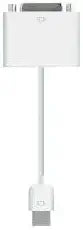
Apple MB204G/A Micro-DVI to DVI Adapter
★★★★★
Connect Your MacBook Air to External Displays The Apple Micro-DVI to DVI Adapter allows you to easily connect your MacBook Air to a DVI-equipped display or projector. Enjoy viewing your content on a larger screen with this simple and reliable adapter. Specifications: Brand: Apple Mode...
Check availability
Affiliate Disclosure: Studio Supplies may earn a commission from qualifying purchases made through links on this page, at no additional cost to you. This helps support our editorial team.
Notice a mistake? Let Us Know
Overview
Connect Your MacBook Air to External Displays
The Apple Micro-DVI to DVI Adapter allows you to easily connect your MacBook Air to a DVI-equipped display or projector. Enjoy viewing your content on a larger screen with this simple and reliable adapter.
Specifications:
- Brand: Apple
- Model: MB204G/A
- Connector 1: Micro-DVI (MacBook Air)
- Connector 2: DVI
- Compatibility: MacBook Air
Key Features
The Micro-DVI to DVI adapter was designed specifically to fit the slim profile of MacBook Air.
Can be used in both video mirroring and extended desktop modes.
Specifications
Input Connector
Micro-DVI
Output Connector
DVI
Compatibility
MacBook Air (with Micro-DVI port)
Supported Modes
Video mirroring, extended desktop
Frequently Asked Questions
What devices is the Apple Micro-DVI to DVI Adapter compatible with?
This adapter is specifically designed to fit the slim profile of the MacBook Air and is compatible with MacBook Air models that feature a Micro-DVI port.
What display modes does this adapter support?
The Apple Micro-DVI to DVI Adapter can be used in both video mirroring and extended desktop modes, providing flexibility for how you use your external display.
Can this adapter be used to connect to an HDMI monitor?
No, this adapter is designed to convert Micro-DVI to DVI. It does not support HDMI connections directly. You would need a separate DVI to HDMI adapter or cable.
Is this adapter compatible with MacBooks that use Mini DisplayPort or Thunderbolt?
No, this adapter is specifically for Micro-DVI ports. It is not compatible with devices that use Mini DisplayPort or Thunderbolt connections.
Is a DVI cable included with the adapter?
No, the Apple MB204G/A Micro-DVI to DVI Adapter only includes the adapter itself; a DVI cable for connection to a monitor would need to be purchased separately.
Related Products


