



Apple
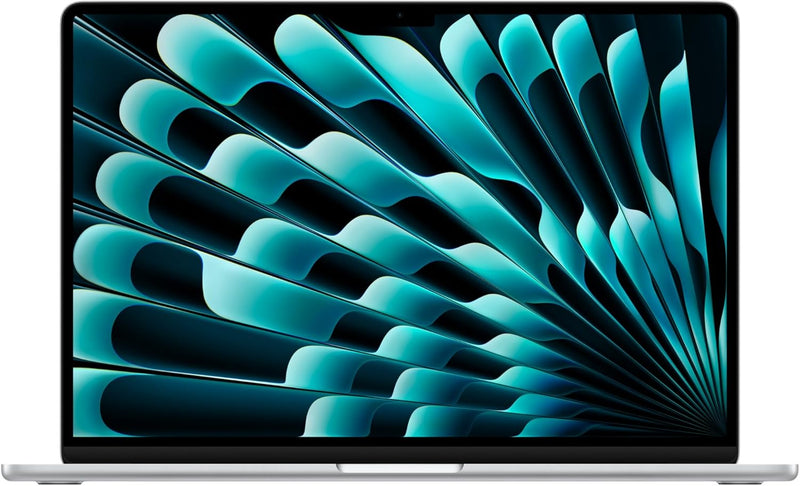
Apple MC9E4LL/A MacBook Air 15-inch M3 16GB 256GB
★★★★★
1080pBluetooth 5.3
M3's 8-core CPU and fanless efficiency in a 15-inch chassis makes this the most capable passive-cooled laptop at its entry price point.
$1,189.00*$1,299.00Save 8%
Check availability
*Price sourced from Amazon.com. Last updated:Jun 06, 2026.Price and availability are subject to change.
Affiliate Disclosure: Studio Supplies may earn a commission from qualifying purchases made through links on this page, at no additional cost to you. This helps support our editorial team.
Notice a mistake? Let Us Know
Overview
Key Features
LEAN. MEAN. M3 MACHINE — With a powerful 8-core CPU and up to 10-core GPU, the blazing-fast MacBook Air with M3 chip is a superportable laptop that sails through work and play.
BUILT FOR APPLE INTELLIGENCE—Apple Intelligence is the personal intelligence system that helps you write, express yourself, and get things done effortlessly. With groundbreaking privacy protections, it gives you peace of mind that no one else can access your data—not even Apple.*
PORTABLE DESIGN — Lightweight and under half an inch thin, so you can take MacBook Air anywhere you go.
UP TO 18 HOURS OF BATTERY LIFE — Amazing, all-day battery life so you can leave the power adapter at home.
MORE ROOM FOR WHAT YOU LOVE — The 15.3-inch Liquid Retina display supports 1 billion colors.
LOOK SHARP, SOUND GREAT — Everything looks and sounds amazing with a 1080p FaceTime HD camera, three mics, and six speakers with Spatial Audio.
APPS FLY WITH APPLE SILICON — All your favorites, from Microsoft 365 to Adobe Creative Cloud, run lightning fast in macOS.
GET CONNECTED — MacBook Air features two Thunderbolt ports, a headphone jack, Wi-Fi 6E, Bluetooth 5.3, and a MagSafe charging port. And connect up to two external displays with the laptop lid closed.
IF YOU LOVE IPHONE, YOU’LL LOVE MAC — MacBook Air works like magic with your other Apple devices. Start an email on your iPhone and finish it on your Mac. Send text messages from your Mac. And much more.
LEGAL DISCLAIMERS — This is a summary of the main product features. See below to learn more.
Specifications
Chip
Apple M3 (8-core CPU, up to 10-core GPU)
Memory
16GB Unified Memory
Storage
256GB SSD
Display
15.3-inch Liquid Retina, 1 billion colors
Battery Life
Up to 18 hours
Camera
1080p FaceTime HD
Audio
Six speakers with Spatial Audio, three mics
Wireless
Wi-Fi 6E, Bluetooth 5.3
Ports
Two Thunderbolt, MagSafe charging, headphone jack
Security
Touch ID
Operating System
macOS
Color
Silver
Dimensions
13.4 x 9.35 x 0.45 inches
Weight
3.32 pounds
Pros & Cons
👍 Pros
- Fanless thermal design eliminates mechanical failure points and produces zero audible noise across all workloads — a concrete operational advantage in quiet environments.
- M3's 3nm architecture delivers measurably higher CPU performance-per-watt than M2, enabling up to 18 hours of battery life under mixed workloads.
- 15.3-inch Liquid Retina display covering 1 billion colors provides accurate color rendering suitable for photo review and content consumption at this price tier.
- Wi-Fi 6E support enables access to the 6GHz band for reduced wireless congestion and more consistent throughput on compatible routers.
- 3.32-pound chassis under 0.45 inches thin makes this the most portable 15-inch laptop in this performance class.
👎 Cons
- 256GB single-NAND SSD benchmarks at lower sequential throughput than the 512GB model's dual-die configuration — a measurable speed penalty that compounds with small storage capacity.
- 16GB unified memory is the minimum configuration and reaches compression thresholds under sustained professional mixed workloads — no upgrade path post-purchase.
- Only two Thunderbolt ports with no native SD, HDMI, or USB-A — a dock or hub is mandatory for any multi-peripheral setup.
- Fanless sustained-load throttling is more pronounced at 16GB than at 24GB because memory pressure causes additional compute overhead during thermal management.
Frequently Asked Questions
What's the practical impact of 16GB unified memory versus 24GB on this machine?
16GB is workable for most productivity and light creative tasks — web, Office, coding, casual photo editing. Where you'll hit the ceiling is heavy multitasking: running Xcode alongside Docker, editing large Lightroom catalogs, or sustained video work. The M3's memory compression is efficient, but 16GB will invoke it under mixed professional loads in ways 24GB avoids entirely.
Is the 256GB SSD sufficient for a primary machine?
256GB is tight for a primary machine in 2024. The M3 Air's base 256GB SSD also uses a single NAND die, which benchmarks at noticeably lower sequential read/write speeds than the 512GB model's dual-die configuration. If local storage volume matters, plan to rely on external drives or cloud storage, or step up to the 512GB model for both capacity and speed.
Does this model support dual external displays?
Yes, with the lid closed. The M3 chip's display engine supports two external displays when the MacBook Air is in clamshell mode (lid closed, connected to power). With the lid open, only one external display is supported — this is an M3 hardware limitation, not a macOS restriction.
How does the fanless design affect real-world performance for video editing?
For clip-based editing and export in DaVinci Resolve or Final Cut Pro, the M3 Air handles 4K H.264 and H.265 well using its hardware encode/decode engines, which don't generate significant heat. Sustained effects rendering at full CPU/GPU load will eventually cause the chip to manage thermals by reducing clock speeds. For occasional exports it's not a practical issue; for all-day render queues, a MacBook Pro with active cooling is the more appropriate tool.
Does Bluetooth 5.3 on this model offer any advantage over Bluetooth 5.0 devices I already own?
Bluetooth 5.3 is backward compatible with all prior Bluetooth versions — your existing headphones, keyboards, and mice will pair and function normally. The 5.3 spec adds improved connection stability and reduced power consumption on compatible accessories, but you'll only see those benefits when paired with Bluetooth 5.3 devices.
Related Products


