
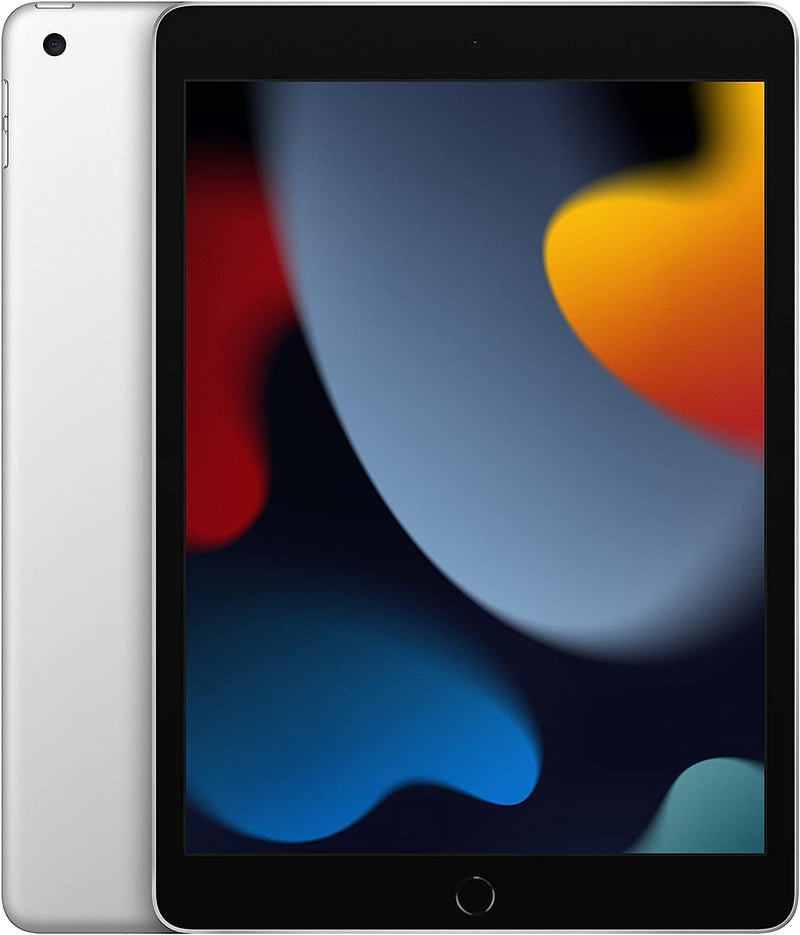


Apple iPad 9th Gen — Which iPad for Who & When to Step Up
The Apple iPad (9th generation) is the last standard iPad to ship with a Home button, Touch ID, Lightning connector, and a 10.2-inch Retina display. Per Apple's official iPad (9th generation) tech specs page, the device pairs an A13 Bionic chip with Center Stage front camera, True Tone display at 500 nits brightness, and support for the 1st-generation Apple Pencil and the original Smart Keyboard. It is positioned as the budget-tier iPad, and remains a strong fit for specific use cases even as Apple has moved the rest of the iPad lineup to USB-C, all-screen designs, and Apple Pencil Pro support.
Use Case 1 — The Family / Kids' iPad
For ages 6-14 — schoolwork apps, age-appropriate games, streaming, FaceTime with grandparents — the iPad 9th gen has the right balance of capability and protection-against-loss. The 10.2-inch display is large enough for reading and video, but the form factor and pricing tier make a dropped iPad far less catastrophic than a dropped iPad Pro. The A13 Bionic chip runs every age-appropriate game on the App Store smoothly. Per Apple's launch newsroom announcement, the iPad family is the most-used iPad in education, and the 9th generation has been the K-12 standard since 2021.
Use Case 2 — Classroom / Education Deployment
Schools deploying iPads at scale weigh per-unit cost, ruggedness, and Apple Pencil support. The iPad 9th gen hits all three: the lowest price-per-unit in the current Apple lineup with first-generation Apple Pencil support for handwriting and annotation in Notability, GoodNotes, and Apple's own Freeform. iMore's best iPad for students guide notes that for K-8 deployments the standard 10.2-inch iPad is still acceptable, while older students benefit more from the iPad Air or iPad Pro. For mass classroom carts, the trade-off favors the cheaper unit.
Use Case 3 — Secondary Household / Couch & Kitchen Tablet
Households with one primary computer or laptop frequently want a second-screen device for couch web browsing, kitchen recipe display, bedside reading, and casual video. The iPad 9th gen fills that role at half the price of the iPad Pro and without the feature set most secondary-tablet uses don't need (no need for 120Hz ProMotion, no need for Apple Pencil Pro, no need for M-series chip performance). The 10-hour battery life from Apple's specs covers a full day of light use without recharging.
Use Case 4 — Reader, Note-Taker, Light Content Consumer
For users whose primary tablet use is reading (Kindle, Books, Pocket), taking lecture or meeting notes (with Apple Pencil 1st gen), and watching the occasional video, the iPad 9th gen's A13 Bionic chip provides plenty of headroom. The 10.2-inch display is more comfortable for reading than the smaller iPad mini for users with mid-to-late-life eyesight, while the 1st-gen Apple Pencil delivers handwriting that is competitive with the more expensive Pencil 2 for non-pressure-critical work.
Use Case 5 — Older-Adult Transition Device
For older users transitioning to a touchscreen device from a desktop or as a first tablet, the iPad 9th gen's Home button + Touch ID combination is meaningfully easier than the FaceID + gesture-only navigation on newer iPads. The Home button provides a single, always-visible "back to start" mechanism that reduces the learning curve.
Honest Cons vs Newer iPads
- No Apple Intelligence support. Per MacRumors' iPad 10 vs iPad 11 buyer's guide, only the iPad with A17 Pro or M-series chips support Apple Intelligence features. The iPad 9th gen's A13 Bionic is two generations behind the requirement, so future iPadOS AI features will not run on it
- Lightning, not USB-C. Lightning accessory ecosystem is end-of-life across Apple's lineup as of iPad 10 onward. New Apple-ecosystem accessories increasingly require USB-C or Pencil 2 magnetic-charging support, both of which the iPad 9th gen lacks
- Non-laminated display, no anti-reflective coating. Per iMore's iPad-for-students coverage, the iPad 9th gen has a visible air gap between the glass and the panel and lacks the anti-reflective coating found on iPad Air and iPad Pro — meaningful in bright outdoor or sunlit-classroom settings
- Apple Pencil 1st generation only. Per MacRumors' iPad 9 vs iPad 10 buyer's guide, the iPad 9th gen pairs the Pencil via Lightning plug (not magnetic), and does not support the Apple Pencil 2nd-gen magnetic attach + wireless charging that the iPad Air, iPad Pro, and iPad mini all have. The newer Pencils (Pro, USB-C) are not supported
- 10.2-inch with bezels feels small versus current edge-to-edge iPads. The 10th-gen iPad bumped to 10.9-inch Liquid Retina with a thinner-bezel design; the 9th gen retains the traditional thick bezel + Home button layout
- 500 nits brightness is lower than the rest of the lineup. iPad Air and iPad Pro models reach higher peak brightness; the iPad 9th gen is less comfortable in direct sunlight
When to Step Up — and to What
- Step to iPad (10th or 11th gen) if USB-C compatibility, the larger 10.9-inch Liquid Retina display, or the modern accessory ecosystem matters. The 11th gen adds an A16 chip and is the safer long-term iPadOS support pick
- Step to iPad Air (M2 or M3) if Apple Intelligence support, Pencil Pro / Apple Pencil 2 with magnetic charging, or M-series performance for design/light creative work is on the requirements list. iMore's student-iPad coverage calls out the 11-inch iPad Air as the recommended sweet spot for university students
- Step to iPad mini (A17 Pro) if portability for note-taking and on-the-go reading dominates the use case. The mini's smaller form factor and A17 Pro chip make it the strongest pocket-class iPad for lecture-and-library workflows
- Step to iPad Pro (M4) for professional creative workflows — video editing, music production, ProMotion 120Hz display needs, or external-monitor / Stage Manager workflows. The Pro tier is meaningful only for users whose iPad replaces a laptop for creative tasks
Best-Fit Buyer Profiles
- Parents buying a first iPad for a child aged 6-14 — capability without the cost of premium tiers
- K-12 educators deploying iPads at classroom scale — per-unit cost matters more than future-proofing
- Households wanting a second-screen tablet for couch / kitchen / bedside use — the iPad 9th gen handles every routine task
- Budget-conscious readers and note-takers who don't need pressure-sensitive pen input or Apple Intelligence
- Older adults transitioning to tablets who benefit from the Home button + Touch ID navigation paradigm
Where Buyers Should Look Elsewhere
- Buyers needing Apple Intelligence — the iPad 9th gen's A13 Bionic cannot run Apple Intelligence; iPad Air M2 / M3 or iPad mini A17 Pro is the minimum tier
- Pro creative workflows (video editing, music production, color-critical design) — iPad Air M2 minimum, iPad Pro M4 ideal
- Buyers committed to the current USB-C accessory ecosystem — iPad 10 or 11 is the entry point with USB-C
- Pencil Pro / Pencil 2nd-gen users — the iPad 9th gen supports only Pencil 1st generation; pen-heavy workflows benefit from iPad Air or iPad Pro
Sources & Citations
- Apple, "iPad (9th generation) Technical Specifications," support.apple.com (accessed 2026-05-17)
- Apple, "Apple's most popular iPad delivers even more performance and advanced features (launch newsroom)," apple.com/newsroom (accessed 2026-05-17)
- MacRumors, "iPad 9 vs. iPad 10 Buyer's Guide," macrumors.com (accessed 2026-05-17)
- MacRumors, "iPad 10 vs. iPad 11 Buyer's Guide," macrumors.com (accessed 2026-05-17)
- iMore, "Best iPad for students 2026," imore.com (accessed 2026-05-17)
Last verified: 2026-05-17


