



Apple
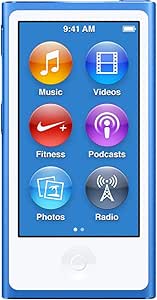
Apple MKN02LL/A iPod Nano 16GB Blue (7th Generation)
30 hours of lossless audio playback in a pocketable 16GB device that eliminates the smartphone battery drain of dedicated music listening.
Check availability
Affiliate Disclosure: As an Amazon Associate, Studio Supplies earns from qualifying purchases made through links on this page, at no additional cost to you. This helps support our editorial team.
Notice a mistake? Let Us Know
Overview
Key Features
Frequency response: 20Hz to 20,000Hz
240-by-432-pixel resolution at 202 pixels per inch
Music playback time: Up to 30 hours Video playback time: Up to 3.5 hours
Mac requirements: Mac computer with USB 2 or 3 port, OS X v10.7.5 or later, and iTunes 12.2 or later.
PC requirements: PC with USB 2 port, Windows 7 or later, and iTunes 12.2 or later.
Specifications
Brand
Apple
Model
MKN02LL/A
Generation
7th Generation
Storage
16GB
Display Resolution
240 x 432 pixels at 202 ppi
Frequency Response
20Hz – 20,000Hz
Music Playback
Up to 30 hours
Video Playback
Up to 3.5 hours
Connector
Lightning
Mac Requirements
USB 2 or 3, macOS 10.7.5+, iTunes 12.2+
PC Requirements
USB 2.0, Windows 7+, iTunes 12.2+
Color
Blue
Frequently Asked Questions
What does the 202 ppi display actually look like for navigating music and video?
At 240x432 pixels across a small touchscreen, 202 ppi delivers sharp enough text and album art for menu navigation and cover browsing. It's not a retina-class display, but at the physical size of the nano's screen, it's more than adequate for its purpose — you're not watching movies on this panel, you're selecting albums.
How does the 30-hour music playback figure hold up in real use?
Apple's 30-hour figure is measured at moderate volume with lossless or AAC files and screen off during playback — the most favorable condition. Real-world use with frequent screen interaction, higher volumes, or mixed music/video playback will reduce this. Expect 20–25 hours in typical use, which still far exceeds smartphone listening sessions.
What file formats and audio quality does this device support?
The iPod nano 7th Gen supports AAC, MP3, Apple Lossless (ALAC), AIFF, and WAV formats. The 20Hz–20,000Hz frequency response covers the full audible spectrum. Content is managed through iTunes 12.2 or later, which handles format conversion on import if your source files are in compatible formats.
Does this iPod nano support wireless streaming or Bluetooth?
No — the 7th generation iPod nano does not include Bluetooth or Wi-Fi. Audio output is exclusively through the 3.5mm headphone jack and the Lightning connector (for compatible accessories). This is a deliberate simplicity trade-off: no wireless means longer battery life and no pairing complexity.
Is this device still compatible with current Macs and PCs?
Compatibility requires iTunes 12.2 or later on macOS 10.7.5 (Lion) or later, or Windows 7 or later with USB 2.0. Note that Apple discontinued iTunes on macOS Catalina (10.15) and later, replacing it with Finder for device sync. On modern Macs running macOS Catalina or newer, the nano syncs via Finder rather than iTunes.
Related Products


