



Asus
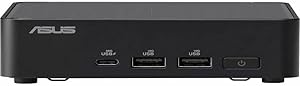
Asus RNUC14RVHU500000I NUC 14 Pro Mini PC
Intel Core Ultra 5 compute in a sub-4-inch cube delivers desktop-class CPU throughput at roughly one-tenth the footprint of a traditional tower.
$560.00*
Check availability
*Price sourced from Amazon.com. Last updated:Aug 28, 2026.Price and availability are subject to change — details.
Affiliate Disclosure: As an Amazon Associate, Studio Supplies earns from qualifying purchases made through links on this page, at no additional cost to you. This helps support our editorial team.
Notice a mistake? Let Us Know
Overview
Key Features
Easy to install
Environment friendly
Specifications
Brand
ASUS
Model
RNUC14RVHU500000I
Type
Barebone Mini PC
Processor
Intel Core Ultra 5 (Meteor Lake)
Graphics
Intel Arc (integrated, Meteor Lake)
NPU
Yes (Intel NPU for AI inference)
RAM
Not included (2x SO-DIMM DDR5, up to 96GB)
Storage
Not included (M.2 NVMe)
Operating System
Not included (Barebone)
Form Factor
Mini PC
Frequently Asked Questions
This is listed as a barebone system — what exactly does that mean, and what do I need to add?
Barebone means the NUC 14 Pro ships with the chassis, motherboard, CPU, and cooling system pre-installed, but without RAM or storage. You will need to install DDR5 SO-DIMMs (up to 96GB across two slots) and an M.2 NVMe SSD before the system will POST and boot. This modular approach lets you spec memory and storage independently rather than paying for a bundle you don't need.
What CPU is in the RNUC14RVHU500000I specifically?
The RNUC14RVHU500000I SKU is built around the Intel Core Ultra 5 processor (Meteor Lake architecture). It features Intel's NPU (Neural Processing Unit) for AI inference workloads offloaded from the CPU and GPU, and Intel Arc graphics replacing the previous-generation Iris Xe — delivering meaningfully higher GPU throughput for light creative and display-intensive tasks.
What display connectivity does this NUC support?
The NUC 14 Pro supports multiple simultaneous displays via Thunderbolt 4, HDMI 2.1, and USB4 ports depending on the specific port configuration of this SKU. Thunderbolt 4 supports up to 8K display output and daisy-chaining — confirm the rear I/O layout in the full spec sheet for exact display count limits.
How does the NUC 14 Pro's thermal design handle sustained workloads in such a small chassis?
ASUS's smart cooling system in the NUC 14 Pro uses a redesigned fan and vapor chamber heatsink path to manage the Core Ultra 5's configurable TDP. Under sustained multi-core loads the system manages thermals through fan ramp — audible under heavy compute — but avoids the sustained throttling that plagued earlier NUC generations. In light-to-moderate office workloads the system is near-silent.
Can the NUC 14 Pro run dual 4K monitors for a productivity workstation setup?
Yes. The Thunderbolt 4 and HDMI 2.1 ports provide sufficient bandwidth for simultaneous dual 4K/60Hz output. Triple or quad display configurations are possible with Thunderbolt daisy-chaining or a Thunderbolt dock, though this depends on the display adapter chain and is subject to Intel's display engine limits.
Related Products


