

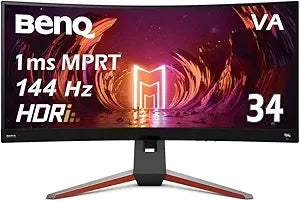


BenQ
BenQ EX3410R MOBIUZ Curved Gaming Monitor - 34" 144Hz
34 Inch5W
A 34-inch 1440p ultrawide at 144Hz that gives your games the immersive field of view your flat monitor has been hiding.
$599.99*
Check availability
*Price sourced from Amazon.com. Last updated:Sep 04, 2026.Price and availability are subject to change — details.
Affiliate Disclosure: As an Amazon Associate, Studio Supplies earns from qualifying purchases made through links on this page, at no additional cost to you. This helps support our editorial team.
Notice a mistake? Let Us Know
Overview
Key Features
Level Up the Game: 34 Inch WQHD 21:9 VA 144Hz Ultrawide Curved gaming computer monitor features Freesync Premium and color optimizer settings.
Experience Smooth Gameplay: Catch all the small details with a 1ms MPRT response rate and 144Hz refresh rate.
Built-In Speakers: Free up desk space with built-in speakers that delivers premium audio. The 2.1 channel amplifier's 5W subwoofer delivers a vibrant bass note
HDRi Optimization: Get ready for a cinematic experience thanks to the HDRi optimization which improves contrast and colors of the image.
Light Tuner: Be in control of the game by selecting your ideal contrast in both bright and dark scenes
Specifications
Screen Size
34 inches
Display Type
VA
Aspect Ratio
21:9
Resolution
WQHD
Curvature
Curved
Refresh Rate
144Hz
Response Rate
1ms MPRT
Adaptive Sync Technology
Freesync Premium
Audio Channels
2.1 channel amplifier
Subwoofer Power
5W
Frequently Asked Questions
What resolution does the BenQ EX3410R run at, and what GPU do I need to drive it?
The EX3410R runs at 3440x1440 WQHD — that's 4.95 million pixels, roughly 75% more than 1080p. To hit 144Hz at that resolution you'll want at minimum an RTX 3070 or RX 6800 XT for modern titles at medium-high settings; demanding games at max settings may require stepping up further.
Does FreeSync Premium work with Nvidia GPUs on this monitor?
FreeSync Premium is AMD's adaptive sync standard, but Nvidia's G-Sync Compatible mode works with FreeSync monitors that pass Nvidia's validation. The EX3410R's variable refresh rate range supports G-Sync Compatible operation — confirm it's enabled in Nvidia Control Panel.
What is the 1000R curvature, and does it actually help in use?
1000R means the panel curves to match the approximate radius of human eye focus distance (1000mm). At 34 inches it brings the screen edges slightly closer to your peripheral vision, reducing the need to swivel your head and keeping the image in focus across the panel width.
What is MPRT response time versus GtG, and which is relevant to gaming?
MPRT (Moving Picture Response Time) is a measure of perceived motion blur with backlight strobing enabled — the EX3410R's 1ms MPRT is achieved with this mode on. GtG (gray-to-gray) is the raw pixel switching speed. For everyday gaming without strobing, GtG is the more representative figure; MPRT mainly applies when using backlight blur-reduction modes.
Does the built-in 2.1 audio system replace a desktop speaker setup?
The 2.1 system with a 5W subwoofer is adequate for casual gaming and media — better than typical 2.0 monitor speakers. It won't replace a dedicated desktop speaker or headphone amp for critical listening, but it meaningfully reduces desk clutter for users who don't need audiophile-grade audio.
Related Products


