



Canon
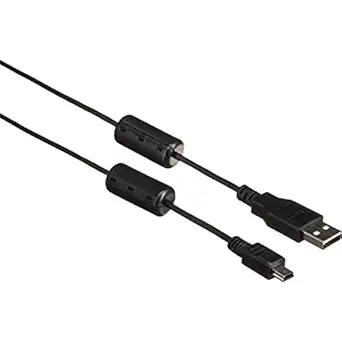
Canon 1892B001 IFC-200U USB Interface Cable EOS
★★★★★
A dedicated USB interface cable that keeps your EOS camera connected and transferring images without relying on card readers or third-party adapters.
$11.95*$29.95Save 60%
View on Amazon
✓ In Stock on Amazon.com
*Price sourced from Amazon.com. Last updated:Jul 15, 2026.Price and availability are subject to change.
Affiliate Disclosure: Studio Supplies may earn a commission from qualifying purchases made through links on this page, at no additional cost to you. This helps support our editorial team.
Notice a mistake? Let Us Know
Overview
Key Features
Canon IFC-200U USB Interface Cable for many EOS Digital Cameras
Specifications
Type
USB Interface Cable
Computer Connector
USB-A
Compatibility
Many Canon EOS Digital Cameras
Brand
Canon
Model
1892B001 (IFC-200U)
ASIN
B000Y98H8E
Pros & Cons
👍 Pros
- Provides a direct Canon-to-computer connection for compatible EOS cameras without requiring a third-party cable or adapter
- The USB-A computer connection is universally compatible with desktop computers, hubs, and USB-A-equipped laptops
- Enables EOS Utility tethered shooting workflows on compatible camera models — a connection type that matters for studio still life and portrait capture
- Manufactured by Canon for Canon cameras — connector tolerances and electronic compatibility are matched to the camera's USB port design
- At 200cm (approximately 6.5 feet), the cable length provides enough slack for practical tethered shooting distances between camera and laptop
👎 Cons
- Compatibility is limited to specific EOS camera models — not a universal cable, and incompatibility is determined by physical connector type on the camera body
- USB 2.0 transfer speeds are slower than a dedicated UHS-II or USB 3.0 card reader for bulk image transfers from high-capacity cards
- Modern computers frequently lack USB-A ports, requiring an adapter that Canon does not supply or certify with this cable
- No locking connector mechanism — the cable can work loose from the camera's USB port during active tethered sessions if the connection is stressed
- This is a single-purpose cable: image transfer and tethered shooting only, with no charging or audio functionality
Frequently Asked Questions
Which Canon EOS cameras is the IFC-200U compatible with?
The IFC-200U is compatible with many Canon EOS Digital cameras, but compatibility is model-specific. Canon's documentation for your specific camera model is the authoritative reference — not all EOS bodies use the same USB connector type or protocol. Verify your camera's USB port type (Mini-USB, Micro-USB, or proprietary connector) before ordering to confirm this cable matches your body.
What connector type does the IFC-200U use on the camera end?
The IFC-200U uses the appropriate connector for its compatible EOS cameras — the specific form factor is determined by Canon's camera design for each supported model. The computer end is standard USB-A. If your camera uses a different connector type than this cable provides, it will not physically connect regardless of brand.
How does using this cable compare to using a memory card reader for image transfer?
Direct camera-to-computer transfer via this cable is slower than using a dedicated USB 3.0 or UHS-II card reader for large card dumps. However, for selective transfer, tethered shooting, or situations where a card reader isn't available, the cable provides a reliable direct connection. For tethered shooting workflows using Canon's EOS Utility software, this cable is the correct physical connection.
Does this cable support tethered shooting with Canon EOS Utility software?
Canon's IFC-series USB cables are the designated interface for EOS Utility tethered shooting on compatible cameras. Whether your specific camera model supports tethered capture is determined by EOS Utility's compatibility list — the cable is the physical layer, and EOS Utility handles the software protocol. Confirm your camera is listed in EOS Utility's supported device list before relying on tethered workflows.
Is the IFC-200U cable still manufactured, and are there compatibility concerns with modern computers?
The IFC-200U connects via USB-A to the computer. Modern laptops increasingly ship without USB-A ports. A USB-A to USB-C adapter or hub will bridge the connection, though Canon does not certify specific adapters. For computers with only USB-C ports, verify adapter compatibility or consider a card reader as an alternative transfer method.
Related Products


