



Canon
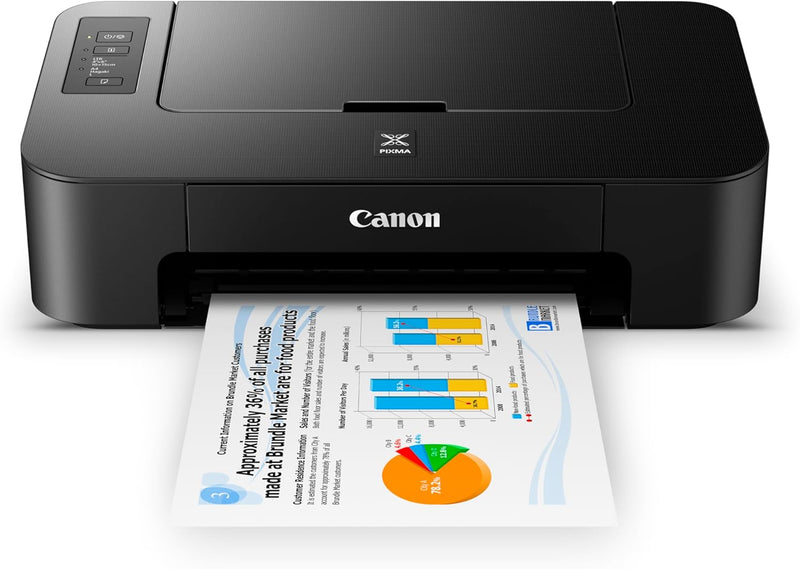
Canon TS202 Compact Inkjet Printer - Photo & Document Printing
★★★★★
Simple and Reliable Printing SolutionThe Canon Pixma TS202 Inkjet Photo Printer offers a compact and efficient solution for printing documents and photos. With its fine hybrid ink system and rear paper tray, it provides high-quality prints in a small footprint. Print Technology: Inkjet Ink S...
$65.93*$119.99Save 45%
Check availability
*Price sourced from Amazon.com. Last updated:Jun 28, 2026.Price and availability are subject to change.
Affiliate Disclosure: Studio Supplies may earn a commission from qualifying purchases made through links on this page, at no additional cost to you. This helps support our editorial team.
Notice a mistake? Let Us Know
Overview
Simple and Reliable Printing Solution
The Canon Pixma TS202 Inkjet Photo Printer offers a compact and efficient solution for printing documents and photos. With its fine hybrid ink system and rear paper tray, it provides high-quality prints in a small footprint.
- Print Technology: Inkjet
- Ink System: Fine hybrid ink system
- Paper Tray: Rear paper tray
- Connectivity: USB (required, not included)
- Compatibility: XL ink cartridges
Key Features
Fine hybrid ink system for detailed documents and photos.In The Box : PIXMA TS202 Inkjet Printer, Setup CD-ROM, Full Set of Ink Cartridges (PG-243/CL-244), Power Cord
Quickly refill paper with the dedicated rear paper tray
With a great compact size, the Pixma TS202 fits almost anywhere
OS compatibility: Windows 5 Windows 10, Windows 8.1, Windows 7 SP1; Mac 6 Mac OS X v10.10.5, macOS v10.12 (Sierra); Ink compatibility: Ink tank & fill volume PGI 246 black: 8.9 ml (Std.) , 12.0 ml (XL), CLI 246 color: 9.0 ml (Std.) , 13.0 ml (XL), PGI 243 black: 5.6 ml (Std.), CLI 244 color 6.2 ml (Std.)
Output tray capacity - Rear paper tray 60 sheets of plain paper or 20 sheets of 4 x 6 / 10 sheets of 5 x 7 photo paper
In The Box : PIXMA TS202 Inkjet Printer, Setup CD-ROM, Full Set of Ink Cartridges (PG-243/CL-244), Power Cord
USB Cable required for printing USB cable not included
Specifications
Printer Type
Compact Inkjet Printer
Ink System
Fine Hybrid Ink System
Paper Tray
Dedicated Rear Paper Tray
Operating System Compatibility (Windows)
Windows 10, Windows 8.1, Windows 7 SP1
Operating System Compatibility (Mac)
Mac OS X v10.10.5, macOS v10.12 (Sierra)
Included Ink Cartridges
PG-243/CL-244 (Full Set)
Included Items
PIXMA TS202 Inkjet Printer, Setup CD-ROM, Full Set of Ink Cartridges, Power Cord
Plain Paper Output Capacity
60 sheets
4x6 Photo Paper Output Capacity
20 sheets
5x7 Photo Paper Output Capacity
10 sheets
Connectivity
USB (cable not included)
Pros & Cons
👍 Pros
- The Canon TS202 printer utilizes a fine hybrid ink system, ensuring crisp documents and vibrant photo printing quality.
- Its compact size allows the PIXMA TS202 to fit comfortably into almost any space, ideal for smaller homes or offices.
- The dedicated rear paper tray enables quick and easy paper refills, improving workflow efficiency for printing tasks.
- Included with the printer is a full set of ink cartridges (PG-243/CL-244), offering immediate use out of the box.
- The printer supports a diverse range of operating systems, including Windows 10, Windows 8.1, Windows 7 SP1, and Mac OS X v10.10.5 to macOS v10.12 (Sierra).
👎 Cons
- A USB cable, necessary for printing connectivity, is not included in the box and must be purchased separately.
- The maximum output tray capacity for photo paper is limited to 20 sheets of 4x6 or 10 sheets of 5x7, which may require frequent reloading for larger photo print jobs.
- It lacks wireless connectivity options, requiring a direct USB connection to a computer for printing.
- The printer's compatibility is limited to older Mac OS versions up to macOS v10.12 (Sierra), potentially excluding newer Mac users.
- Ink cartridge capacities, particularly the standard sizes, might lead to more frequent replacements depending on print volume.
Frequently Asked Questions
What operating systems are compatible with the Canon TS202 printer?
The Canon TS202 is compatible with Windows 10, Windows 8.1, Windows 7 SP1, and Mac OS X v10.10.5 to macOS v10.12 (Sierra).
Is a USB cable included with the Canon TS202 for connecting to a computer?
No, a USB cable is required for printing but is not included in the box and must be purchased separately.
How does the Canon TS202 handle different types of paper?
The printer features a dedicated rear paper tray that holds 60 sheets of plain paper or a smaller quantity of photo paper (20 sheets of 4x6 / 10 sheets of 5x7).
What kind of ink system does this printer use for quality output?
The Canon TS202 uses a fine hybrid ink system designed to produce detailed documents and vibrant photos.
What items are included in the box with the PIXMA TS202 printer?
The box includes the PIXMA TS202 Inkjet Printer, a Setup CD-ROM, a full set of PG-243/CL-244 ink cartridges, and a power cord.
Related Products


