



Canon
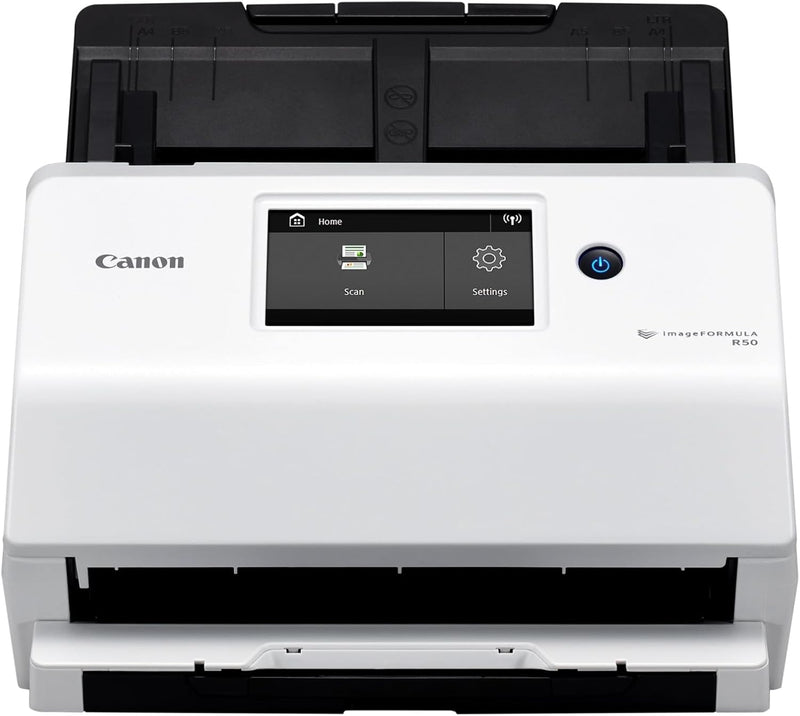
Canon 4823C001 imageFORMULA R50 Business Document Scanner
★★★★★
Streamline Your Document Management with Canon imageFORMULA R50The Canon imageFORMULA R50 Business Document Scanner simplifies document digitization for both PC and Mac users. With a color touchscreen, easy setup, and flexible connectivity options, this scanner makes converting paper documents to...
$381.00*
View on Amazon
✓ In Stock on Amazon.com
*Price sourced from Amazon.com. Last updated:Jun 28, 2026.Price and availability are subject to change.
Affiliate Disclosure: Studio Supplies may earn a commission from qualifying purchases made through links on this page, at no additional cost to you. This helps support our editorial team.
Notice a mistake? Let Us Know
Overview
Streamline Your Document Management with Canon imageFORMULA R50
The Canon imageFORMULA R50 Business Document Scanner simplifies document digitization for both PC and Mac users. With a color touchscreen, easy setup, and flexible connectivity options, this scanner makes converting paper documents to searchable digital files a breeze.
- Connectivity: USB Cable or Wi-Fi Network
- Touchscreen: LCD Color Touchscreen
- Document Feeder: Auto Document Feeder (ADF)
- Scanning: Color Duplex Scanning
- Scan Speed: Up to 40 pages-per-minute
- Operating System Support: Windows and Mac
- Driver: TWAIN driver included
Key Features
Easy to use: Large color touchscreen to select scan destinations or shortcuts, and access settings
Flexible connectivity: Built-in SuperSpeed+ USB and Wi-Fi, allowing local and networked use, and sharing among multiple users
Fast and efficient: Scans both sides of a document at the same time, in color, at up to 40 pages-per-minute, with a 60 sheet automatic feeder (ADF)
High quality imaging: Can automatically adjust output resolution to improve image quality and reduce file size for easier mixed batch document scanning
Broad compatibility: Supports Windows and Mac operating systems; TWAIN driver also included
Reliably handles many different media types single or in batches
Peace of Mind: Backed by a one-year warranty and knowledgeable, friendly U.S.-based technical support
Specifications
Product Type
Business Document Scanner
Model
imageFORMULA R50
Interface
SuperSpeed+ USB, Wi-Fi
Scanning Speed
Up to 40 pages-per-minute (color, duplex)
Automatic Document Feeder (ADF) Capacity
60 sheets
Operating System Compatibility
Windows, Mac
Driver Support
TWAIN
Warranty
One-year
Support
U.S.-based technical support
Pros & Cons
👍 Pros
- Features a large color touchscreen, simplifying the selection of scan destinations, shortcuts, and settings.
- Offers flexible connectivity options with built-in SuperSpeed+ USB and Wi-Fi, supporting both local and networked use.
- Scans both sides of a document simultaneously in color at up to 40 pages-per-minute, enhancing efficiency.
- Equipped with a 60-sheet automatic document feeder (ADF) to handle larger scanning tasks without constant supervision.
- Automatically adjusts output resolution to improve image quality while reducing file size, optimizing mixed batch document scanning.
- Supports both Windows and Mac operating systems, along with a TWAIN driver for broad software compatibility.
- Designed to reliably handle many different media types, whether individually or in batches, increasing versatility.
- Comes with a one-year warranty and access to knowledgeable, friendly U.S.-based technical support for peace of mind.
👎 Cons
- Specific scan resolutions are not provided, which might be a consideration for users with very precise imaging needs.
- The automatic image quality adjustment feature, while beneficial, might not always align with user-specific preferences without manual override options.
- While compatible with Windows and Mac, specific versions of these operating systems are not detailed, potentially causing compatibility questions for older systems.
- The scanner is primarily for documents, and its capabilities for scanning photos or delicate media may not be as robust as specialized photo scanners.
- The 60-sheet ADF capacity might be limiting for offices that frequently process extremely large batches of documents exceeding this amount.
Frequently Asked Questions
How does this scanner handle different types of documents?
This scanner is designed to reliably handle many different media types, whether fed singly or in batches, ensuring versatile use.
What operating systems are compatible with the Canon imageFORMULA R50 scanner?
The Canon imageFORMULA R50 supports both Windows and Mac operating systems and includes a TWAIN driver for broad compatibility.
Does the scanner offer dual-sided scanning capabilities?
Yes, it is fast and efficient, capable of scanning both sides of a document at the same time in color.
What is the capacity of the automatic document feeder?
The scanner is equipped with a 60-sheet automatic document feeder (ADF) for efficient batch scanning.
How does this scanner simplify the user experience?
It features a large color touchscreen for easy selection of scan destinations, shortcuts, and access to settings, making it user-friendly.
What kind of support and warranty does this scanner come with?
It is backed by a one-year warranty and offers knowledgeable, friendly U.S.-based technical support for peace of mind.
Related Products


