



Canon
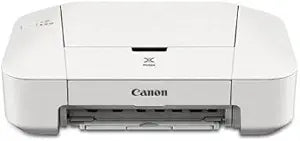
Canon IP2820 Office Inkjet Printer
★★★★★
The Canon PIXMA iP2820 delivers 4800 x 600 dpi color output and Auto Power On in a sub-compact footprint built for low-volume home and office printing.
View price on Amazon
Affiliate Disclosure: Studio Supplies may earn a commission from qualifying purchases made through links on this page, at no additional cost to you. This helps support our editorial team.
Notice a mistake? Let Us Know
Overview
Key Features
The Auto Power On feature automatically powers up the printer whenever you send a file to be printed
Print even more with the optional high-capacity XL ink cartridges
Quite Mode lets you print quietly without disturbing those around you
Specifications
Printing Technology
Inkjet
Max Resolution
4800 x 600 dpi
Ink Cartridges
PG-245 / CL-246 (standard); PG-245XL / CL-246XL (optional high-yield)
Paper Sizes
4"x6", 5"x7", Letter, Legal, U.S. #10 Envelopes
Input Tray Capacity
60 sheets
Connectivity
Hi-Speed USB
Features
Auto Power On, Quiet Mode, Full HD Movie Print
Pros & Cons
👍 Pros
- 4800 x 600 dpi maximum resolution produces smooth color gradients suitable for borderless 4x6 and 5x7 photo prints.
- Auto Power On eliminates manual wake steps, reducing friction in low-volume print workflows.
- XL cartridge compatibility (PG-245XL/CL-246XL) enables lower cost-per-page for users who print more than occasionally.
- Quiet Mode reduces mechanical noise during the print cycle — a measurable acoustic reduction for shared workspaces.
- Compact physical footprint conserves desk space in tight home office environments.
👎 Cons
- USB-only connectivity means the printer cannot be shared across a network or used wirelessly — a hard limitation for multi-device households or offices.
- 60-sheet input tray capacity requires frequent paper reloading under any sustained print volume.
- No automatic duplex printing means double-sided documents require manual page flipping and a second print pass.
- Single-function design (print only) — no scan, copy, or fax capability bundled into the unit.
Frequently Asked Questions
What ink cartridges does the iP2820 use, and is there a high-yield option?
The iP2820 uses PG-245 (black) and CL-246 (color) standard cartridges. Optional PG-245XL and CL-246XL high-capacity variants increase page yield per cartridge, reducing cost-per-page for users who print frequently. The XL cartridges are drop-in replacements using the same physical slot.
How does the printer connect to a computer?
The iP2820 connects exclusively via Hi-Speed USB (USB 2.0). There is no Wi-Fi, Ethernet, or Bluetooth option on this model — it is a direct-tethered single-computer printer.
What does Auto Power On actually do, and can it be disabled?
Auto Power On wakes the printer from a powered-off state automatically when a print job is received over USB. This eliminates the step of manually powering the unit before printing. It can typically be toggled in the Canon printer driver settings on the host machine.
What is the maximum print resolution and what does it mean practically?
Maximum resolution is 4800 x 600 dpi. The 4800 horizontal dpi is achieved through fine droplet placement on the print head pass, producing smooth color gradients in photo prints. For standard document printing, the printer operates at lower internal resolutions; the 4800 dpi ceiling is relevant for 4x6 and 5x7 photo output.
What paper sizes and types does the iP2820 support?
Supported sizes include 4x6", 5x7", Letter, Legal, and U.S. #10 Envelopes. The input tray capacity is 60 sheets. There is no automatic duplex (two-sided) printing on this model.
Related Products


