

Canon
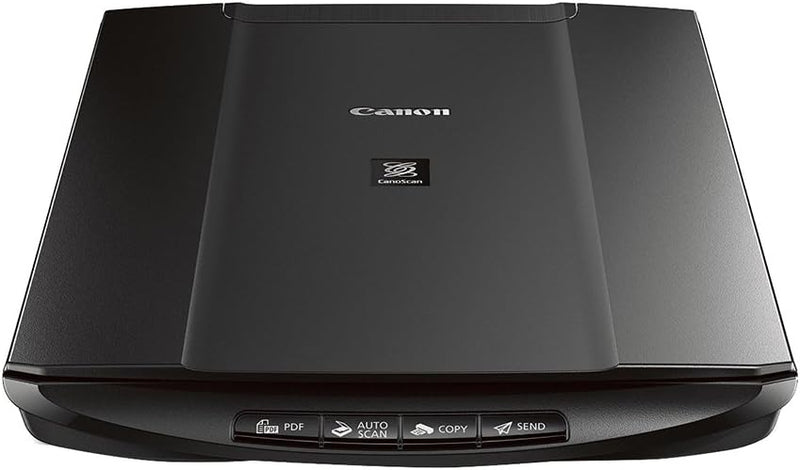
Canon LiDE120 Office Document Scanner
★★★★★
2400 x 48001.6 Inch
Simplify Scanning with the Canon Office Products LiDE120 Document Scanner The Canon CanoScan LiDE120 Color Image Scanner offers a compact and affordable solution for scanning documents and photos. With easy-to-use features like "Send to Cloud" functionality and Auto Scan Mode, this scanner simpl...
$99.95*$133.99Save 25%
Check availability
*Price sourced from Amazon.com. Last updated:Jun 28, 2026.Price and availability are subject to change.
Affiliate Disclosure: Studio Supplies may earn a commission from qualifying purchases made through links on this page, at no additional cost to you. This helps support our editorial team.
Notice a mistake? Let Us Know
Overview
Simplify Scanning with the Canon Office Products LiDE120 Document Scanner
The Canon CanoScan LiDE120 Color Image Scanner offers a compact and affordable solution for scanning documents and photos. With easy-to-use features like "Send to Cloud" functionality and Auto Scan Mode, this scanner simplifies your scanning workflow.
Key Features:
- Compact design with advanced features
- "Send to Cloud" functionality for easy uploading
- Auto Document Fix and Auto Scan Mode for optimized scans
- Four EZ Buttons for quick scanning, copying, and PDF creation
Specifications:
- Scanner Type: Flatbed
- Optical Resolution: 2400 x 4800 dpi
- Connectivity: USB
- Compatible Operating Systems: Windows, Mac OS X
Key Features
The CanoScan LiDE120 Color Image Scanner is a compact scanner that offers advanced features and affordability; The "Send to Cloud" functionality, for example, lets you upload photos and documents to the Cloud with remarkable ease
The LiDE120 scanner provides a maximum optical resolution of 2400 x 4800 dpi for dazzling scans of both photos and documents
The Auto Document Fix feature automatically produces beautiful scans with advanced image analysis and area-by-area data correction, while Auto Scan Mode3 automatically evaluates the item being scanned and saves it with the appropriate settings
The LiDE120 scanner can help you work efficiently with four EZ Buttons that enable you to scan, copy, Send to Cloud or create a PDF in a snap.LiDE120 scanner uses one USB cable for both data and power, so plugging in is easy; Compatible OS : Windows 8, Windows 8.1, Windows 7, Windows 7 SP1, Windows Vista SP1, Vista SP2, Windows XP SP3 32-bit, Mac OS X v10.6.8 - 10.9
Compatible still image formats are PDF created using Canon PDF Creator only, JPEG, TIFF, and PNG, compatible video formats are MOV from select Canon digital cameras only and MP4 from select Canon digital camcorders only, Dimesion (W x D x H) 9.9 x 14.6 x 1.6 Inch
Specifications
Maximum Optical Resolution
2400 x 4800 dpi
"Send to Cloud" Functionality
Yes
Auto Document Fix
Yes
Auto Scan Mode
Yes
EZ Buttons
4 (Scan, Copy, Send to Cloud, Create PDF)
Power & Data Connection
Single USB Cable
Compatible Still Image Formats
PDF (Canon PDF Creator only), JPEG, TIFF, PNG
Compatible Video Formats
MOV (select Canon digital cameras only), MP4 (select Canon digital camcorders only)
Dimensions (W x D x H)
9.9 x 14.6 x 1.6 Inch
Compatible OS
Windows 8, Windows 8.1, Windows 7, Windows 7 SP1, Windows Vista SP1, Vista SP2, Windows XP SP3 32-bit, Mac OS X v10.6.8 - 10.9
Pros & Cons
👍 Pros
- Offers a high maximum optical resolution of 2400 x 4800 dpi for detailed photo and document scans
- Features "Send to Cloud" functionality, allowing for easy uploading of scanned items to cloud services
- Includes Auto Document Fix for automatically producing beautiful scans with intelligent image analysis
- Equipped with four EZ Buttons for quick scanning, copying, PDF creation, and "Send to Cloud" functions
- Powered solely by a single USB cable for both data and power, simplifying setup and reducing cable clutter
👎 Cons
- Compatible video formats are limited to MOV and MP4 from select Canon cameras and camcorders only
- Compatible still image formats are specifically PDF (created with Canon PDF Creator only), JPEG, TIFF, and PNG
- Operating system compatibility is defined, potentially limiting use with unsupported or older/newer OS versions
- The Auto Scan Mode's automatic settings may not always align with specific user preferences for customization
- Its compact design, while space-saving, may not accommodate scanning larger or irregularly shaped items
Frequently Asked Questions
What is the maximum scanning resolution of the Canon LiDE120?
The LiDE120 scanner offers a maximum optical resolution of 2400 x 4800 dpi, enabling detailed scans for both photos and documents.
Can I send scanned documents directly to cloud services?
Yes, the "Send to Cloud" functionality allows for easy uploading of photos and documents to the Cloud.
Does this scanner automatically improve image quality?
The Auto Document Fix feature automatically enhances scans through advanced image analysis and area-by-area data correction, ensuring beautiful results.
How many quick access buttons does the LiDE120 have?
The scanner is equipped with four EZ Buttons that provide quick access to scan, copy, Send to Cloud, or create a PDF.
What operating systems are compatible with this scanner?
It is compatible with Windows 8, Windows 8.1, Windows 7, Windows 7 SP1, Windows Vista SP1, Vista SP2, Windows XP SP3 32-bit, and Mac OS X v10.6.8 - 10.9.
How does the scanner connect for power and data?
The LiDE120 scanner uses a single USB cable for both data transfer and power, simplifying its setup.
Related Products


