



Canon
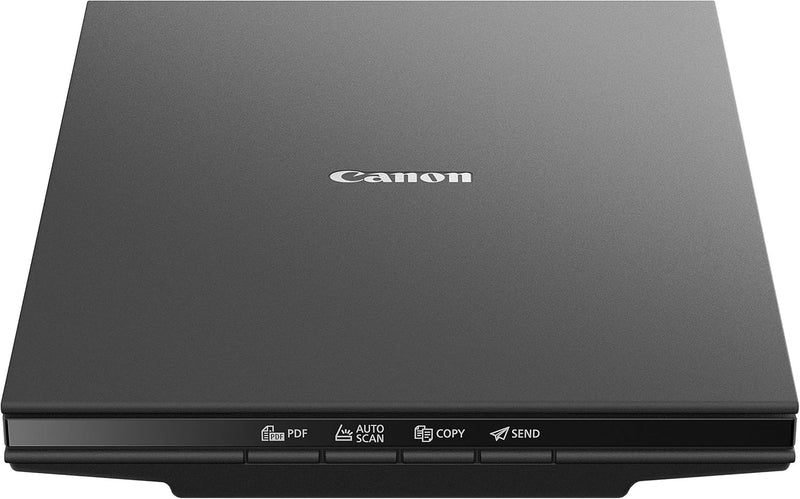
Canon LIDE300-cr CanoScan Slim Color Scanner (Renewed)
★★★★★
2400 x 2400
Scan documents and photos in as little as 10 seconds with this slim, USB-powered Canon flatbed scanner.
$82.83*
View on Amazon
✓ In Stock on Amazon.com
*Price sourced from Amazon.com. Last updated:Jun 28, 2026.Price and availability are subject to change.
Affiliate Disclosure: Studio Supplies may earn a commission from qualifying purchases made through links on this page, at no additional cost to you. This helps support our editorial team.
Notice a mistake? Let Us Know
Overview
Key Features
Scan documents quickly and easily with fast scanning up to 10 seconds. - Documents can be immediately uploaded to cloud services like OneDrive or Dropbox, and many more.
Digitize documents and images thanks to 2400 x 2400 dpi resolution, and with image enhancements, such as fade correction and dust reduction, your photos will continue to look great.
Enjoy ease of use with 4 'EZ' Buttons. With auto scan mode, the Scanner automatically detects what you're scanning; built-in PDF button, easily scans and saves pdf's that are editable and searchable.
Compatible with Windows 10/8.1/7 SP1, Mac OS X 10.10.5 - 10.13, and Linux with ScanGear MP driver installed. - Entire unit runs off USB power, allowing for simpler operation. - Advanced Z-Lid accepts books and other thick media for scanning.
Specifications
Brand
Canon
Model
LIDE300-cr
Scanner Type
Flatbed
Optical Resolution
2400 x 2400 dpi
Color Depth
24 bpp
Scan Speed
Approximately 10 seconds per page
Connectivity
USB (wired)
Power Source
USB-powered (no external adapter)
Maximum Scan Size
A4 / Letter / Legal
Lid Type
Advanced Z-Lid (accommodates thick media)
Compatibility
Windows 10/8.1/7 SP1, Mac OS X 10.10.5–10.13, Linux (ScanGear MP)
Dimensions
18 x 14 x 6 inches
Condition
Renewed
Pros & Cons
👍 Pros
- USB-powered design eliminates the need for a separate power adapter, simplifying your desk setup
- Fast scan speed of approximately 10 seconds per page keeps workflows moving
- 2400 x 2400 dpi optical resolution captures fine detail in photos and documents
- Four dedicated EZ Buttons provide one-touch access to scan, copy, email, and PDF functions
- Slim, lightweight form factor takes up minimal desk space and stores easily upright
👎 Cons
- No automatic document feeder, so multi-page scanning requires manually placing each page
- Compatibility tops out at Mac OS 10.13, which may require checking driver support for newer macOS versions
- USB-A connection only — no USB-C option, so newer laptops may need an adapter
- Flatbed design limits maximum scan size to letter or A4 dimensions
Frequently Asked Questions
Does this scanner require a separate power adapter?
No. The CanoScan Lide 300 runs entirely off USB power, so a single USB cable connects it to your computer and provides all the power it needs.
Can I scan pages from a book or thick document?
Yes. The Advanced Z-Lid is designed to lift and accommodate books and other thick media, so you can scan bound materials without damaging the spine or the scanner.
What file formats can I save scans in?
The built-in PDF button lets you create editable and searchable PDF files directly. The bundled software also supports saving scans as JPEG, TIFF, and other common image formats.
Is this scanner compatible with Mac computers?
Yes, it is compatible with Mac OS X 10.10.5 through 10.13. It also supports Windows 10, 8.1, and 7 SP1, as well as Linux with the ScanGear MP driver installed.
Can I upload scans directly to cloud storage?
Yes. Scanned documents can be immediately uploaded to cloud services like OneDrive, Dropbox, and others directly from the scanner software.
Related Products


