



Canon
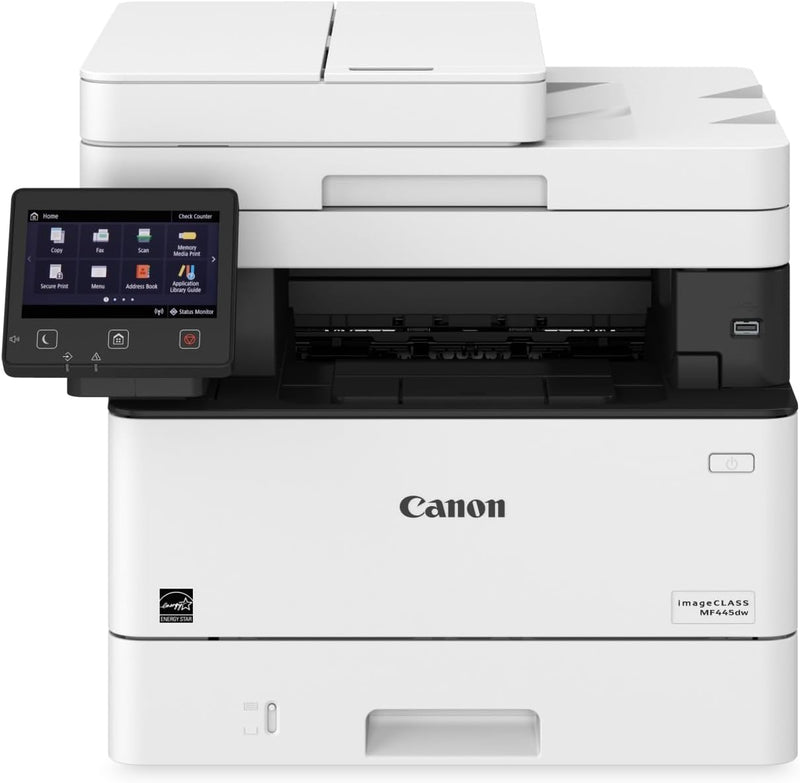
Canon MF445dw imageCLASS Wireless Laser Printer
★★★★★
Streamline Your Workflow with the Canon imageCLASS MF445dw The Canon imageCLASS MF445dw is a versatile all-in-one laser printer designed to enhance productivity in small and medium-sized businesses. Enjoy fast printing, mobile connectivity, and a customizable touchscreen interface. Specificatio...
$629.95*
View on Amazon
✓ In Stock on Amazon.com
*Price sourced from Amazon.com. Last updated:Jun 28, 2026.Price and availability are subject to change.
Affiliate Disclosure: Studio Supplies may earn a commission from qualifying purchases made through links on this page, at no additional cost to you. This helps support our editorial team.
Notice a mistake? Let Us Know
Overview
Streamline Your Workflow with the Canon imageCLASS MF445dw
The Canon imageCLASS MF445dw is a versatile all-in-one laser printer designed to enhance productivity in small and medium-sized businesses. Enjoy fast printing, mobile connectivity, and a customizable touchscreen interface.
Specifications:
- Brand: Canon
- Model: MF445dw
- Functions: Print, Copy, Scan, Fax
- Printing Technology: Laser
- Printer Output: Monochrome
- Max Print Speed (Monochrome): 40 ppm
- First Print Time: 5.3 seconds
- Resolution: 600 x 600 dpi
- Duplex Printing: Automatic
- Display: 5" Color Touchscreen
- Connectivity: Wi-Fi, Ethernet, USB
- Mobile Printing: Yes
- Scanner Type: Single-Pass Duplexing Automatic Document Feeder
- Max Input Sheet Capacity: 900
Key Features
USABILITY: 5" intuitive, color touchscreen with smartphone-like usability. A unique, customized device experience with Application Library.
Create Wi-Fi Direct hotspot from the printer to establish direct connection to compatible mobile device(s) without the need for an external router.
QUALITY AND RELIABILITY: Canon's signature reliability and engine technologies help keep productivity high and minimize the impact on support resources. Intuitive maintenance videos for common tasks like consumables replacement. Designed to achieve maximum uptime with status notifications to help keep supplies replenished.
WORKFLOW EFFICIENCY: Supports mobile solutions for printing and scanning. Scan and convert documents to searchable digital files through a single-pass duplex document feeder. Designed for small print jobs with first-print time as fast as 5.3 seconds.
COST EFFICIENCY: Out-of-the-box, standard two-sided printing plus the ability to print multiple pages onto one page helps to reduce paper consumption. Available high-capacity cartridge helps reduce overall supply costs.
SECURITY: Low risk of confidential information loss, as documents are only stored in short-term memory. Security settings can be set behind an administrator log-in. Verify System at Startup is a process to help verify the validity of the device firmware and Application Library from unauthorized modifications.
MOBILE-FRIENDLY DEVICE ACCESS: From application-based to cloud-based to device native, the imageCLASS MF445dw model offers a variety of methods for printing from a mobile phone or tablet across iOS and Android devices.
The Canon PRINT Business application, which supports both platforms, offers access to additional device settings as well as the ability to scan from the printer to a mobile phone or tablet.
Specifications
Product Type
Wireless Laser Printer
Model
MF445dw imageCLASS
Brand
Canon
Display
5" intuitive, color touchscreen
Connectivity
Wi-Fi Direct, Wireless
Scanning
Single-pass duplex document feeder
First-Print Time
As fast as 5.3 seconds
Printing
Standard two-sided printing
Security
Short-term memory storage, Administrator log-in, Verify System at Startup
Mobile OS Support
iOS, Android
Application Support
Canon PRINT Business application
Pros & Cons
👍 Pros
- Features an intuitive 5-inch color touchscreen with smartphone-like usability for easy navigation and control.
- Includes Canon's signature reliability and engine technologies to ensure high productivity and minimal support needs.
- Offers workflow efficiency with support for mobile printing and scanning solutions across various devices.
- Designed for cost efficiency with standard two-sided printing and high-capacity cartridge options to reduce paper and supply costs.
- Enhances security by storing documents only in short-term memory and providing administrator login for settings.
👎 Cons
- Specific details on color printing capabilities, such as quality and speed, are not provided for this laser printer.
- The maximum paper capacity for both trays is not listed, which could impact large print job efficiency.
- Specific dimensions and weight are not provided, making it difficult to assess its physical footprint for office placement.
- Energy consumption details like power usage during operation or standby are not mentioned in the features.
- While mobile-friendly, the exact range or strength of its Wi-Fi Direct hotspot is not specified.
Frequently Asked Questions
What kind of display does the Canon MF445dw feature?
The Canon MF445dw is equipped with a 5-inch intuitive, color touchscreen that offers smartphone-like usability for easy interaction.
How does this printer contribute to workflow efficiency?
It supports mobile printing and scanning solutions and can scan and convert documents to searchable digital files through its single-pass duplex document feeder, with first-print times as fast as 5.3 seconds.
What security measures are included with the MF445dw?
This printer helps mitigate confidential information loss by storing documents only in short-term memory and allows security settings to be protected by an administrator log-in.
Can I print directly from my mobile device without a router?
Yes, the printer can create a Wi-Fi Direct hotspot, allowing direct connection to compatible mobile devices without the need for an external router.
How does the MF445dw help reduce printing costs?
It offers standard two-sided printing and the ability to print multiple pages onto one sheet, both of which help reduce paper consumption, and it uses available high-capacity cartridges to lower overall supply costs.
Related Products


