

Canon
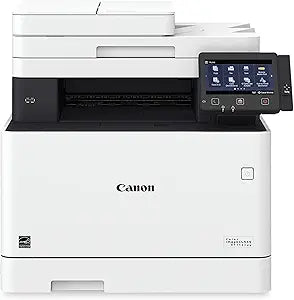
Canon MF743Cdw Color imageCLASS All-in-One Laser Printer
★★★★★
Seamless Productivity for Modern Workplaces The Canon Color imageCLASS MF743Cdw is a versatile all-in-one laser printer designed for small and medium-sized businesses. With its print, scan, copy, and fax capabilities, this printer streamlines your workflow while delivering high-quality color outp...
$988.88*
View on Amazon
✓ In Stock on Amazon.com
*Price sourced from Amazon.com. Last updated:Jun 27, 2026.Price and availability are subject to change.
Affiliate Disclosure: Studio Supplies may earn a commission from qualifying purchases made through links on this page, at no additional cost to you. This helps support our editorial team.
Notice a mistake? Let Us Know
Overview
Seamless Productivity for Modern Workplaces
The Canon Color imageCLASS MF743Cdw is a versatile all-in-one laser printer designed for small and medium-sized businesses. With its print, scan, copy, and fax capabilities, this printer streamlines your workflow while delivering high-quality color output and reliable performance. Its advanced features, including wireless connectivity, mobile printing support, and an intuitive touchscreen interface, make it an ideal solution for today's dynamic work environments.
Specifications:
- Brand: Canon
- Model: MF743Cdw
- Functions: Print, Scan, Copy, Fax
- Print Technology: Laser
- Print Color: Color
- Connectivity: Wireless, Mobile-Ready, NFC (Near Field Communication)
- Duplex Printing: Yes
Key Features
USABILITY: A unique, customized device experience with Application Library. 5" intuitive color touchscreen with smartphone-like usability. Create Wi-Fi Direct hotspot from the printer to establish direct connection to mobile device(s) without the need for external router
QUALITY AND RELIABILITY: Canon's signature reliability and engine technologies help keep productivity high and minimize the impact on support resources. Intuitive maintenance videos for common tasks like consumables replacement
WORKFLOW EFFICIENCY: Supports mobile solutions for printing and scanning. Scan and convert documents to searchable digital files through a one-pass scan / duplex document feeder. Designed for small print jobs with first-print time as fast as 10. 3 seconds
COST EFFICIENCY: High-capacity, all-in-one cartridge helps reduce overall supply costs. Out-of-the-box, standard two-sided printing plus the ability to print multiple pages onto one sheet helps to reduce paper consumption
SECURITY FEATURES: Helps mitigate risk of confidential information loss as documents are only stored in short-term memory. Security settings can be set behind an administrator log-in
WARRANTY: 3 Year Limited Warranty
Max printspeed black white: 28.0 pages_per_minute
Paper size: 3 x 5, 8.5 x 14
Specifications
Printer Type
All-in-One Laser Printer
Color Printing
Yes
Control Panel
5" Intuitive Color Touchscreen
Connectivity
Wi-Fi Direct Hotspot, Mobile Solutions
Scanner Type
One-Pass Scan / Duplex Document Feeder
First Print Out Time
As fast as 10.3 seconds
Max Print Speed (Black/White)
28.0 pages_per_minute
Supported Paper Sizes
3 x 5, 8.5 x 14
Cartridge Type
High-capacity, All-in-One
Security Features
Administrator Log-in for Settings
Warranty
3 Year Limited Warranty
Pros & Cons
👍 Pros
- Offers a 5-inch intuitive color touchscreen with smartphone-like usability, simplifying navigation and control.
- Supports creating a Wi-Fi Direct hotspot from the printer, enabling direct connection to mobile devices without a router.
- Includes a one-pass scan/duplex document feeder, efficiently converting documents to searchable digital files.
- Achieves a first-print time as fast as 10.3 seconds, contributing to workflow efficiency for small print jobs.
- Features high-capacity, all-in-one cartridges, designed to help reduce overall supply costs.
👎 Cons
- The maximum print speed for black and white is 28 pages per minute, which might be considered moderate for high-volume office environments.
- The printer's security settings require an administrator log-in, which could be an inconvenience for users in less controlled environments.
- While supporting mobile solutions, specific app compatibility or ease of integration with diverse mobile ecosystems might vary.
- The claim of minimizing impact on support resources suggests some level of user involvement in basic maintenance, which might not suit all users.
- The product focuses on small print jobs, implying that it might not be optimized for extremely large, continuous print runs.
Frequently Asked Questions
What kind of touchscreen does the Canon MF743Cdw feature?
The Canon MF743Cdw is equipped with a 5-inch intuitive color touchscreen, designed for smartphone-like usability.
Can this printer connect directly to mobile devices without a router?
Yes, the printer can create a Wi-Fi Direct hotspot, allowing direct connection to mobile devices without the need for an external router.
How fast is the first print out from this printer?
The Canon MF743Cdw boasts a first-print time as fast as 10.3 seconds, which contributes to its workflow efficiency for various tasks.
What are the security features of this printer?
To help mitigate confidential information loss, security settings can be established behind an administrator log-in, and documents are stored only in short-term memory.
Does this printer support two-sided printing?
Yes, it offers out-of-the-box, standard two-sided printing, which helps to reduce paper consumption and improve cost efficiency.
What is the maximum print speed for black and white documents?
The maximum print speed for black and white documents on the Canon MF743Cdw is 28.0 pages per minute.
Related Products


