



Canon
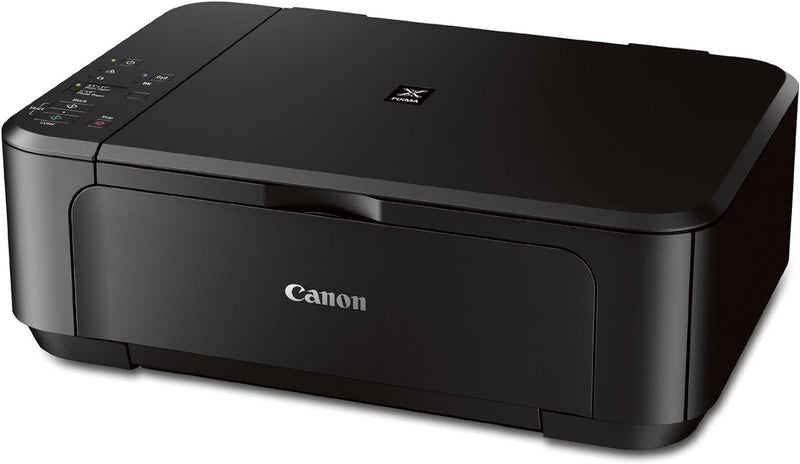
Canon MG3520 BK Wireless Color Printer Scanner Copier
★★★★★
Versatile Wireless Printing for Home or Office The Canon PIXMA MG3520 is a compact all-in-one printer that offers wireless connectivity, versatile printing options, and convenient scanning and copying features. Specifications: Functions: Print, Scan, Copy Wireless Connectivity: Wi-Fi Mobile P...
$139.00*
Check availability
*Price sourced from Amazon.com. Last updated:Jun 28, 2026.Price and availability are subject to change.
Affiliate Disclosure: Studio Supplies may earn a commission from qualifying purchases made through links on this page, at no additional cost to you. This helps support our editorial team.
Notice a mistake? Let Us Know
Overview
Versatile Wireless Printing for Home or Office
The Canon PIXMA MG3520 is a compact all-in-one printer that offers wireless connectivity, versatile printing options, and convenient scanning and copying features.
Specifications:
- Functions: Print, Scan, Copy
- Wireless Connectivity: Wi-Fi
- Mobile Printing: PIXMA Printing Solutions (PPS), AirPrint
- Duplex Printing: Automatic 2-sided printing
- Ink System: Hybrid Ink System (pigment black and color dye ink)
- Print Speed (Black): 9.9 ppm
- Print Speed (Color): 5.7 ppm
- Scanner Type: Flatbed
- Special Features: Wireless, Borderless Photo Printing, Works with Alexa
Key Features
Compatible with CL-241 XL Ink Tanks & PG-240 XL or PG-240 XXL Pigment Black Ink Tanks. Save Even More On Combo/Value Packs!
With Google Cloud Print, you can print from wherever you are, from applications you use every day. You can even share your home and work printers with anyone you choose.
Built-In Auto Duplex Printing: Automatically print on both sides of the page without the hassle of turning it over manually.
Auto Power On:This convenient feature automatically powers up the printer whenever you send a photo or document to be printed.
Quick Start:Begin inputting commands in mere seconds. Plus with the Quiet Mode feature lets you print anytime without worrying about disturbing those around you.
Specifications
Model
MG3520 BK
Functionality
Printer, Scanner, Copier
Connectivity
Wireless
Printer Type
Color
Duplex Printing
Built-In Auto Duplex Printing
Ink Compatibility
CL-241 XL, PG-240 XL, PG-240 XXL
Cloud Printing
Google Cloud Print
Power Feature
Auto Power On
Startup Feature
Quick Start
Noise Feature
Quiet Mode
Pros & Cons
👍 Pros
- Offers Google Cloud Print compatibility, enabling printing from various applications and locations remotely.
- Features built-in auto duplex printing, automatically printing on both sides of a page to save paper.
- Includes an Auto Power On feature, which automatically activates the printer when a print command is received.
- Provides Quick Start functionality, allowing users to input commands and begin printing almost immediately.
- Equipped with a Quiet Mode feature, minimizing operational noise for less disturbance in quiet environments.
👎 Cons
- Ink compatibility is limited to specific Canon CL-241 XL, PG-240 XL, or PG-240 XXL ink tanks, which may affect availability or cost.
- As an all-in-one device, if one function like printing or scanning malfunctions, the entire unit's utility is compromised.
- Wireless connectivity relies on existing network infrastructure and may be less reliable than a direct wired connection in some settings.
- The "Quick Start" feature, while convenient, does not specify the exact warm-up time or first-page-out speed.
- Quiet Mode may potentially affect print speed, as noise reduction often involves slower mechanical operation.
Frequently Asked Questions
Can I print directly from my smartphone or tablet to this printer?
Yes, with Google Cloud Print compatibility, you can print from various mobile applications and devices to the Canon MG3520 BK.
Does this printer automatically print on both sides of the paper?
Yes, it features Built-In Auto Duplex Printing, allowing it to automatically print on both sides of the page without manual intervention.
What types of ink cartridges does this printer use?
This printer is compatible with CL-241 XL Ink Tanks and PG-240 XL or PG-240 XXL Pigment Black Ink Tanks.
How quickly does the printer become ready to print?
The Quick Start feature allows you to begin inputting commands in mere seconds, speeding up the printing process.
Can this printer be used in a quiet environment without much disturbance?
Yes, the Canon MG3520 BK includes a Quiet Mode feature designed to reduce operational noise, making it suitable for use in quiet spaces.
Is it necessary to manually turn the printer on before sending a print job?
No, thanks to the Auto Power On feature, the printer will automatically power up when it detects a print request.
Related Products


