Corsair

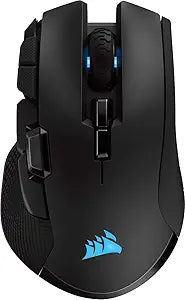
Corsair CH-9317011-EU Ironclaw RGB Wireless Gaming Mouse

4.0 (3476 reviews)

Triple-mode wireless at 18,000 DPI with Slipstream's sub-1ms latency — the Ironclaw RGB Wireless eliminates the performance gap between wired and wireless gaming.

$68.76*
In Stock on Amazon.com
View on Amazon

*Price sourced from Amazon.com. Last updated:Jul 14, 2026.Price and availability are subject to change.

Affiliate Disclosure: Studio Supplies may earn a commission from qualifying purchases made through links on this page, at no additional cost to you. This helps support our editorial team.

Notice a mistake? Let Us Know

Overview

The Corsair Ironclaw RGB Wireless is built around a proprietary Slipstream 2.4GHz wireless protocol that Corsair rates at sub-1ms latency — putting it in the same functional tier as wired optical mice for competitive gaming. The 18,000 DPI optical sensor provides a wide ceiling, though the meaningful operating range for most users is 400–3,200 DPI where tracking linearity is most consistent. Ten programmable buttons cover the primary click switches, side thumb buttons, a clickable scroll wheel, and DPI adjustment buttons — all mappable in iCUE with per-profile configurations stored onboard. The 3-zone RGB implementation covers the scroll wheel, logo, and a palm zone, all synchronizable with other iCUE-compatible Corsair hardware.

This mouse is designed for desktop-primary gaming setups where wireless freedom matters but competitive responsiveness cannot be compromised. The Slipstream receiver gives it a credible place in fast-paced FPS and MOBA environments, while Bluetooth mode makes it portable for travel or multi-device desk setups. The right-hand ergonomic shell, rated for large hands, positions it as a comfort-first choice for extended sessions rather than an ultralight speed-optimized design. Users building a Corsair-centric peripheral ecosystem will find the iCUE integration a genuine workflow benefit; users on macOS or Linux should factor in the loss of software-side customization when evaluating against competing wireless options.

Specifications

Sensor
Optical, 18,000 DPI
Connectivity
Slipstream 2.4GHz Wireless, Bluetooth, USB Wired
Buttons
10 programmable
RGB Lighting
3-zone RGB multi-colour backlighting
Battery Life
Up to 50 hours (RGB off)
Software
Corsair iCUE (Windows)
Model
CH-9317011-EU

Pros & Cons

👍 Pros

  • 18,000 DPI optical sensor with sub-1ms Slipstream wireless latency closes the performance gap with wired mice
  • Three connectivity modes (Slipstream 2.4GHz, Bluetooth, USB wired) in a single device for maximum deployment flexibility
  • 10 programmable buttons configurable per-profile in iCUE, reducing reliance on keyboard binds in complex game setups
  • 50-hour rated battery life (RGB off) means multi-day use between charges in typical gaming sessions
  • 3-zone RGB with iCUE integration allows synchronization across a full Corsair ecosystem without third-party bridging

👎 Cons

  • At 130g, the Ironclaw is on the heavier end of wireless gaming mice — a measurable disadvantage for users who prefer sub-100g designs for rapid flick movements
  • The USB receiver dongle is required for Slipstream mode and occupies a full USB-A port with no built-in hub pass-through
  • iCUE software is Windows-exclusive, meaning macOS and Linux users lose access to DPI profile switching, macro programming, and RGB customization entirely
  • RGB illumination cuts rated battery life from 50 hours to roughly 15–20 hours — a significant reduction for players who prefer lit peripherals
  • The right-hand ergonomic contour suits large hands but is not ambidextrous, ruling it out for left-handed users

Frequently Asked Questions

Slipstream uses Corsair's proprietary 2.4GHz protocol optimized for sub-1ms wireless latency — functionally indistinguishable from a wired connection in competitive play. Standard Bluetooth 4.2 is also available but operates at higher latency and is better suited for casual use or travel.
You must actively switch modes — Slipstream, Bluetooth, and wired USB are selected modes, not concurrent channels. A hardware button on the underside cycles between them, so swapping between a gaming PC (Slipstream) and a work laptop (Bluetooth) is quick but not automatic.
The sensor is most accurate between 400–3200 DPI, where tracking consistency is highest. At maximum 18,000 DPI the sensor technically performs, but at that sensitivity level pixel-level noise becomes a practical limitation — most competitive players run 800–1600 DPI regardless of ceiling.
Corsair rates 50 hours with RGB off. With full RGB illumination active, expect 15–20 hours in practice. Users who prioritize battery life typically disable lighting via iCUE, which is a one-time configuration.
Hardware functions — all buttons, movement tracking, and plug-and-play USB — work on macOS and Linux. The iCUE software for custom DPI profiles, RGB configuration, and macro programming is Windows-only, so advanced customization requires a Windows machine.