



Corsair
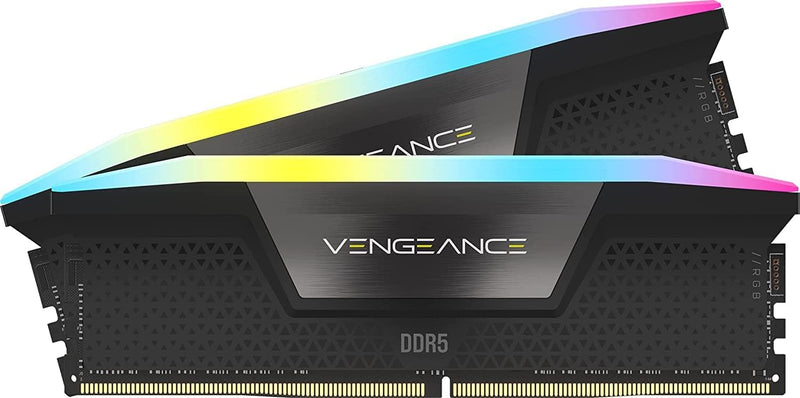
Corsair CMH64GX5M2B6000C30 Vengeance RGB 64GB DDR5 6000MHz RAM
64GB DDR5
64GB at DDR5-6000 CL30 fills the bandwidth gap that limits next-gen Intel builds without triggering costly Gear 2 latency penalties.
$1,432.43*
Check availability
*Price sourced from Amazon.com. Last updated:Oct 23, 2026.Price and availability are subject to change — details.
Affiliate Disclosure: As an Amazon Associate, Studio Supplies earns from qualifying purchases made through links on this page, at no additional cost to you. This helps support our editorial team.
Notice a mistake? Let Us Know
Overview
Key Features
Dynamic Ten-Zone RGB Lighting: Illuminate your system with ten individually addressable, ultra-bright RGB LEDs per module, encased in a panoramic light bar for vivid RGB lighting from any viewing angle.
Onboard Voltage Regulation: Enables easier, more finely-tuned, and more stable overclocking through CORSAIR iCUE software than previous generation motherboard control.
Custom Intel XMP 3.0 Profiles: Customize and save your own XMP profiles via iCUE to tailor performance by app or task for greater efficiency.
Create and Customize: Choose from dozens of preset lighting profiles, or create your own in iCUE.
Maximum Bandwidth and Tight Response Times: Optimized for peak performance on the latest Intel DDR5 motherboards.
Specifications
Memory Size
64GB (2x32GB)
Memory Type
DDR5 SDRAM
Memory Speed
6000MHz
CAS Latency
CL30
Voltage
1.4V
RGB Zones
10 per module, individually addressable
XMP Version
Intel XMP 3.0
Form Factor
DIMM
Color
Black
Software Control
Corsair iCUE
Frequently Asked Questions
Does this kit require XMP to run at 6000MHz?
Yes. DDR5 defaults to JEDEC speeds — typically 4800MHz or lower. XMP 3.0 must be enabled in BIOS to unlock the rated 6000MHz CL30 profile. Most Z690 and Z790 motherboards handle this automatically on first boot detection.
Is DDR5-6000 the optimal frequency for Intel 12th and 13th gen platforms?
For Alder Lake and Raptor Lake, 6000MHz is a well-validated sweet spot. It sits at the Gear 1 boundary on most boards, delivering full memory controller bandwidth. Push past ~6400MHz and many boards shift to Gear 2, widening CPU-to-memory latency in a way that can offset the bandwidth gains.
Can I expand to a four-stick configuration later by adding a second kit?
Not recommended. Adding a second kit from a different purchase batch can cause instability at rated speeds. If you need 128GB, buy a matched quad-stick set from the start rather than pairing two dual-kit purchases.
Does onboard voltage regulation actually improve overclocking stability over motherboard-controlled memory?
Yes, measurably. The VRM sits on the DIMM itself rather than relying on the motherboard's memory power delivery, giving iCUE finer voltage step control. This reduces the rail variance that causes high-frequency instability, particularly on boards with less capable onboard memory VRMs.
Does the iCUE RGB control add any latency or CPU overhead to memory operation?
The LED controller runs independently from the memory bus — RGB management has no impact on memory latency or bandwidth. iCUE does consume a small amount of background CPU and RAM, which is worth noting on systems where every resource counts.
Related Products
