

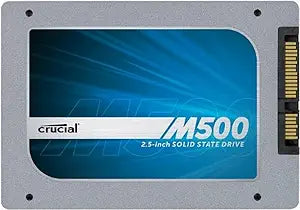
Crucial
Crucial CT120M500SSD1 M500 120GB SATA SSD
500 MB/s reads and hardware AES-256 encryption turn any SATA system into a fast, secure boot drive for under $1/GB.
View price on Amazon
Affiliate Disclosure: As an Amazon Associate, Studio Supplies earns from qualifying purchases made through links on this page, at no additional cost to you. This helps support our editorial team.
Notice a mistake? Let Us Know
Overview
Key Features
Transformative performance: dramatically faster than a hard drive
Nearly instantaneous boot times
Sequential Read: 500 MB/s | Sequential Write: 400 MB/s | 4KB Random Read: 80,000 IOPS
Ample storage: available in capacities up to terabyte-class
Includes top-level hardware encryption technology
Specifications
Capacity
120 GB
Form Factor
2.5-inch
Interface
SATA 6 Gb/s (SATA III)
Sequential Read
500 MB/s
Sequential Write
130 MB/s (120 GB model)
4KB Random Read
80,000 IOPS
Height
7mm (with 9.5mm adapter included)
Encryption
AES 256-bit hardware encryption (TCG Opal 2.0, IEEE 1667)
NAND Type
Micron 20nm MLC
Compatibility
PC, Mac, laptops, desktops, servers
Frequently Asked Questions
Will the Crucial M500 120GB work in my laptop's 2.5" drive bay?
Yes. The M500 is a standard 2.5-inch, 7mm form factor SATA III (6 Gb/s) drive. It includes a 9.5mm spacer adapter in the box, so it fits both 7mm and 9.5mm drive bays. Any system with a SATA II or SATA III port will accept this drive, though you will only reach full speed on SATA III.
What real-world bottleneck does upgrading to this SSD solve?
If your current system runs a mechanical hard drive, the HDD is almost certainly the biggest performance bottleneck. Replacing it with the M500 moves random 4K read performance from roughly 0.5 IOPS (HDD) to 80,000 IOPS — that is the difference between a 45-second boot and a 10-second boot, and it transforms application load times and general system responsiveness.
Does the hardware encryption require any special software to enable?
The M500 supports AES 256-bit hardware encryption via the TCG Opal 2.0 and IEEE 1667 standards. To activate it, you need a compatible BIOS that supports drive passwords or third-party encryption management software like BitLocker (Windows) or McAfee Endpoint Encryption. The encryption engine runs on the drive's controller and adds zero performance overhead.
Is 120 GB enough for a primary boot drive?
A clean Windows installation uses approximately 20-30 GB, leaving roughly 90-100 GB for applications. For a dedicated OS and core application drive paired with a secondary storage HDD, 120 GB is viable. If you plan to store large files, media libraries, or more than a handful of large applications on a single drive, the 120 GB capacity will fill up quickly.
Is this drive compatible with Mac systems?
Yes. The M500 works in any Mac with a standard 2.5" SATA bay, including MacBook Pro (pre-2013 non-Retina), Mac Mini, and older iMac models. Format it as APFS or HFS+ through Disk Utility and it functions as a direct replacement for the factory HDD.
Related Products


