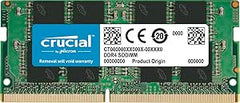
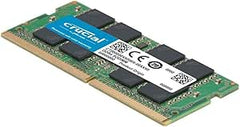
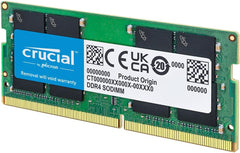
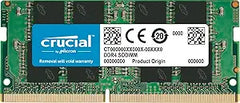
Crucial 8GB DDR4 SODIMM — Compatibility and Upgrade Guide
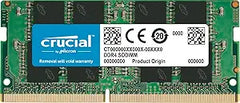
This is a DDR4 SODIMM module — the small form factor (260-pin) used in laptops, mini-PCs, and some all-in-one desktops. The PC4-19200 designation corresponds to DDR4-2400 (2,400 MT/s). SODIMM modules are not interchangeable with full-size desktop DIMMs; the connector and module geometry are different.
How to Confirm Your Laptop Takes This Module
Three things must match before purchasing any RAM upgrade:
- Form factor — SODIMM (laptop) vs DIMM (desktop). This module is SODIMM
- Generation — DDR4 vs DDR3 vs DDR5. The notch on the module is keyed differently for each generation; they will not physically fit each other's slots. This module is DDR4
- Speed and voltage — DDR4 SODIMMs run at 1.2V; most laptops accept DDR4-2400 or faster modules and will run them at whatever speed the laptop's CPU + chipset support (often slower than the module's rated speed if the laptop predates the module)
Crucial provides a free System Scanner tool that detects the laptop model and lists confirmed-compatible upgrades — the safest path to verify before ordering.
Laptops That Commonly Use This DDR4 SODIMM
This is not an exhaustive list — Crucial's System Scanner is the authoritative compatibility source. The categories below cover the most common upgrade scenarios:
- 2017-2021 mainstream Windows laptops with Intel 7th-11th Gen Core or AMD Ryzen 3000-5000 mobile chips — many of these ship with a single 4 GB or 8 GB module installed plus an empty SODIMM slot for a second module
- Business laptops from this era — Lenovo ThinkPad T480 / T490 / T14 (Gen 1, Gen 2), Dell Latitude 5400 / 5410 / 5420, HP EliteBook 840 G6 / G7. Most have user-accessible SODIMM slots
- Apple Mac mini 2014 (DDR3 not DDR4 — not compatible) and earlier are NOT this module. Modern Apple silicon Macs use soldered unified memory and cannot be RAM-upgraded
- Mini-PCs from this era — Intel NUC 7-11 series, some HP / Dell / Lenovo Tiny / Mini desktops, Beelink and similar Asian mini-PCs
- Some all-in-one desktops from this era that use laptop-style components
Single vs Dual-Channel Configuration
Most laptops with two SODIMM slots run faster when populated with two modules in dual-channel configuration than with a single module of equivalent total capacity. For a laptop that currently has one 8 GB module:
- Adding this 8 GB module → 16 GB total, dual-channel — best price-per-performance gain because dual-channel itself improves integrated-graphics performance and reduces memory-bandwidth bottlenecks
- Replacing the existing 8 GB with this 8 GB → no gain; this is a sideways move
For a laptop that currently has a single 4 GB module, replacing it with this 8 GB module gets you 8 GB single-channel — better than 4 GB but slower than two 4 GB modules would be. The ideal upgrade in that case is to install this 8 GB module in the empty slot, keeping the existing 4 GB in place for a 12 GB asymmetric configuration that still runs in dual-channel mode for the first 4 GB of each module.
What This Module Cannot Replace
- Soldered laptop RAM — many ultrabooks (most modern Apple Mac laptops, some XPS / Surface / Yoga models, Chromebooks) have RAM soldered to the motherboard; no upgrade is possible
- DDR5 SODIMMs — physical key location is different; a DDR4 module will not fit a DDR5 slot or vice versa. Newer 2022+ laptops increasingly ship with DDR5
- LPDDR4 / LPDDR4X / LPDDR5 — low-power memory used in many ultrabooks and tablets is soldered, not removable, and not the same form factor as SODIMM regardless of generation
Tools You Need for the Upgrade
- Small Phillips screwdriver (Phillips #0 or #1 depending on laptop) for the bottom-panel screws
- Anti-static precautions — touch a grounded metal object before handling the module, or use an anti-static wristband for extra caution
- ~10-15 minutes for the entire upgrade on most user-serviceable laptops
iFixit publishes free teardown guides for most popular laptop models — search the iFixit device page for your specific laptop before opening it to confirm the RAM slots are accessible and the procedure is non-destructive.
Sources & Citations
- Crucial, "CT8G4SFS824A 8GB DDR4 SODIMM specifications," crucial.com (accessed 2026-05-16)
- Crucial, "System Scanner compatibility tool," crucial.com (accessed 2026-05-16)
- iFixit, "Laptop teardown guides," ifixit.com (accessed 2026-05-16)
- JEDEC, "DDR4 SDRAM specifications," jedec.org (accessed 2026-05-16)
Last verified: 2026-05-16