

Dell
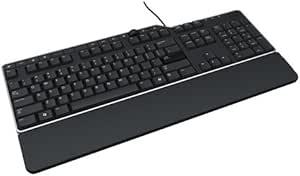
Dell 331-9653 Business Multimedia Keyboard KB522
★★★★★
Usb 2.0
Experience Comfortable and Efficient Typing Introducing the Dell KB522 Business Multimedia Keyboard. This wired keyboard features a refreshed design with a sturdy build and mid-profile keycaps, offering a comfortable and quiet typing experience for daily business use. It also includes convenient...
$28.10*$29.99Save 6%
Check availability
*Price sourced from Amazon.com. Last updated:Jul 16, 2026.Price and availability are subject to change.
Affiliate Disclosure: Studio Supplies may earn a commission from qualifying purchases made through links on this page, at no additional cost to you. This helps support our editorial team.
Notice a mistake? Let Us Know
Overview
Experience Comfortable and Efficient Typing
Introducing the Dell KB522 Business Multimedia Keyboard. This wired keyboard features a refreshed design with a sturdy build and mid-profile keycaps, offering a comfortable and quiet typing experience for daily business use. It also includes convenient multimedia and shortcut keys.
Specifications:
- Type: Wired Keyboard
- Design: Business Multimedia
- Keycap Profile: Mid-profile
- Features: Multimedia and shortcut keys
- Brand: Dell
Key Features
Dell Keyboard - Kb522 Business Multimedia - Cable Connectivity - Usb 2.0 Interface - 104 Key - English - Compatible With Computer, Workstation (pc) - Internet, Sleep, My Computer, Calculator, Zoom In, Email, Volume Control, Play/pause, Media Player, Mute, Forward, ... Hot Key(s) - Qwerty Keys Layout - Built-in Usb Hub - Black, Signature Silver
Specifications
Brand
Dell
Model
KB522
Connectivity
Cable
Interface
USB 2.0
Number of Keys
104
Language
English
Compatibility
Computer, Workstation (PC)
Hot Key Functions
Internet, Sleep, My Computer, Calculator, Zoom In, Email, Volume Control, Play/pause, Media Player, Mute, Forward
Key Layout
QWERTY
Features
Built-in USB Hub
Color
Black, Signature Silver
Pros & Cons
👍 Pros
- Features dedicated hot keys for common functions like internet, email, and volume control, streamlining daily tasks.
- Includes a built-in USB hub, offering convenient connectivity for additional peripherals directly from your keyboard.
- Provides a standard 104-key English QWERTY layout, ensuring familiarity and ease of use for most users.
- Designed for versatile compatibility with both computers and workstations, making it suitable for various setups.
- Equipped with cable connectivity via USB 2.0, offering a reliable and stable connection for uninterrupted use.
👎 Cons
- Relies on wired USB 2.0 connectivity, which may limit placement flexibility compared to wireless alternatives.
- The QWERTY layout is standard English, potentially not ideal for users requiring alternative language layouts.
- Lacks specific mention of advanced ergonomic features, which might be a consideration for prolonged typing sessions.
- The design aesthetic is described as black and signature silver, which might not suit all desk setups or personal preferences.
- While offering hot keys, the specific range of pre-programmed functions might not cover every niche user requirement.
Frequently Asked Questions
What types of devices is the Dell KB522 keyboard compatible with?
The Dell KB522 Business Multimedia Keyboard is designed for broad compatibility, working seamlessly with both computers and workstations (PC).
Does this keyboard offer any extra connectivity options?
Yes, the keyboard features a built-in USB hub, providing convenient access points for connecting additional USB devices directly from your desk.
What kind of hot keys are included on the KB522 keyboard?
The KB522 includes a range of multimedia and business-oriented hot keys, such as controls for internet, sleep, My Computer, calculator, zoom in, email, volume control, play/pause, media player, mute, and forward functions.
Is this a wired or wireless keyboard?
This is a wired keyboard, utilizing USB 2.0 cable connectivity to ensure a stable and reliable connection to your device.
What is the key layout of the Dell KB522 keyboard?
The Dell KB522 keyboard features a standard 104-key English QWERTY layout, suitable for a wide range of users and applications.
Related Products


