

Dell
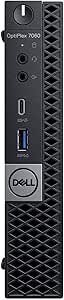
Dell 5V1FW OptiPlex 7000 Tower Desktop
UHD
Space-Saving Power: Dell OptiPlex 7000 Tower Desktop The Dell OptiPlex 7000 Tower Desktop delivers full-power features in an ultra-compact design. Featuring impressive performance and versatile mounting options, this desktop is perfect for businesses seeking efficient and reliable computing solu...
Check availability
Affiliate Disclosure: Studio Supplies may earn a commission from qualifying purchases made through links on this page, at no additional cost to you. This helps support our editorial team.
Notice a mistake? Let Us Know
Overview
Space-Saving Power: Dell OptiPlex 7000 Tower Desktop
The Dell OptiPlex 7000 Tower Desktop delivers full-power features in an ultra-compact design. Featuring impressive performance and versatile mounting options, this desktop is perfect for businesses seeking efficient and reliable computing solutions.
Key Features:
- Ultra Compact Design
- Optional Intel Pro Technology
- 8th Generation Intel Core Processors
- Intel Octane Memory Support
Key Features
Personal computer - Micro
1 x Intel Core i5 (8th Gen) 8500T/2.1 GHz (3.5 GHz) (6-Core)
8 GB (installed)/32 GB (max) - DDR4 SDRAM - non-ECC
1 x 500 GB - SATA - 7200 RPM
Intel UHD Graphics 630
Specifications
Brand
Dell
Model
5V1FW
Series
OptiPlex 7000 Tower Desktop
Form Factor
Micro
Processor
Intel Core i5 (8th Gen) 8500T
Processor Cores
6-Core
Base Processor Speed
2.1 GHz
Max Turbo Frequency
3.5 GHz
RAM
8 GB (installed)/32 GB (max) - DDR4 SDRAM - non-ECC
Storage
1 x 500 GB - SATA - 7200 RPM
Graphics
Intel UHD Graphics 630
Pros & Cons
👍 Pros
- Powered by an Intel Core i5 (8th Gen) 8500T 6-Core processor, offering reliable performance for business tasks.
- Includes 8GB DDR4 SDRAM, providing sufficient memory for multitasking and typical office applications.
- Comes with a 500 GB SATA 7200 RPM hard drive, offering a good balance of storage capacity and access speed for an HDD.
- Features Intel UHD Graphics 630, capable of handling standard display needs and integrated graphics tasks.
- The Micro form factor makes it suitable for environments with limited space, offering flexibility in placement.
👎 Cons
- The 500 GB SATA 7200 RPM hard drive is slower than modern SSDs, impacting boot times and application loading.
- 8GB of RAM might be a limiting factor for users running multiple demanding applications simultaneously.
- As an 8th Gen Intel Core i5 processor, it is not the latest generation, which could mean lower performance compared to newer CPUs.
- Intel UHD Graphics 630 are integrated graphics and are not suitable for graphically intensive tasks like advanced CAD or gaming.
- Specific connectivity ports (USB, display outputs) are not detailed, which can be important for peripheral connections.
Frequently Asked Questions
What processor is included in the Dell OptiPlex 7000 Tower Desktop?
This desktop features an 8th Gen Intel Core i5-8500T 6-Core processor, with a base speed of 2.1 GHz and a max turbo frequency of 3.5 GHz.
How much RAM does this OptiPlex desktop have?
It comes with 8 GB of DDR4 SDRAM installed, and it is upgradeable to a maximum of 32 GB.
What type of storage is included?
The desktop includes a 500 GB SATA hard drive that operates at 7200 RPM, offering a balance of capacity and speed.
What kind of graphics capabilities does it have?
It is equipped with Intel UHD Graphics 630, which are integrated graphics suitable for standard business and desktop tasks.
What is the form factor of this Dell desktop?
This is a Micro form factor personal computer, designed to be compact and space-efficient.
Is the RAM ECC or non-ECC?
The installed RAM is non-ECC DDR4 SDRAM.
Related Products


