



Dell
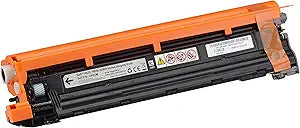
Dell 724-BBNE MJN86 Black Imaging Drum H625 H825
★★★★★
Maintain sharp, consistent output across 50,000 pages with a genuine Dell imaging drum built for H625/H825/S2825 printers.
$65.99*
Check availability
*Price sourced from Amazon.com. Last updated:Jun 27, 2026.Price and availability are subject to change.
Affiliate Disclosure: Studio Supplies may earn a commission from qualifying purchases made through links on this page, at no additional cost to you. This helps support our editorial team.
Notice a mistake? Let Us Know
Overview
Key Features
Genuine DELL black imaging drum unit
Works with DELL H625, H825, S2825 printers
Yields 50K pages
Mfg part number is 593-BBPF, 1KCF9
Dell genuine imaging drum delivers excellent print quality, sharp images and text
Specifications
Brand
Dell
Part Number
724-BBNE
Alternate Part Numbers
593-BBPF, 1KCF9, MJN86
Type
Black Imaging Drum (Genuine OEM)
Page Yield
Up to 50,000 pages
Compatible Printers
Dell H625cdw, H825cdw, S2825cdn
Color
Black
Pros & Cons
👍 Pros
- 50,000-page yield means significantly fewer replacements compared to toner cartridges, reducing long-term maintenance frequency.
- Genuine Dell OEM part ensures full firmware compatibility with no override prompts or error messages on H625/H825/S2825 printers.
- Delivers consistent, sharp text and image quality across the drum's entire rated lifespan without gradual degradation until end-of-life.
- Drop-in installation with no calibration required — the printer automatically recognizes and configures the new drum unit.
- Single black drum unit simplifies inventory management for offices running these Dell color MFPs.
👎 Cons
- Only compatible with three Dell printer models (H625, H825, S2825) — zero cross-compatibility with any other Dell or third-party printers.
- Genuine Dell OEM pricing is significantly higher per unit than third-party compatible drums, though yield offsets the per-page cost.
- This is the black drum only — color printing also requires separate cyan, magenta, and yellow drums, which must be purchased individually.
- Dell has discontinued the H625/H825/S2825 printer line, meaning this drum and compatible supplies may become harder to source over time.
- The drum is a wear component with no refurbishment or recycling program widely available, creating electronic waste at end of life.
Frequently Asked Questions
Which Dell printers is this imaging drum compatible with?
This drum is designed for the Dell H625cdw, H825cdw, and S2825cdn color multifunction printers. It will not work with other Dell printer families — verify your model number before purchasing.
How long does this imaging drum last before it needs replacement?
It's rated for approximately 50,000 pages. Actual yield depends on print coverage, media type, and environmental conditions, but at typical 5% coverage this drum will last most small offices well over a year before replacement is needed.
What's the difference between an imaging drum and a toner cartridge?
The imaging drum is the component that transfers toner onto paper — it's the photosensitive cylinder inside the printer. Toner cartridges hold the powder pigment, while the drum physically applies it. You'll typically replace toner cartridges several times before the drum needs replacing, since the drum's 50K-page yield far exceeds most toner cartridge yields.
Is this a genuine Dell part or a third-party compatible?
This is a genuine Dell OEM imaging drum, part number 724-BBNE (also referenced as 593-BBPF / 1KCF9 / MJN86). Using the genuine drum ensures the printer firmware recognizes it without override prompts and maintains Dell's specified print quality.
Will my printer alert me when this drum needs replacing?
Yes. Dell H625, H825, and S2825 printers track drum life via an internal page counter and will display a replacement warning as the drum approaches its rated yield. The printer may allow you to continue printing briefly after the warning, but print quality will degrade.
Related Products


