



Dell
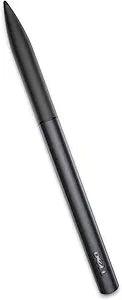
Dell 750-AADH Active Stylus Pen for Tablets
★★★★★
A pre-calibrated active stylus with pressure and hover sensing for select Dell Venue Pro and Latitude tablets.
$10.00*
Check availability
*Price sourced from Amazon.com. Last updated:Jul 13, 2026.Price and availability are subject to change.
Affiliate Disclosure: Studio Supplies may earn a commission from qualifying purchases made through links on this page, at no additional cost to you. This helps support our editorial team.
Notice a mistake? Let Us Know
Overview
Key Features
Only compatible with Windows OS
Provides accuracy without jagged edges and curved lines that accurately follow the pen motion
Includes Pressure Sensing and Hover Sensing
Active Stylus works only with select Dell Windows tablets - Dell Venue 8 Pro 5000 Series (5830), Venue 11 Pro 5000 Series (5130), Venue 11 Pro 7000 Series (7130, 7139, and 7140), and Latitude 13 7000 Series 2-in-1 (7350)
Specifications
Model
750-AADH
Type
Active Stylus
Pressure Sensing
Yes
Hover Sensing
Yes
Pre-Calibrated
Yes
Compatible OS
Windows only
Supported Devices
Venue 8 Pro 5830, Venue 11 Pro 5130, Venue 11 Pro 7130/7139/7140, Latitude 13 7350
Brand
Dell
Pros & Cons
👍 Pros
- Pre-calibrated out of the box with no setup or driver installation required
- Pressure sensing enables natural variation in line weight for writing and drawing
- Hover sensing provides cursor tracking before the stylus touches the screen
- Eliminates jagged edges for smooth, precise input on supported tablets
👎 Cons
- Compatible with only a narrow range of older Dell Venue Pro and Latitude models
- Windows OS only — no support for macOS, Android, or iOS
- Not compatible with newer Dell tablets that use different active pen protocols
- Limited to digitizer-equipped Dell models, so there is no way to use it as a general capacitive stylus on unsupported devices
Frequently Asked Questions
Which Dell tablets is this stylus compatible with?
It works with the Dell Venue 8 Pro 5000 Series (5830), Venue 11 Pro 5000 Series (5130), Venue 11 Pro 7000 Series (7130, 7139, 7140), and Latitude 13 7000 Series 2-in-1 (7350). It is not compatible with other Dell tablets or non-Dell devices.
Does the Dell Active Stylus require pairing or driver installation?
No. The stylus comes pre-calibrated and is ready to use immediately with supported tablets. Simply bring the stylus tip near the screen and it is detected automatically.
Does this stylus work with macOS, Android, or iOS devices?
No. The Dell Active Stylus (750-AADH) is compatible with Windows OS only and requires the specific Dell tablet digitizer hardware found in the supported models listed.
What is the difference between pressure sensing and hover sensing on this stylus?
Pressure sensing varies line thickness and opacity based on how hard you press, which is useful for drawing and handwriting. Hover sensing detects the stylus when it is near the screen but not touching, allowing on-screen cursor tracking and previewing before you make contact.
Does this stylus require batteries or charging?
Active styluses typically require a power source. Check the specific power requirements for the 750-AADH, as it may use a replaceable AAAA battery to power its active digitizer features.
Related Products


