



Dell
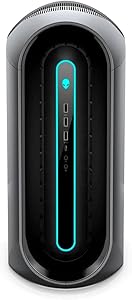
Dell Alienware Aurora R10 Ryzen 9, 16GB RAM, 1TB SSD, RTX 3060 Ti Gaming Desktop (Renewed)
16GB RAM1TB SSD1TB HDD
Twelve-core Ryzen 9 at up to 4.7GHz turbo paired with RTX 3060 Ti 8GB delivers sustained 1440p and capable 4K gaming in Alienware's tool-free chassis.
$180.00*$1,807.99Save 90%
View on Amazon
✓ In Stock on Amazon.com
*Price sourced from Amazon.com. Last updated:Jun 04, 2026.Price and availability are subject to change.
Affiliate Disclosure: Studio Supplies may earn a commission from qualifying purchases made through links on this page, at no additional cost to you. This helps support our editorial team.
Notice a mistake? Let Us Know
Overview
Key Features
Dell Alienware Aurora R10 Desktop
AMD Ryzen 9 Ryzen 9-5900 Twelve-Core Processor 3GHz (4.7GHz With Turbo Boost)
1TB SSD + 1TB HDD Hard Drive & 16GB RAM Memory
Nvidia GeForce RTX 3060 Ti Graphics Card
Wireless Wifi & Bluetooth, Keyboard and mouse. Windows11 Home
Specifications
Processor
AMD Ryzen 9 5900 Twelve-Core 3.0GHz (up to 4.7GHz Turbo)
Memory
16GB DDR4 RAM
Primary Storage
1TB NVMe SSD
Secondary Storage
1TB HDD
Graphics
NVIDIA GeForce RTX 3060 Ti 8GB GDDR6
Connectivity
Wireless Wi-Fi, Bluetooth
Operating System
Windows 11 Home
Condition
Renewed
Included
Keyboard, Mouse
Pros & Cons
👍 Pros
- Ryzen 9 5900 twelve-core CPU with 4.7GHz turbo handles simultaneous gaming, background recording, and application workloads without the core-count bottleneck that affects 6- and 8-core gaming systems.
- RTX 3060 Ti with 8GB GDDR6 at 256-bit bus delivers 1440p high-settings frame rates that comfortably exceed 60fps in modern AAA titles and supports DLSS for near-native 4K output.
- 1TB NVMe SSD provides fast game load times while the secondary 1TB HDD adds bulk storage — hybrid configuration avoids the cost of a single large SSD.
- Alienware's tool-free chassis design simplifies RAM and storage upgrades without specialized tools, which is relevant given the 16GB RAM ceiling for modern gaming workloads.
- Keyboard and mouse are included in the renewed package, reducing total out-of-pocket cost for a complete gaming setup.
👎 Cons
- 16GB DDR4 RAM is borderline for simultaneously running a modern AAA title alongside streaming software — the Aurora R10's target workload — making a RAM upgrade a likely near-term expense.
- The Ryzen 9 5900's 65W TDP results in CPU throttling under extended multi-threaded loads compared to the 5900X, a gap that shows up in sustained content creation workloads more than in gaming.
- RTX 3060 Ti's 8GB VRAM becomes constrained at native 4K ultra settings in texture-heavy titles, limiting this system's longevity as a true 4K gaming platform without relying on DLSS upscaling.
- The Aurora R10's proprietary form factor limits GPU upgrade paths — replacement cards must fit Alienware's non-standard mounting and power connector configuration.
- As a renewed unit, no manufacturer warranty coverage applies, which is a meaningful exposure given the Aurora R10's history of thermal management challenges in sustained loads.
Frequently Asked Questions
What is the performance difference between the Ryzen 9 5900 (non-X) in this unit versus the 5900X?
The 5900 runs a 65W TDP versus the 5900X's 105W, with a base clock of 3.0GHz versus 3.7GHz. Turbo Boost reaches 4.7GHz on the 5900 — close to the 5900X's 4.8GHz ceiling. In sustained multi-threaded workloads, the lower TDP means the 5900 throttles earlier under extended load. For gaming, where peak single-core boost matters most, the gap is minimal — typically under 5% in frame rate.
Is 16GB RAM sufficient for gaming and streaming simultaneously in 2024?
16GB DDR4 is the functional minimum for modern AAA gaming plus background tasks. Running a game alongside OBS or Discord with a browser open will push close to the limit on RAM-heavy titles. Upgrading to 32GB is straightforward on the Aurora R10 platform — the board supports DDR4 in dual-channel configuration — and is recommended if simultaneous streaming or content creation is a use case.
What does the RTX 3060 Ti's 8GB GDDR6 VRAM mean for resolution targeting?
8GB GDDR6 at a 256-bit bus provides 448 GB/s memory bandwidth — sufficient for high-texture 1440p gaming and entry-level 4K at reduced settings. At 4K ultra settings in texture-heavy titles, the 8GB buffer becomes the limiting factor as texture sets exceed available VRAM, causing stuttering. This card is optimally positioned as a 1440p high-settings card rather than a native 4K solution.
What does the 1TB SSD + 1TB HDD storage configuration mean for load times?
The 1TB SSD handles OS boot and installed games — NVMe load times are 3–5x faster than the HDD for supported titles. The 1TB HDD provides bulk storage for media, older games, or backups at conventional read speeds (~150MB/s). DirectStorage-enabled titles gain the most from NVMe — install primary games on the SSD and archive completed titles to the HDD.
Does this renewed unit include the original Alienware keyboard and mouse?
Yes — the listing confirms keyboard and mouse are included, which is notable as many renewed listings omit peripherals. However, as a renewed unit, peripheral condition may vary from new; inspect them on arrival.
Related Products


