



Dell
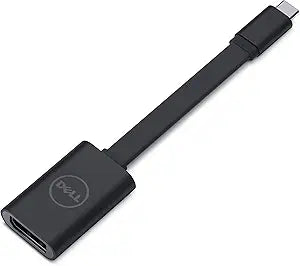
Dell DBQANBC067 USB-C to DisplayPort Adapter
★★★★★
4KUSB-CDisplayPort
Compact plug-and-play USB-C to DisplayPort adapter with 4K 60Hz output for sharp external displays.
$6.70*$9.99Save 32%
View on Amazon
✓ In Stock on Amazon.com
*Price sourced from Amazon.com. Last updated:Jul 15, 2026.Price and availability are subject to change.
Affiliate Disclosure: Studio Supplies may earn a commission from qualifying purchases made through links on this page, at no additional cost to you. This helps support our editorial team.
Notice a mistake? Let Us Know
Overview
Key Features
Enjoy a clear and crisp display with 60Hz Ultra HD (4K) compatibility
Take the adapter with you wherever you go Its compact and lightweight design makes it easy to carry
Convenient, Pro compatibility lug and play allows you not to waste time setting up the display
Just connect the adapter between the laptop's USB-C port and the DisplayPort input on the screen or projector, and you're ready to start
Specifications
Brand
Dell
Model
DBQANBC067
Input Connector
USB-C
Output Connector
DisplayPort
Maximum Resolution
Ultra HD (4K) at 60Hz
Setup
Plug and Play (No Drivers Required)
Pros & Cons
👍 Pros
- Supports full 4K at 60Hz for sharp, smooth visuals on high-resolution displays
- Plug-and-play operation requires zero driver installation or configuration
- Compact and lightweight design is easy to carry in a laptop bag or pocket
- Dell-branded build quality with a straightforward, reliable single-purpose design
👎 Cons
- Only provides a single DisplayPort output with no additional ports or passthrough charging
- Requires that your USB-C port supports DisplayPort Alt Mode, which is not universal across all devices
- Dongle-style form factor means it protrudes directly from the laptop, which can be awkward in tight desk setups
Frequently Asked Questions
Does this adapter support 4K resolution?
Yes, it supports Ultra HD (4K) at 60Hz, delivering a crisp and smooth display output on compatible monitors and projectors.
Do I need to install drivers to use this adapter?
No, it is a plug-and-play device. Simply connect it between your USB-C port and the DisplayPort input on your display, and it works immediately without any software installation.
Will this work with any USB-C laptop?
It requires a USB-C port that supports video output (DisplayPort Alt Mode). Not all USB-C ports carry video signals, so check your laptop's specifications to confirm compatibility.
Does this adapter support audio passthrough?
DisplayPort carries both video and audio signals, so audio will pass through to displays or projectors that have built-in speakers or audio outputs.
How long is the cable on this adapter?
This is a compact dongle-style adapter designed for portability, not a long cable. For extended reach, you would connect a standard DisplayPort cable from the adapter to your display.
Related Products


