



Dell
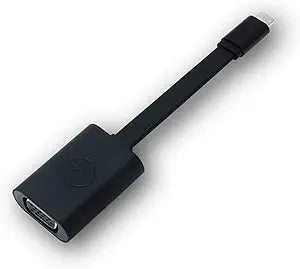
Dell DBQBNBC064 USB-C to VGA Adapter 470-Abnc
★★★★★
Plug in and present instantly — Dell's USB-C to VGA adapter delivers dependable legacy display connectivity without drivers or configuration.
$9.91*
View on Amazon
✓ In Stock on Amazon.com
*Price sourced from Amazon.com. Last updated:Jul 15, 2026.Price and availability are subject to change.
Affiliate Disclosure: Studio Supplies may earn a commission from qualifying purchases made through links on this page, at no additional cost to you. This helps support our editorial team.
Notice a mistake? Let Us Know
Overview
Key Features
ADAPTER USB-C TO VGA 470-ABNC
Specifications
Brand
Dell
Model
DBQBNBC064
Part Number
470-ABNC
Input Connector
1x 24-pin USB-C (Type C) Male
Output Connector
1x 15-pin HD-15 (VGA) Female
Signal Type
Analog VGA (via DisplayPort Alt Mode)
Max Resolution
1920×1200
Driver Required
No (plug-and-play)
Audio Support
No
Color
Black
Pros & Cons
👍 Pros
- Requires zero driver installation — recognized instantly on Windows and macOS
- Passive adapter design means no external power source or charging required during use
- 15-pin HD-15 female connector fits every VGA-equipped projector and legacy monitor without adapters
- Compact form factor adds negligible weight to a laptop bag or presentation kit
- Dell's OEM build quality ensures consistent connector tolerances and strain relief
👎 Cons
- VGA is an analog signal — image quality degrades noticeably on cable runs over 10 feet or with lower-grade VGA cables
- No audio passthrough, requiring a separate solution for sound in presentation environments
- Requires DisplayPort Alt Mode on the USB-C host; data-only USB-C ports will not work
- Limited to a single display output; no daisy-chaining or multi-monitor expansion possible
- 1920×1200 ceiling means this adapter is not suitable for 4K or high-refresh-rate display workflows
Frequently Asked Questions
Does this adapter require driver installation before use?
No. The Dell DBQBNBC064 is plug-and-play. Connect it to a USB-C port and the host OS enumerates the adapter automatically — no software download or restart required.
What is the maximum resolution this adapter supports?
The adapter outputs via analog VGA, which supports resolutions up to 1920×1200 at 60Hz, though practical quality depends on the cable run and display quality. VGA is an analog signal, so expect some softness compared to digital outputs at equivalent resolutions.
Will this work with USB-C ports that only carry USB data (not DisplayPort Alt Mode)?
No. This adapter requires a USB-C port with DisplayPort Alt Mode support. If your USB-C port is data-only, the adapter will not output video. Check your device's spec sheet for "DP Alt Mode" or "Thunderbolt" support before purchasing.
Is this adapter compatible with Thunderbolt 3 and Thunderbolt 4 ports?
Yes. Thunderbolt 3 and 4 ports are supersets of USB-C with DisplayPort Alt Mode included, so the DBQBNBC064 works on any Thunderbolt-equipped host.
Can this adapter carry audio to the VGA display?
No. VGA is a video-only standard — it carries no audio signal. You will need a separate audio output path for sound.
Related Products


